Check dd command write progress in Linux
Preface In Linux, there is a powerful tool called dd for manipulating disk images, which is absolutely fantastic. The only downside is that it doesn't display the operation progress. However, there are ways to work around this. Below are several methods to check the writing progress. Using the status option to view progress If you are using the GNU version of dd and your coreutils version is higher than 8.24, you can use the status option. For example: `sudo dd if=/dev/sda of=/dev/zero status=progress` The above command on Mac
目录5 个章节
Preface
Under Linux, there is a powerful tool called dd used for operating on disk images—it's truly an amazing utility. The only drawback is that it doesn't display progress during operations. However, there are workarounds for this. Below are several methods to check the writing progress.
status Option to Check Progress
If you are using the GNU version of dd and the coreutils version is higher than 8.24, you can use the status option. For example:
sudo dd if=/dev/sda of=/dev/zero status=progress
The command above will result in an error when executed on Mac OS X, because OS X uses the BSD version of the command line, not GNU. You can install GNU coreutils on Mac OS X or use the
pvcommand introduced below.
pv command
sudo pv -tpreb /dev/sda | dd of=/dev/zero
sudo pv -tpreb /dev/sda | dd of=/dev/zero bs=4096 conv=notrunc,noerror
Using pv together with dialog can also display a progress bar dialog box:
(sudo pv -n /dev/sda | dd of=/dev/zero) 2>&1 | dialog --gauge "dd process bar" 10 70 0
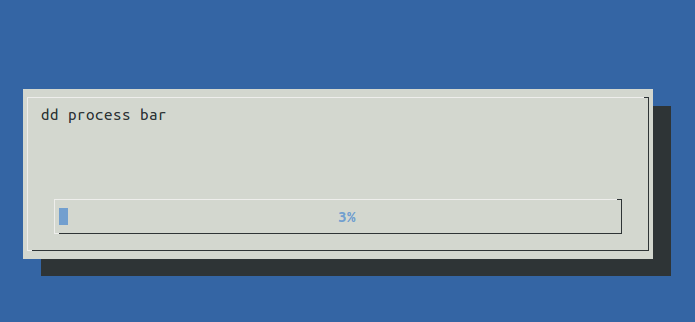
Using pkill to Print Progress
Open a new Shell and execute the following command to output progress information once per second:
watch -n 1 pkill -USR1 -x dd
References
http://blog.topspeedsnail.com/archives/8125 http://blog.topspeedsnail.com/archives/2748 http://blog.topspeedsnail.com/archives/9464 https://www.mobibrw.com/2017/7677
_EOF_
Check dd command write progress in Linux
- 本文作者:
- 程序设计实验室
- 版权声明:
- 本博客所有文章除特别声明外,均采用 BY-NC-SA 许可协议。转载请注明出处!
相关文章
Useful-Gnome-Plugins
About 了解更多有趣的操作请关注我的微信公众号:DealiAxy 每一篇文章都在我的博客有收录:blog.deali.cn
2025-10-27 · FAQ & Tips · 约 1 分钟
KDE下OBS直播闪屏解决
关闭避免撕裂即可。 直播效果
2025-10-27 · FAQ & Tips · 约 1 分钟
某些软件中无法切换fcitx输入法的问题
gsettings set org.gnome.settings-daemon.plugins.xsettings overrides "{'Gtk/IMModule':<'fcitx'>}"
2025-10-27 · FAQ & Tips · 约 1 分钟
pip和git速度太慢?配置Linux终端代理教程
前言 现在做开发已经严重依赖网络了,但是没办法,很多工具都是国外的,我们国内访问速度太慢了,所以配置一下终端代理就很有必要了 ProxyChains介绍 ProxyChains是一个命令行预加载器,用于挂钩动态链接程序中的套接字,并通过一个或多个socks / http代理重定向它。 GitHub地址 https://github.com/rofl0r/proxychains-ng MacOS和L
2025-10-27 · FAQ & Tips · 约 1 分钟
讨论
共 0 条加载评论中…