

Using JDBC to Operate SQLite in Java
Introduction to SQLite SQLite is a lightweight database system that can be used without installation, and can also be very easily embedded into a system. FireFox embeds SQLite, so you can directly use JavaScript on FireFox to call and operate the database. SQLite is written in C, can cross platforms such as Linux and Windows, and for access and operations in Java, JDBC can be used to connect to SQLite. For connecting to SQLite with JDBC, there are roughly two approaches, one is
目录4 个章节
Introduction to SQLite
SQLite is a lightweight database system that can be used without installation, and can also be very easily embedded into a system. FireFox embeds SQLite, so you can directly use JavaScript on FireFox to call and operate the database.
SQLite is written in C, can cross platforms such as Linux and Windows, and for access and operations in Java, JDBC can be used to connect to SQLite.
For connecting to SQLite with JDBC, there are roughly two approaches: one is connecting to the data with Pure-Java, and the other is directly using Java to call a library written in C. In actual tests, the approach of directly calling the C library should be faster, but on platforms where a suitable C library cannot be found, the Pure-Java version can be used.
SQLiteJDBC this version currently found is more actively updated, and in usage it is almost the same as ordinary JDBC, so getting started with the program is very simple.
SQLiteJDBC can be downloaded from here. The following examples were made with version 3.5.7, providing examples of creating a Table, removing a Table, querying, inserting, deleting, and updating.
Example Code
import java.sql.*;

import org.sqlite.SQLiteConfig;
import org.sqlite.SQLiteDataSource;
public class MyTest {
    public Connection getConnection() throws SQLException
    {
        SQLiteConfig config = new SQLiteConfig();
        // config.setReadOnly(true);
        config.setSharedCache(true);
        config.enableRecursiveTriggers(true);


        SQLiteDataSource ds = new SQLiteDataSource(config);
        ds.setUrl("jdbc:sqlite:sample.db");
        return ds.getConnection();
        //ds.setServerName("sample.db");


    }
    //create Table
    public void createTable(Connection con )throws SQLException{
        String sql = "DROP TABLE IF EXISTS test ;create table test (id integer, name string); ";
        Statement stat = null;
        stat = con.createStatement();
        stat.executeUpdate(sql);

    }
    //drop table
    public void dropTable(Connection con)throws SQLException{
        String sql = "drop table test ";
        Statement stat = null;
        stat = con.createStatement();
        stat.executeUpdate(sql);
    }

    //新增
    public void insert(Connection con,int id,String name)throws SQLException{
        String sql = "insert into test (id,name) values(?,?)";
        PreparedStatement pst = null;
        pst = con.prepareStatement(sql);
        int idx = 1 ;
        pst.setInt(idx++, id);
        pst.setString(idx++, name);
        pst.executeUpdate();

    }
    //修改
    public void update(Connection con,int id,String name)throws SQLException{
        String sql = "update test set name = ? where id = ?";
        PreparedStatement pst = null;
        pst = con.prepareStatement(sql);
        int idx = 1 ;
        pst.setString(idx++, name);
        pst.setInt(idx++, id);
        pst.executeUpdate();
    }
    //刪除
    public void delete(Connection con,int id)throws SQLException{
        String sql = "delete from test where id = ?";
        PreparedStatement pst = null;
        pst = con.prepareStatement(sql);
        int idx = 1 ;
        pst.setInt(idx++, id);
        pst.executeUpdate();
    }

    public void selectAll(Connection con)throws SQLException{
        String sql = "select * from test";
        Statement stat = null;
        ResultSet rs = null;
        stat = con.createStatement();
        rs = stat.executeQuery(sql);
        while(rs.next())
        {
            System.out.println(rs.getInt("id")+"\t"+rs.getString("name"));
        }
    }
    public static void main(String args[]) throws SQLException{
        MyTest test = new MyTest();
        Connection con = test.getConnection();
        //建立table
        test.createTable(con);
        //新增資料
        test.insert(con, 1, "第一個");
        test.insert(con, 2, "第二個");
        //查詢顯示資料
        System.out.println("新增二筆資料後狀況:");
        test.selectAll(con);

        //修改資料
        System.out.println("修改第一筆資料後狀況:");
        test.update(con, 1, "這個值被改變了!");
        //查詢顯示資料
        test.selectAll(con);

        //刪除資料
        System.out.println("刪除第一筆資料後狀況:");
        test.delete(con, 1);
        //查詢顯示資料
        test.selectAll(con);

        //刪除table
        test.dropTable(con);

        con.close();

    }
}
Explanation
SQLite does not have a user login mechanism, so you only need to specify the location of the database file to access in order to use it. In jdbc:sqlite:sample.db, sample.db is the file name; you can also specify its path location c:\sample.db.
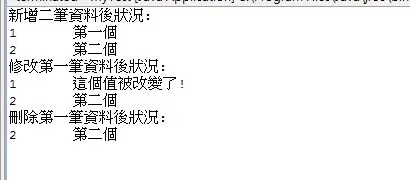
The following is the execution result:
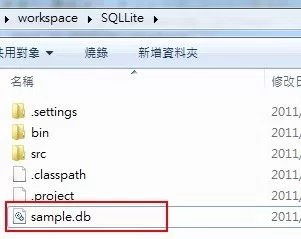
The sample.db file, which did not originally exist, was also created automatically, under the project directory.
References
_EOF_
Using JDBC to Operate SQLite in Java
- 本文作者:
- 程序设计实验室
- 版权声明:
- 本博客所有文章除特别声明外,均采用 BY-NC-SA 许可协议。转载请注明出处!
相关文章
Apache-Commons-IO-最佳实践
本文列举了Java输入输出部分(IO area)的大量“最佳实践”(best practices)。 java.io.File 通常你需要去处理文件或文件名时,有许多会出错的情况: 一个类可在Unix运行但不能在Windows运行,反之亦然。 由于双路径分隔符(path separator)或缺失路径分隔符(path separator)导致文件名无效。 (在Windows上的)符合通用命名标准(
2022-05-27 · Java · 约 1 分钟
JavaWeb开发---使用IDEA创建Servlet程序
前言 最近做项目需要,从之前熟悉的PHP和Python转到了JavaWeb,所以就有了这个笔记。资源图片都是来自网上的资源,根据自己的实际操作应用,做了总结归纳。 所需工具 JDK Tomcat IDEA 创建工程 设置工程名字: 创建完成后工程结构如下: 上面的图片是在网络上复制的,好像我用的IDEA 2017.3.2没有这个Create web.xml的选项,我也不知道为啥,难道是IDEA越更
2021-12-18 · Java · 约 1 分钟
Spring-Boot:创建第一个应用
简介 Spring Boot 是一个轻量级框架,可以完成基于 Spring 的应用程序的大部分配置工作。在本教程中,将学习如何使用 Spring Boot 的 starter、特性和可执行 JAR 文件结构,快速创建能直接运行的基于 Spring 的应用程序。 本文使用IDEA作为开发工具,Gradle作为构建工具,创建一个简单的SpringBoot应用,暂时不涉及数据库的配置。 使用IDEA创建
2022-05-27 · Java · 约 1 分钟
Java开发:JDK安装和环境配置
前言 环境配置是开发中最基础的部分,不过最近有很多新入坑的同学,都在问怎么安装JDK和配置环境,索性写一篇。 这里要注意一下,在Windows平台和Linux平台下做开发是不同的,Windows平台开发Java需要自己手动配置JDK的环境变量,而大多数Linux都是不需要的,安装了OpenJDK就可以了(可能很多发行版都自带了OpenJDK),这点是比较方便的。 下载Java JDK Window
2023-02-08 · Java · 约 1 分钟
讨论
共 0 条加载评论中…