Java使用JDBC操作SQLite
SQLite介紹 SQLite是一個輕量級的資料庫系統,不需要安裝就可以使用,也可以十分容易的就內嵌於系統內,FireFox就內嵌SQLite,可以在FireFox上直接使用JavaScript來呼叫操作資料庫。 SQLite是由C語言撰寫而已,可以跨Linux及Windows等平台,在Java存取及操作上則可使用JDBC來連線SQLite。 在JDBC連線SQLite上,大概分成二種方式,一種是
目录4 个章节
SQLite介紹
SQLite是一個輕量級的資料庫系統,不需要安裝就可以使用,也可以十分容易的就內嵌於系統內,FireFox就內嵌SQLite,可以在FireFox上直接使用JavaScript來呼叫操作資料庫。
SQLite是由C語言撰寫而已,可以跨Linux及Windows等平台,在Java存取及操作上則可使用JDBC來連線SQLite。
在JDBC連線SQLite上,大概分成二種方式,一種是由Pure-Java來連結資料,另一種則是直接利用Java呼叫C語言撰寫的函式庫,不過在實測上直接呼叫C的函式庫的方式應該是比較快的,不過在無法找到合適C函式庫的平台則可使用Pure-Java版。
SQLiteJDBC目前查到這個版本是比較有在更新,而且在使用上跟一般的JDBC幾乎是一樣的,上手程式十分簡單。
SQLiteJDBC可以由這裡下載,以下範例是由3.5.7版本製作,提供建立Table、移除Table、查詢、新增、刪除及修改等範例。
實例代碼
import java.sql.*;

import org.sqlite.SQLiteConfig;
import org.sqlite.SQLiteDataSource;
public class MyTest {
    public Connection getConnection() throws SQLException
    {
        SQLiteConfig config = new SQLiteConfig();
        // config.setReadOnly(true);
        config.setSharedCache(true);
        config.enableRecursiveTriggers(true);


        SQLiteDataSource ds = new SQLiteDataSource(config);
        ds.setUrl("jdbc:sqlite:sample.db");
        return ds.getConnection();
        //ds.setServerName("sample.db");


    }
    //create Table
    public void createTable(Connection con )throws SQLException{
        String sql = "DROP TABLE IF EXISTS test ;create table test (id integer, name string); ";
        Statement stat = null;
        stat = con.createStatement();
        stat.executeUpdate(sql);

    }
    //drop table
    public void dropTable(Connection con)throws SQLException{
        String sql = "drop table test ";
        Statement stat = null;
        stat = con.createStatement();
        stat.executeUpdate(sql);
    }

    //新增
    public void insert(Connection con,int id,String name)throws SQLException{
        String sql = "insert into test (id,name) values(?,?)";
        PreparedStatement pst = null;
        pst = con.prepareStatement(sql);
        int idx = 1 ;
        pst.setInt(idx++, id);
        pst.setString(idx++, name);
        pst.executeUpdate();

    }
    //修改
    public void update(Connection con,int id,String name)throws SQLException{
        String sql = "update test set name = ? where id = ?";
        PreparedStatement pst = null;
        pst = con.prepareStatement(sql);
        int idx = 1 ;
        pst.setString(idx++, name);
        pst.setInt(idx++, id);
        pst.executeUpdate();
    }
    //刪除
    public void delete(Connection con,int id)throws SQLException{
        String sql = "delete from test where id = ?";
        PreparedStatement pst = null;
        pst = con.prepareStatement(sql);
        int idx = 1 ;
        pst.setInt(idx++, id);
        pst.executeUpdate();
    }

    public void selectAll(Connection con)throws SQLException{
        String sql = "select * from test";
        Statement stat = null;
        ResultSet rs = null;
        stat = con.createStatement();
        rs = stat.executeQuery(sql);
        while(rs.next())
        {
            System.out.println(rs.getInt("id")+"\t"+rs.getString("name"));
        }
    }
    public static void main(String args[]) throws SQLException{
        MyTest test = new MyTest();
        Connection con = test.getConnection();
        //建立table
        test.createTable(con);
        //新增資料
        test.insert(con, 1, "第一個");
        test.insert(con, 2, "第二個");
        //查詢顯示資料
        System.out.println("新增二筆資料後狀況:");
        test.selectAll(con);

        //修改資料
        System.out.println("修改第一筆資料後狀況:");
        test.update(con, 1, "這個值被改變了!");
        //查詢顯示資料
        test.selectAll(con);

        //刪除資料
        System.out.println("刪除第一筆資料後狀況:");
        test.delete(con, 1);
        //查詢顯示資料
        test.selectAll(con);

        //刪除table
        test.dropTable(con);

        con.close();

    }
}
說明
SQLite並沒有使用者登入的的機制,所以只需要告知要存取的資料庫檔案位置就可以使用了。jdbc:sqlite:sample.db其中sample.db就是檔案名稱,也可指定其路徑位置c:\sample.db。
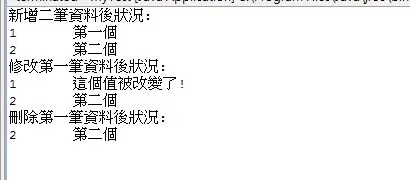
以下是執行結果:
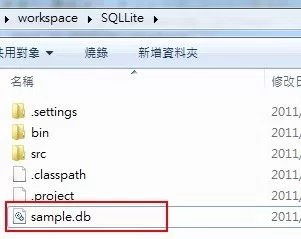
原本沒有sample.db這個檔案也被自動建立了,在專案目錄底下。
參考資料
_EOF_
Java使用JDBC操作SQLite
- 本文作者:
- 程序设计实验室
- 版权声明:
- 本博客所有文章除特别声明外,均采用 BY-NC-SA 许可协议。转载请注明出处!
相关文章
2020年第一次用上Struts2框架做Web开发的体验
SliiyStruts2 又名 sb-struts2,因为struts真的太难用了(也许在很多年前是很好用的,但是现在看来,被其他框架秒成渣) 前言 想不到我还是得和这struts框架打交道啊,从一开始学web的时候就十分抵制这类古老,使用反人类的框架,不过为了帮女朋友做个学校的作业,还是得搞一下,然而,半小时就写好的业务代码,因为我不熟悉这个框架和Java的这套体系,调试了半天才成功run起来…
2022-06-17 · Java · 约 1 分钟
Java开发:JDK安装和环境配置
前言 环境配置是开发中最基础的部分,不过最近有很多新入坑的同学,都在问怎么安装JDK和配置环境,索性写一篇。 这里要注意一下,在Windows平台和Linux平台下做开发是不同的,Windows平台开发Java需要自己手动配置JDK的环境变量,而大多数Linux都是不需要的,安装了OpenJDK就可以了(可能很多发行版都自带了OpenJDK),这点是比较方便的。 下载Java JDK Window
2023-02-08 · Java · 约 1 分钟
Spring-Boot:创建第一个应用
简介 Spring Boot 是一个轻量级框架,可以完成基于 Spring 的应用程序的大部分配置工作。在本教程中,将学习如何使用 Spring Boot 的 starter、特性和可执行 JAR 文件结构,快速创建能直接运行的基于 Spring 的应用程序。 本文使用IDEA作为开发工具,Gradle作为构建工具,创建一个简单的SpringBoot应用,暂时不涉及数据库的配置。 使用IDEA创建
2022-05-27 · Java · 约 1 分钟
Maven国内镜像配置
配置maven安装目录下的conf/settings.xml。 在<mirrors>节点下,设置: mirror idaliyun-public/id mirrorOf*/mirrorOf namealiyun public/name urlhttps://maven.aliyun.com/repository/public/url /mir
2021-12-18 · Java · 约 1 分钟
讨论
共 0 条加载评论中…