

LCD Phone Veterans Never Die: A Day of Downgrading the iQOO Neo5 Lite to OriginOS 1
The four-year-old iQOO Neo5 Lite still runs smoothly? Serves vivo service right for looking dumbfounded when they tried to talk me out of downgrading. Downgrading to OriginOS 1.x yourself is the real skill—and you even have to freaking hunt down old apps yourself? This phone is perfectly usable; they're just hell-bent on forcing you to buy a new one.
目录11 个章节
Preface
Hi everyone, I'm Xiyuan.
I already complained in my moto g75 unboxing post: wanting to buy a decent LCD phone these days is a pipe dream. Newly released LCD models are basically all low-end, and their performance can't even beat the iQOO Neo5 Lite (Snapdragon 870) I bought in 2021 🤣
(This phone only cost me 1,500 yuan back then ⬇️)

So guess what? Four years later, I'm still sticking with this phone
Not only is the hardware aging + the new system negatively optimized, it stutters like crazy every single day 🤣
I happened to see that vivo service has a battery replacement promo recently—only 69 yuan for a new battery—so I figured I'd go to the service center and take care of it, and while I was at it have them downgrade me to the factory system version.
I've also packed up all the tools used in this article. Friends who need them can reply "vivo降级" in the backend of the WeChat official account "曦远Life" to get them.
Backing Up Data
Whether you're planning to downgrade yourself or go to the service center, you must back up first.
A downgrade will wipe your data, and service repairs may also reflash the system. Preventing data loss and leaks is the most important thing.
The backup method is simple:
- Install vivo Share for PC
- Turn on Developer Mode + USB debugging
- Connect to the computer via USB and follow the prompts
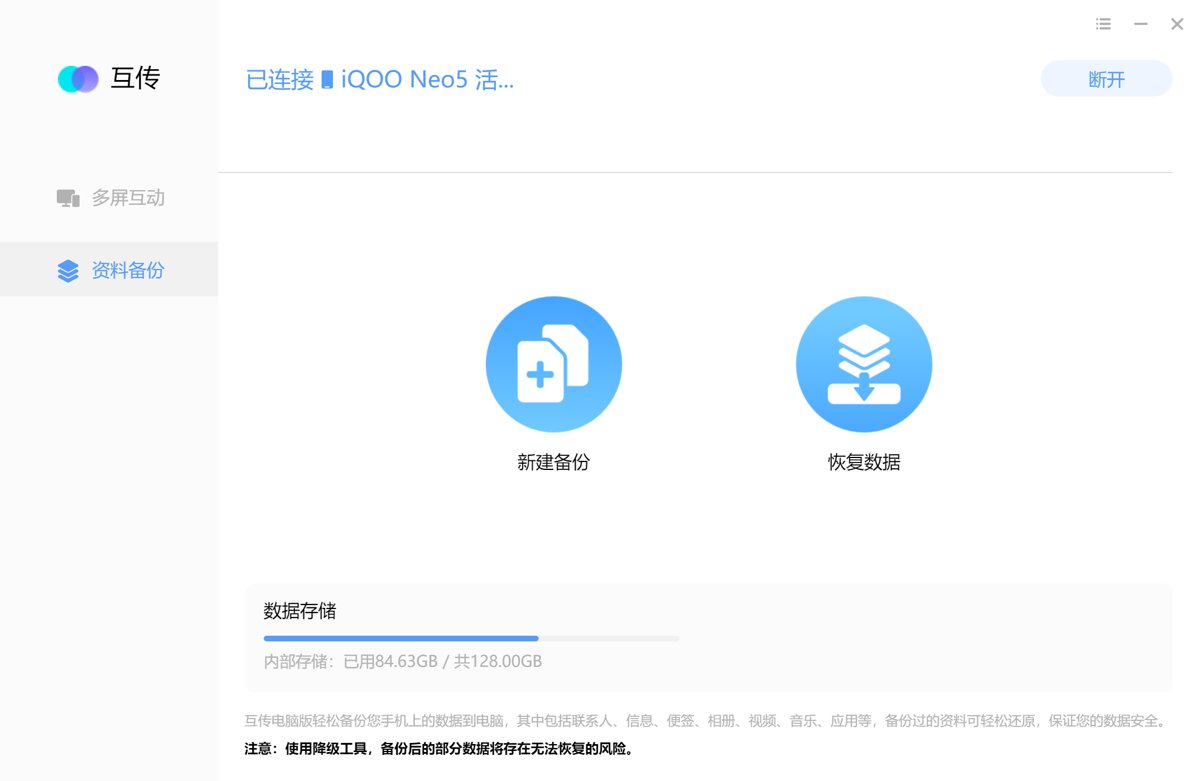
Once you enter the backup screen, photos, contacts, and app data can all be backed up.

After backing up, factory-reset the phone, then take it to the service center. That's the safest approach.
Restoring Data
When restoring, you can also choose what you need:
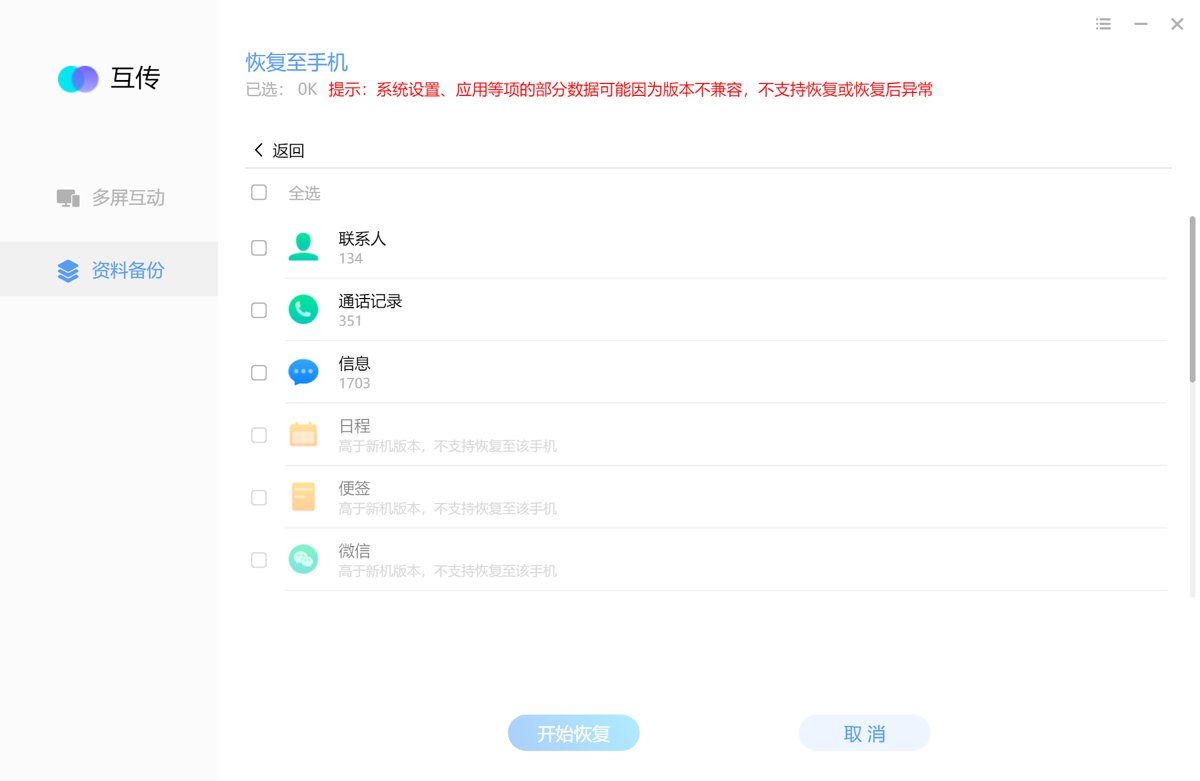
DIY Downgrade
vivo officially provides a downgrade tool:
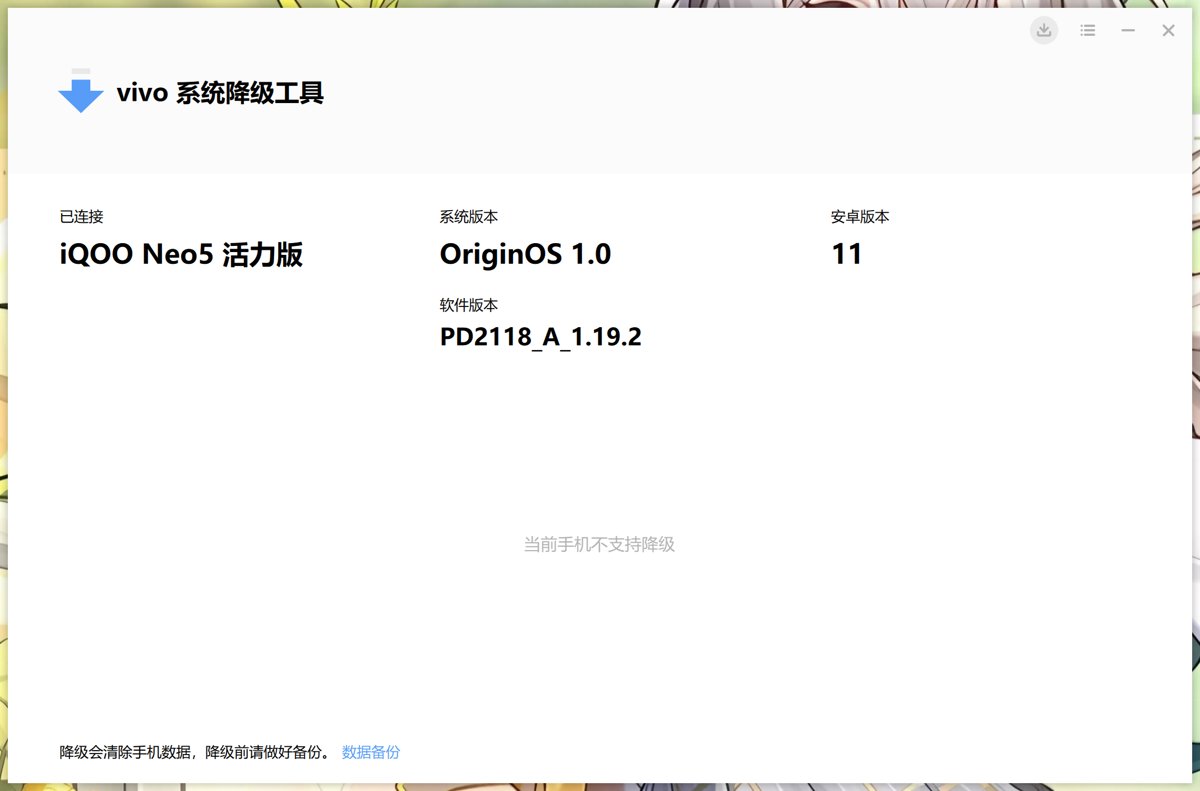
After backing up your data, you can use the downgrade tool to downgrade the system yourself
But here's the problem
The available versions are very limited. Based on my testing, this Neo5 Lite of mine can only downgrade OriginOS 4 to OriginOS 3
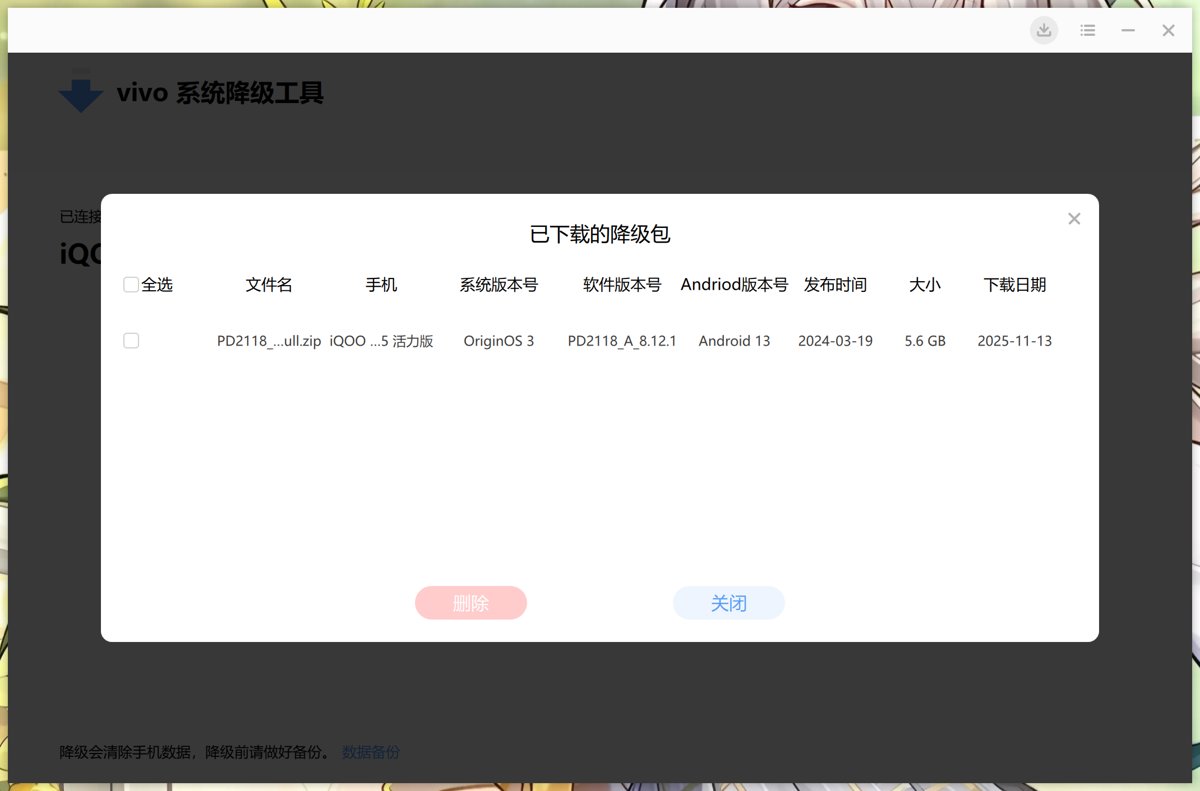
In other words, "self-service downgrade" can only fix a tiny bit of stuttering; it can't get you back to the smoothest original system
That's also why I wanted to go to the service center for the downgrade
Service Center Experience
OK, back to the main topic
After work yesterday I went straight to the nearest vivo service center
The service environment was pretty OK
I scanned the QR code to take a number as instructed. The service guy was very friendly and poured everyone a cup of water. Service gets a thumbs-up 👍

I had two goals for this visit:
- Replace the battery
- Downgrade the system (the main goal)
The staff first showed me a "User Notice," confirming that I would bear the downgrade risks myself. After I signed, I explained why I was there: if they could downgrade the system, I'd replace the battery while I was at it
Battery Replacement: Talked Out of It
After inspecting my phone, the service guy said: "Your phone's battery still has 75% health. No need to replace it. Even if you did, it wouldn't improve battery life much. The fast drain now is because the hardware can't keep up."
In that case I won't replace it. Save where you can.
The Downgrade
Here's the key part. I asked for a downgrade.
The service guy's first words were: "No need to downgrade. It won't get any smoother. This phone is too old."
(??? I came here precisely because it's lagging, bro 😭)
He also looked at the system version and said I was already on a very old OriginOS 3 (I'd already done a downgrade before coming to the service center, but I could only get down to OriginOS 3 myself), and very seriously repeated that downgrading could damage or brick the phone, and I'd have to bear the risk myself.
After I insisted again and again, he finally agreed to check whether a downgrade was possible.
Five minutes later he came back and said they could help me downgrade to version 1.x. I gladly agreed.
I sat in a chair nearby and waited a few minutes, then the service guy handed the still-booting phone back to me
Waited another five minutes or so, the phone booted normally into the system. OK, mission accomplished for this trip. Time to go home~
Downgrade Successful
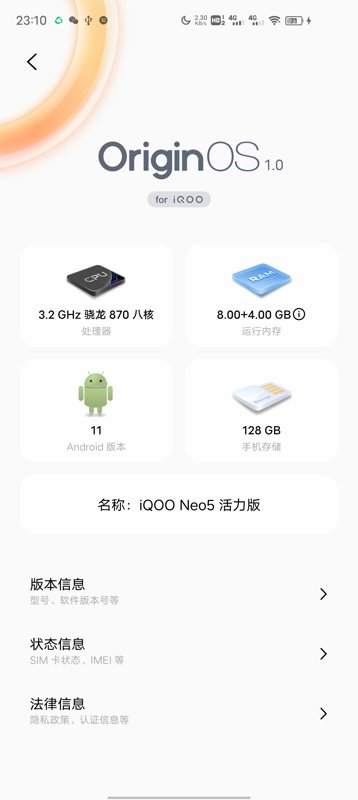
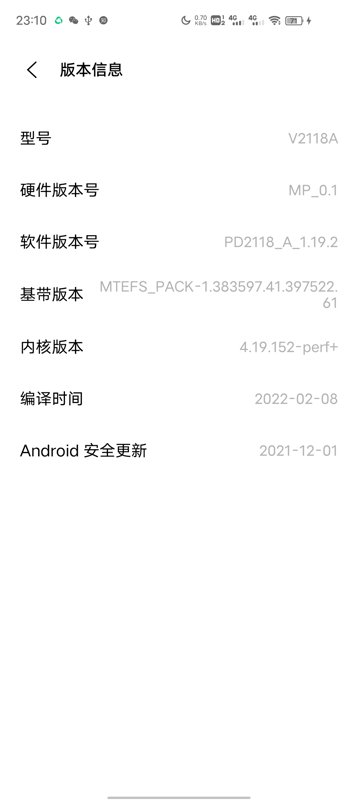
Excellent. Successfully downgraded at the service center to the oldest major version, OriginOS 1
The version number is 1.19.2
Not a particularly old version. I've seen people on 1.6, which is probably the factory version
But compared to current OriginOS 4.x it's still much better. At least it's a lot smoother
| System Version | Version Number |
|---|---|
 |  |
Impressions:
- Animations are smoother
- Scrolling doesn't stutter anymore
- App switching is noticeably snappier
- Power consumption after the downgrade is also more stable
The service guy still wanted to fool me into thinking a downgrade wouldn't make it smoother. I think the new system is just negatively optimized 😤
Uninstalling Built-in Bloatware
After getting home I kept tinkering with the phone setup
Used adb commands to uninstall some of vivo's built-in junk apps
For example: i Music, i Video, the browser, plus things like live wallpapers, the data plan store, Game Park, and so on. If people are interested I'll write a detailed article later and put together a list of commonly uninstalled package names.
Using Old Versions of Apps
OriginOS 1.x comes preinstalled with a lot of Chinese apps
Besides deleting some I don't need, the ones I use day to day—Alipay, Taobao, Pinduoduo, JD.com, and the like—I kept. These are old app versions from several years ago, which saved me the trouble of hunting them down.
WeChat wasn't preinstalled. When I restored my data earlier I restored WeChat and its data, but this WeChat is the current new version, 8.x—bloated and laggy. It's fine on a new phone, but on this old 870 chip it's already struggling
To make the old phone smoother, I found an old version of WeChat to downgrade to. To still be able to use mini programs, based on experience shared by other users, I chose version 7.0.22, which is also the last version of 7.x
Using an old version of WeChat takes some technique. Some people may install it and still not be able to log in
The general idea is to log in with the new WeChat first, then uninstall while keeping the data, then install the old WeChat. At that point it's already in a logged-in state by default—just open it and you're done 😄
I've also uploaded this old WeChat installer package to a cloud drive. Friends who need it can reply "微信7" in the backend of the WeChat official account "曦远Life" to get it.
Wrap-up
If your old phone has also been getting laggier over the past couple of years, you might as well try asking the service center whether a downgrade is possible.
As long as you can get down to one of the early versions after leaving the factory, it can basically get a second wind and last a few more years no problem.
Honestly, phone performance has long been overkill. Chips like the Snapdragon 870 and 888 from three or four years ago are still perfectly adequate today. A lot of people feel their phone is "old and slow," but more often it's not that the hardware can't cut it—it's that system updates keep getting heavier, animations keep getting fancier, and background policies keep getting more baffling.
At the light end it's negative optimization and cloud control; at the heavy end it's cameras going backwards and inflated battery ratings. All kinds of combo punches with just one goal: making you feel like you should buy a new phone.
Add in OLED burn-in, frequent price hikes, and spec-sheet stuffing, and the way phone makers have been playing the game these past few years is honestly pretty off-putting. Consumers who aren't careful easily fall into the "replace every year" trap, spend the money, and the experience isn't even necessarily better than the old phone in their hands.
So if it can be repaired, repair it. If it can be downgraded, downgrade it.
As long as the hardware is still okay, with a little "tuning," an old device can still keep you company and live on happily.
_EOF_
LCD Phone Veterans Never Die: A Day of Downgrading the iQOO Neo5 Lite to OriginOS 1
- 本文作者:
- 程序设计实验室
- 版权声明:
- 本博客所有文章除特别声明外,均采用 BY-NC-SA 许可协议。转载请注明出处!
相关文章
以为要报废的哈啰电动车,被我 9.9 元修好了
自己动手修个报警器,成本不到10块,收获一堆废铁工具和虚无缥缈的成就感?这年头谁还当自己是修理工啊。花一两百找修车店,省得自己折腾,可人家连个破盒子就卖50,真是绝了。
2025-12-06 · 2025 · 约 1 分钟
AI时代的全栈框架:独立开发者的机会与挑战
独立开发者终于能全干了?AI帮忙还愁生态?一体性是王道,但选什么框架还得自己纠结。AI写代码真靠谱?
2025-09-12 · 2025 · 约 1 分钟
硬盘突然坏掉,我花了半个月才把数据救回来…(附数据恢复工具)
硬盘崩了?数据恢复折腾半个月,最后捡回大部分残骸。MFT坏了只能干瞪眼?先镜像再扫描,工具堆里找活路。备份?下次记得多来几个副本,别等丢完才叫苦。
2025-09-27 · 2025 · 约 1 分钟
独立开发者的一周:把生活和项目都推进一点点
一周代码+生活,进度条各推一丢丢。公众号日更堪比自虐,开源项目是时间黑洞。独立开发?不过是把事情磨磨唧唧往前蹭。
2025-11-23 · 2025 · 约 1 分钟
讨论
共 0 条加载评论中…