How to elegantly generate unique IDs in a Django project?
When it comes to generating unique IDs, Django isn't much different from other backend frameworks—the thinking is similar, except you can cut corners a bit by leveraging the Python ecosystem…
目录12 个章节
Introduction
Originally, the title was intended to be "Generating Non-Repetitive Four-Digit Numbers," but since numbers alone are somewhat limiting, it's been generalized to non-repetitive IDs.
This feature was encountered while working on the small project shown in the image below, which is somewhat similar to WeChat's "Face-to-Face Group Creation." It generates a random and unique password, and others can join the classroom by entering this password.
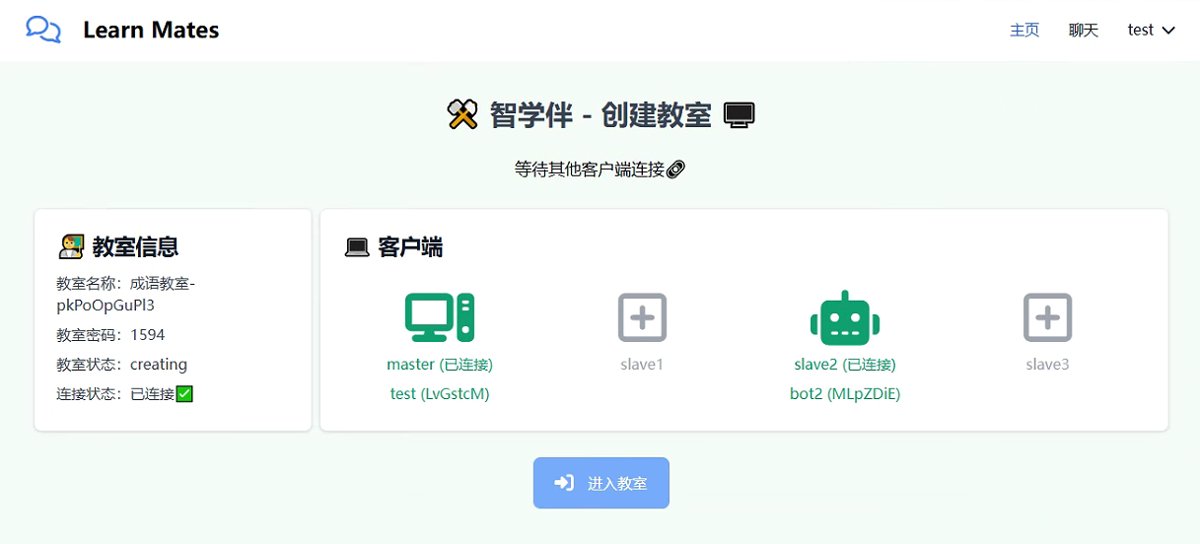
There are several ways to implement this feature, and this article will briefly document one approach.
Without Relying on Third-Party Libraries
First, let's implement this function purely based on Django ORM.
First, define a model.
from django.db import models

class MyModel(models.Model):
    unique_code = models.CharField(max_length=4, unique=True)
Single Task
The simplest and most straightforward method is to write an infinite loop.
import random

def generate_unique_code():
    while True:
        code = str(random.randint(1000, 9999))
        if not MyModel.objects.filter(unique_code=code).exists():
            return code
This implementation is definitely reliable in a single-threaded testing environment. However, this operation is not atomic, and in a concurrent environment, it may generate duplicate numbers.
Considering Concurrency
In high-concurrency scenarios, you can use database transactions or optimistic locking.
from django.db import transaction, IntegrityError

def create_instance():
	  # Number of attempts
  	retry = 10
    for _ in range(retry):
        code = generate_unique_code()
        try:
            with transaction.atomic():
                instance = MyModel(unique_code=code)
                instance.save()
            return instance
        except IntegrityError:
            # If a uniqueness conflict occurs, retry
            continue
    raise Exception("Unable to generate a unique four-digit number")
Pre-generating
The first two methods require frequent database reads, resulting in relatively poor performance.
Alternatively, we can trade space for time. Since it's only four-digit numbers, the range from 0000 to 9999 doesn't contain too many values. We can pre-save these ten thousand rows into the database and add an available field.
When we need to generate a unique ID, we first filter for data where available == True, then randomly select one; and set this field to False.
This is the general idea.
Using Third-Party Libraries
In this project, I used these three libraries together (this is also the main purpose of writing this article, to document these libraries)
- shortuuid
- hashids
- django-autoslug
shortuuid
shortuuid is a lightweight library for generating shorter UUIDs.
Implementing this functionality using this library is straightforward.
import shortuuid
shortuuid.ShortUUID(alphabet="0123456789").random(length=4)
However, in this project, I did not use this library for this purpose.
In fact, as the name suggests, this library has "uuid" in it and is naturally used for tasks related to Python's built-in UUID.
I used this library to simplify the ID of the Client model to 7 characters.
class Client(ModelExt):
    client_id = models.UUIDField(default=uuid.uuid4, editable=False)
    client_key = models.CharField(max_length=100, default=uuid.uuid4)
    user = models.OneToOneField(
        User, on_delete=models.SET_NULL, db_constraint=False, null=True, blank=True, unique=True,
    )
    consumer_name = models.CharField(max_length=100, null=True, blank=True)
    is_online = models.BooleanField(default=False)

    def short_client_id(self):
        short = shortuuid.encode(self.client_id)
        return short[:7]
The shortuuid.encode method can convert a 32-character UUID into 22 characters, and it can be restored using the decode method.
hashids
This is a library for converting numbers into short strings
Although the name includes "hash," the encoding of this library is reversible
import hashids
h = hashids.Hashids()
h.encode(123, 456)
Out[15]: 'X68fkp'
h.decode('X68fkp')
Out[16]: (123, 456)
I used it to generate classroom names based on timestamps

```python
def get_timestamp_hashid():
    hashids = Hashids(salt='hahaha salt lala')
    t = timezone.now().timestamp()
    result = tuple(map(int, str(t).split('.')))
    return hashids.encode(*result)
Because the encode method accepts numbers (or a tuple containing numbers), here the integer and decimal parts of the timestamp are converted into a tuple and then passed into hashids
django-autoslug
This library is used to generate unique slugs based on fields, and it also allows for custom generation logic.
I used this library to implement the unique classroom password generation feature (but I wouldn't particularly recommend this approach).
from autoslug import AutoSlugField


def populate_classroom_number(instance):
    return str(random.randint(1000, 9999))

class ClassroomIdiom(ModelExt):
    name = models.CharField(max_length=100)
    number = AutoSlugField(populate_from=populate_classroom_number, unique=True)
The principle behind this library is straightforward. It generates a slug based on user-defined rules, then checks the database for duplicates. If a duplicate is found, it appends a number to the end. This process can potentially result in numbers that exceed four digits.
The best approach is still the third method I mentioned earlier, which does not rely on any third-party libraries.
Using django-autoslug here was simply for convenience, delegating the complex logic to a third-party library. After all, this is just a toy project.
Summary
When it comes to generating unique IDs, Django isn't really different from other backend frameworks—the approach is quite similar. It's just that you can take advantage of the Python ecosystem to cut some corners...
_EOF_
How to elegantly generate unique IDs in a Django project?
- 本文作者:
- 程序设计实验室
- 版权声明:
- 本博客所有文章除特别声明外,均采用 BY-NC-SA 许可协议。转载请注明出处!
相关文章
Django-Import-Export插件关于外键的处理
前言 Django-Import-Export是一款很好用很方便的Django数据导出导入插件,可以和DjangoAdmin管理后台完美集成,只需要少量的代码配置即可方便实现你要的多种格式导出导入,关于这个插件的使用更多可以看我之前的文章:这里放文章链接 之前我在使用中都是专门做了一个原始数据的表来存导入的数据,然后再对原始数据表做一些数据处理,把数据存到其他表才能真正使用这些数据。(不是很好的做
2022-04-02 · Django · 约 1 分钟
使用easy_thumbnails轻松为图片创建缩略图
关于Django的缩略图 我在Django的官方文档里看了一下,没有找到有关缩略图的官方库,不过在Django的Wiki里头倒是看到了一篇关于使用缩略图的介绍,请参考:https://code.djangoproject.com/wiki/ThumbNails 关于Problem的描述 The majority of applications that have images, probably
2022-08-26 · Django · 约 1 分钟
Django探索验证码功能的实现 - DjangoStarter项目模板里的封装
前言 依然是最近在做的这个项目,用Django做后端,App上提交信息的时候需要一个验证码来防止用户乱提交,正好我的「DjangoStarter」项目脚手架也有封装了验证码功能,不过我发现好像里面只是把验证码作为admin后台登录的校验手段,并没有给出前后端分离项目的验证码相关接口。 所以本文介绍验证码功能实现的同时,也对「DjangoStarter」的验证码模块做一层封装,使其更方便使用~ 用哪
2022-04-09 · Django · 约 1 分钟
配置Django-TinyMCE组件支持上传图片功能
Django自带的Admin后台,好用,TinyMCE作为富文本编辑器,也蛮好用的,这两者结合起来在做博客的时候很方便(当然博客可能更适合用Markdown来写),但是Django-TinyMCE这个组件默认没有图片上传功能的,需要我们自己实现,本文将一步步带大家实现这个图片上传功能。 读者也可以举一反三实现其他需要和Django结合的功能。 编写上传图片逻辑 在任一views.py里添加代码:
2021-12-18 · Django · 约 1 分钟
讨论
共 0 条加载评论中…