Use the GTD method to improve efficiency
GTD, an acronym for Getting Things Done, is a productivity method first introduced by David Allen in 2001. Allen describes the GTD method in his book: "Getting Things Done: The Art of Stress-Free Productivity."
目录10 个章节
Preface
In recent years, with the development of work and side projects, the number of tasks to complete each day has been increasing, and a backlog of work has accumulated. My mind is constantly filled with various things, leaving me feeling chaotic. This not only leads to low efficiency but also easily triggers anxiety.
For this reason, I have been constantly searching for suitable project management tools and have also read some related books. However, many methods are complex and difficult to put into practice quickly.
Until I came across the "Getting Things Done (GTD) methodology" while surfing the internet.
What is the GTD Method
GTD stands for Getting Things Done, a productivity methodology first proposed by David Allen in 2001. Allen describes GTD in his book as: "Getting Things Done: The Art of Stress-Free Productivity."
There is a very insightful statement in the reference materials: Your brain is not meant for storing information. This is because when your mind is cluttered with to-do lists and reminders, there isn't enough mental capacity left for the work that truly needs to be done.
GTD is a very popular time management strategy because its implementation is simple and its effects are powerful. Even if you are not consciously aware, your brain is constantly "working silently" in the background, shuttling back and forth, rearranging your various upcoming to-do items to ensure nothing is missed. Whenever you add a new task to this jumble of items, your brain needs to consider everything on this memo and re-prioritize your work based on the new task.
Quick Practice of GTD
The illustration in Minor Magazine's article is quite good.
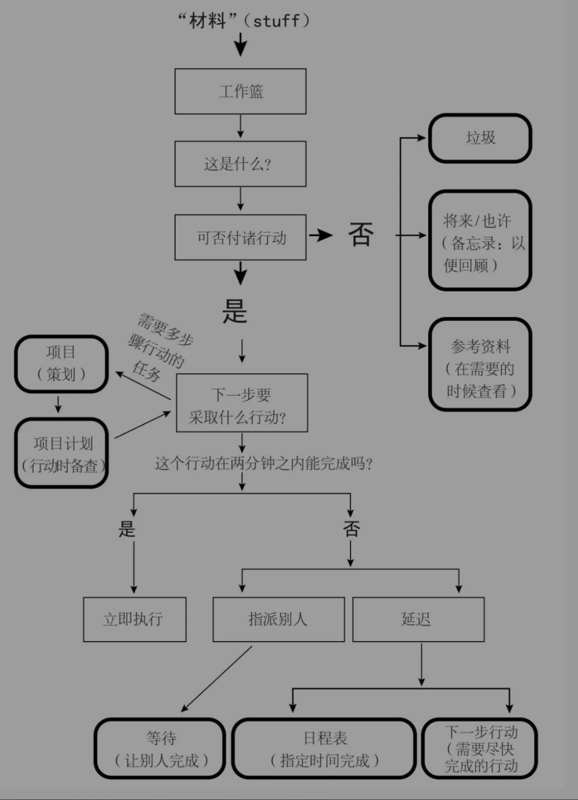
If this article merely repeats concepts that have been covered extensively in other articles, it wouldn't be very meaningful.
Many articles start from scratch, but those who wish to try GTD are often overwhelmed by a large number of to-dos.
The first step is to go through all your current tasks. At this point, tasks may only be kept in your mind—start by putting them all into the inbox.
It might not be possible to record everything all at once; that's okay, just continue adding to the inbox whenever you remember something.
Next, replace the habit of scrolling through short videos or information feeds with checking your to-do software. Sort tasks from the inbox into different lists. For more detail, you can also set priorities for each task.
Then, work on tasks based on the different lists. This way, you only need to focus on what's in front of you.
Key Points
Keep Your Todo List Close at Hand
While working, please keep your todo tool open at all times so you can easily view, modify, and add tasks.
When you're not working, jot down any ideas on your phone and add them to your todo tool immediately. (That's why choosing a cross-platform tool is so important.)
Atomic Tasks
Every todo task should be broken down as much as possible. Tasks beyond a certain size lose their meaning. For example, "develop a personal website" should be converted into a project containing many sub-tasks, such as:
- Determine the website theme
- Research the tools needed for website development
- Determine the technology stack
- Set up the project
- ...
Try to refine each task to the smallest possible unit. This way, you'll have the motivation to complete them.
Choosing a Tool
Following the principle of "don't waste time choosing tools," to get started with GTD quickly, I directly used "Microsoft Todo," which I had previously used as a memo app.
It's not particularly smooth, but it works okay.
You can't set task priorities directly, but you can drag to reorder, so I treat that as the priority. Additionally, you can set subtasks for each task, which conveniently allows you to convert a task into a project. When a specific task within a project becomes too complex, you can easily promote it and organize it into a new project.
I had previously considered kanban tools like Trello, but the free version has too many feature limitations—it doesn't even have a calendar. With Todo, at least I'm more familiar with it, so in the end, I decided against it.
Looking ahead, I might even consider developing a tool tailored to the GTD method. However, the GTD method isn't perfect; it just suits me well at this stage. It's hard to say—what if my efficiency improves further in the future?
To summarize my advice for those who want to try this method: if you haven't used similar tools before, you can choose a kanban tool like Trello. It's very intuitive and straightforward, making it easier to get started than Todo.
How's it going now?
The image shows the interface of my todo software. Over the past five days, starting from last week, I have already used GTD to make many optimizations to my workflow.
This software allows adding task lists and folders. Before starting GTD, I had been using it for a while, so I had accumulated many other tasks.
For practice, I created a "GTD" folder and added three lists within it. Currently, I mainly use two.
"Tasks" serves as the inbox. All tasks are first added here without much thought, and then sorted out gradually.
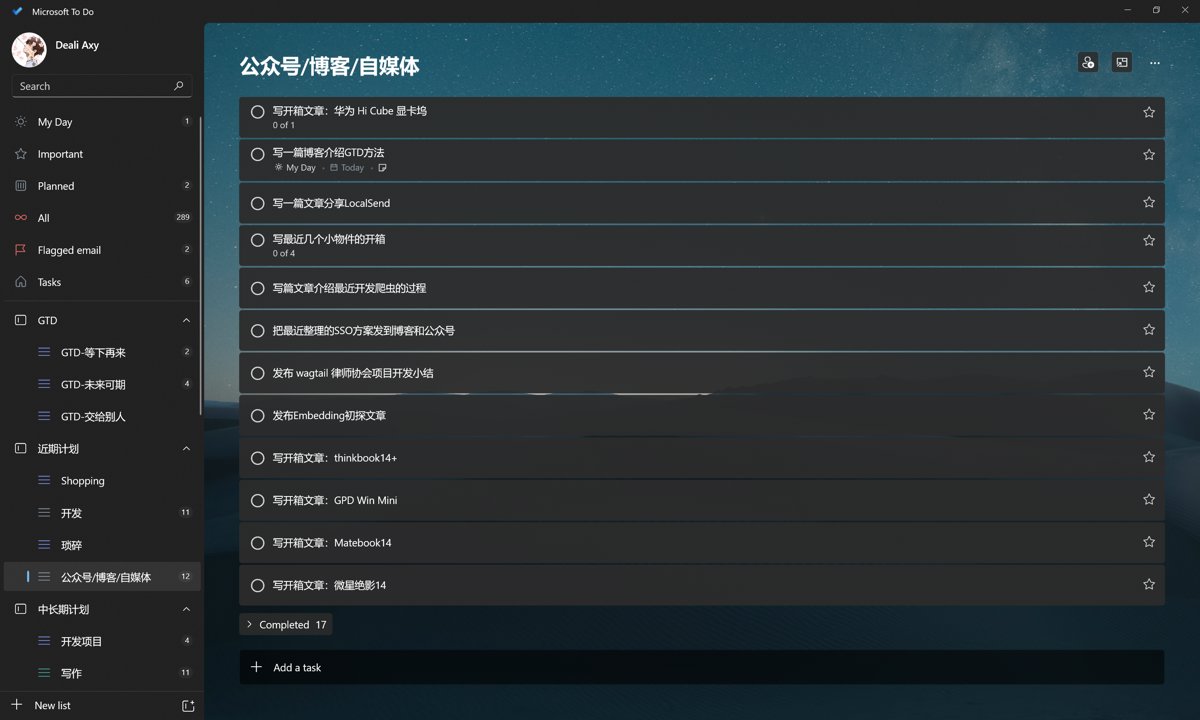
If something can be done immediately, I don't put it on any list; I just do it right away and check it off.
If it can be completed within a few days, I put it into the "Come Back Later" list. If I'm not motivated to do it right now, I put it into the "Future Possibilities" list.
Since I had many lists before, I also categorize the tasks. Development-related ones go into "Short-Term Plan - Development," and writing tasks are treated similarly.
Although it looks similar to before, I have now broken down the tasks in more detail and added due dates, which has greatly increased the likelihood of task completion...
In short, I'll keep trying.
What's Next?
GTD is just the first step
Once tasks are recorded, the amount of work I can do each day becomes quantifiable
The next step in planning, I believe, is time management
I can use the "Pomodoro Technique" to arrange the disposable time each day
Decide how many Pomodoro sessions each task will take, which will help better schedule all tasks
I might even add a schedule to all current tasks
This way, the open-source projects and articles that need updating will no longer be "whenever I have time"
I've already purchased the tool "Spirit City: Lofi Sessions" on Steam
Once everything is ready, I can start using the "Pomodoro Technique"
Reference Materials
- Having trouble finishing things? Use these 5 steps to master the Getting Things Done (GTD) method - https://asana.com/zh-tw/resources/getting-things-done-gtd
- Learn to use GTD for task management in 10 minutes - https://sspai.com/post/40172
_EOF_
Use the GTD method to improve efficiency
- 本文作者:
- 程序设计实验室
- 版权声明:
- 本博客所有文章除特别声明外,均采用 BY-NC-SA 许可协议。转载请注明出处!
相关文章
LCD 手机老兵不死:iQOO Neo5 活力版降级 OriginOS 1 的一天
四年前的iQOO Neo5活力版还流畅?活该vivo售后劝降级时一脸懵逼。自己动手降级到OriginOS 1.x才叫本事,还特么要自己找旧版App?这手机明明够用,非要作死逼人换新机。
2025-11-14 · 2025 · 约 1 分钟
为什么说 Edge/Serverless 是最适合独立开发者的开发方式?
Edge-Serverless?不过是独立开发者偷懒的捷径罢了。国内环境又添堵,Vercel Cloudflare在国外爽得飞起,国内却要自己动手丰衣足食?Node.js全栈框架倒是适配得挺好,但谁不烦这堆麻烦事?
2025-09-14 · 2025 · 约 1 分钟
独立开发者的一周:把生活和项目都推进一点点
一周代码+生活,进度条各推一丢丢。公众号日更堪比自虐,开源项目是时间黑洞。独立开发?不过是把事情磨磨唧唧往前蹭。
2025-11-23 · 2025 · 约 1 分钟
不到半年,我的鸡哥14x也翻车了……
本文作者分享了其机械革命无界14X笔记本电脑的翻车经历。尽管该款电脑在性能和外观上受到好评,但作者不慎遇到键盘Tab键失灵的问题。文章详细记录了作者自行更换硬盘及申请售后服务的过程,并分享了维修进度视频。作者对机械革命的售后服务表示满意,但同时也对品控问题表示担忧。
2025-05-11 · 2025 · 约 1 分钟
讨论
共 0 条加载评论中…