Develop a Hive export tool using Go language
The author chose Go over bash, Python, and C# to write the Hive export tool solely because of its simple deployment. Go's error handling is annoying, but cross-compilation is convenient. The tool is interactive and handles export.
目录15 个章节
Preface
The new version of Hive provides the Beeline tool, which can execute SQL and export data, but the operation is still a bit complex. Some colleagues in the team are not familiar with basic Linux operations, so I spent a bit of time writing an interactive command-line tool for easier use.
Effect
Command-line tools are just this plain and simple.
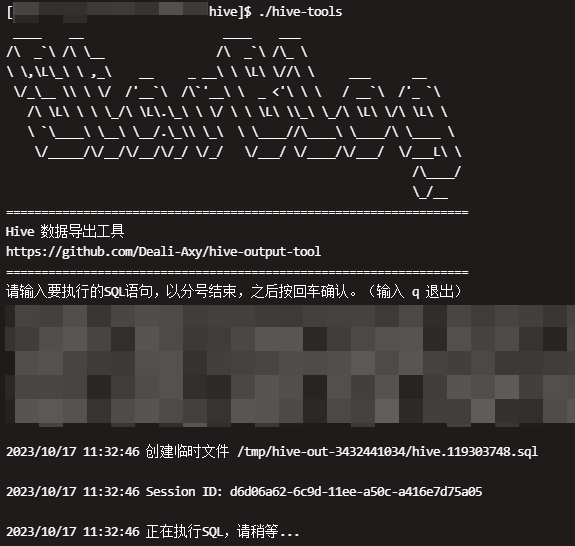
Exploration Process
Initially, I planned to use a bash script, but I found that I couldn't write it at all. Beeline can only export data using output redirection, and there were constant issues with redirection within shell scripts, leading to errors. I gave up on that approach.
Next, I considered switching to Python, which went quite smoothly. However, the host terminal appeared to be an older version of Ubuntu, with Python 2.7 pre-installed. Writing in Python 2 syntax was so frustrating that I decided to use a language that could be compiled into a binary locally, and then upload the binary to the terminal for execution.
At this point, I thought of C#. .NET 8 provides excellent support for AOT, allowing it to be used similarly to C++. However, I encountered some minor issues, such as AOT mode only being able to compile Linux executables on Linux, unlike Go, which supports cross-compilation for Linux executables on Windows. After much effort, when I finally compiled and uploaded the executable, it threw an error saying that the glibc library could not be found.
/lib64/libm.so.6: version `GLIBC_2.29' not found
After looking into it, I realized it was likely related to the system version. Ultimately, I abandoned this approach and turned to using Go for development.
Environment Setup
My computer already has Go installed, but for the completeness of the article, let me still document (pad) this. 😃
On Windows, it is recommended to use scoop to manage software.
You can install Go with just one command.
scoop install go
Due to well-known reasons and the particularities of the domestic network, you need to configure a Go proxy.
go env -w GO111MODULE=on
go env -w GOPROXY=https://goproxy.cn,direct
Done. Next, install Goland or VSCode, and you can start writing code happily.
Using beeline
Export Hive query results using beeline with the following command:
beeline -u jdbc:hive2://host:port -n username -p password --incremental=true --verbose=false --fastConnect=true --silent=true --outputformat=csv2 -f ./temp.sql > result.csv
First, save the SQL you want to execute in a file, then specify it using the -f parameter. The query results will appear in standard output; at this point, redirect them to a file to complete the export of the query results.
Analysis
It sounds simple: this command-line tool prompts the user to input SQL statements, saves them to a temporary file, then executes the beeline command mentioned above, and saves the standard output to a file—completing the export process.
ASCII Logo
Before implementing the serious stuff, let's start with something flashy.
Many command-line tools display a cool ASCII logo on startup, and I wanted to create one too 😀
Many online tools offer the functionality to generate ASCII art text. I used this one: https://tools.kalvinbg.cn/txt/ascii
After entering the text, an ASCII character art is generated, which can then be copied. Here, I'm using "StarBlog" – consider it a promotion for my blog~
Next, you need to store the output using an unescaped string. Most programming languages support this, and Go is no exception.
Go uses double backticks, like this:
var str = `hello`
However, I quickly ran into a problem: the ASCII art also contained backtick characters. Simply pasting it directly resulted in errors unless manual escaping was done, which was too cumbersome.
In the end, I had to first encode the ASCII art using Base64, and then decode and print it within the program.
Remember to import the encoding/base64 library first.
const asciiTitle string = "base64"
var titleDec, _ = base64.StdEncoding.DecodeString(asciiTitle)
fmt.Printf("%s\n", titleDec)
And that solves the problem~
I do have to say, the first time I implemented this feature, I was using C#. C# handled it perfectly with @"ASCII字符画", without all the back-and-forth escaping.
Reading Input
It was originally a simple feature, but somehow in practice there are still some pitfalls.
At first I used fmt.Scanln() to read input.
However, there was a problem: this method stops reading when it encounters a newline (carriage return), and many SQL statements contain line breaks, which causes issues. Either you have to require that the input SQL statements don't contain newlines, or you have to use a different method to read the input.
In the end, of course, I switched to a different method—using the bufio library to read the stream.
reader := bufio.NewReader(os.Stdin)
fmt.Println("请输入要执行的SQL语句,以分号结束,之后按回车确认。")
line, err := reader.ReadBytes(';')
line = bytes.TrimRight(line, "\r\n")
sql := string(line)
Ending with a semicolon allows SQL statements to contain newline characters.
Reading Environment Variables
Using the beeline command requires specifying a username and password, and this part cannot be hardcoded. I plan to implement this by reading environment variables.
However, setting environment variables each time before running the program is too cumbersome. So I pulled out the dotenv method. The Go ecosystem isn't as rich as some others, but you can find corresponding libraries for most functionalities. For this dotenv implementation, I'm using the github.com/joho/godotenv library.
err := godotenv.Load()
if err != nil {
  log.Fatal("Error loading .env file", err.Error())
}
After that, simply create a .env file in the same directory as your program and save the environment variables in it. That's all there is to it.
CONN_STR=jdbc:hive2://host:port
USERNAME=user
PASSWORD=pwd
OUTPUT_FORMAT=csv2
Creating Temporary Directories and Files
Many articles online use deprecated methods like ioutil.TempFile(). In reality, you should now use the methods provided by the os library.
First, create a temporary directory.
dir, err := os.MkdirTemp("", "hive-out-")
if err != nil {
  fmt.Printf("创建临时目录错误!%v\n", err)
  log.Fatal(err)
}
Create a temporary file and write to it.
tempFile, err := os.CreateTemp(dir, "hive.*.sql")
if err != nil {
  fmt.Printf("创建临时文件错误!错误:%v\n", err)
  log.Fatal(err)
}

defer tempFile.Close()
defer os.Remove(tempFile.Name())
defer os.RemoveAll(dir)

data := []byte(sql)
if _, err := tempFile.Write(data); err != nil {
  fmt.Println("写入文件失败!", err.Error())
  log.Fatal(err)
}

log.Printf("创建临时文件 %s\n\n", tempFile.Name())
Generating UUIDs
The Go standard library doesn't provide UUID functionality, which might be part of Go's philosophy of Simplicity.
I'm using the github.com/google/uuid library here. Being a Google product, it should be reliable.
u1, err := uuid.NewUUID()
if err != nil {
  log.Printf("Failed to create UUID: %v\n", err)
  log.Fatal(err)
}
log.Printf("Session ID: %v\n\n", u1)
However, in the end, this UUID wasn't used.
Initially, I intended to use it as the output filename, but later decided that using the date and time would be more appropriate.
Date Time Formatting
This is a common issue. I simply use the fmt.Sprintf method, which is straightforward.
t := time.Now()
timeStr := fmt.Sprintf("%04d-%02d-%02d_%02d-%02d-%02d-%02d", t.Year(), t.Month(), t.Day(), t.Hour(), t.Minute(), t.Second(), t.Nanosecond())
outputPath := fmt.Sprintf("%s.csv", timeStr)
Execute Command + Output Redirection
Linux output has two types:
- stdout
- stderr
For Hive export results, we only need to save the stdout to a file.
In Go, the design is straightforward: simply create a file and redirect the command line's stdout to that file.
outputFile, err := os.Create(outputPath)
if err != nil {
  log.Fatalf("Failed to create file: %v\n", err)
}
Execute the command and redirect output
log.Printf("Executing SQL, please wait...\n\n")
cmd := exec.Command(
  "beeline",
  "-u", os.Getenv("CONN_STR"),
  "-n", os.Getenv("USERNAME"),
  "-p", os.Getenv("PASSWORD"),
  "--incremental=true",
  "--verbose=true",
  "--fastConnect=true",
  "--silent=true",
  "--outputformat="+os.Getenv("OUTPUT_FORMAT"),
  "-f", tempFile.Name(),
)
cmd.Stderr = os.Stderr
cmd.Stdout = outputFile
err = cmd.Run()
if err != nil {
  log.Fatalf("cmd.Run() failed with %s\n", err)
}

defer outputFile.Close()

log.Printf("Data exported to: %s\n\n", outputPath)
log.Println("Done!")
The stderr does not need to be saved to a file, so we just redirect it to the standard error output.
Done!
Summary
I haven't written Go code in a long time, but its design is indeed simple—it's a language with very distinct strengths and weaknesses.
The most direct advantage is the excellent experience of release and deployment. .NET 8's AOT (Ahead-of-Time) compilation has been hyped up immensely, but in practice, the experience of publishing with AOT is still rather mediocre. Moreover, it's picky about the Linux version. This is the direct reason I chose to use Go to develop this tool.
Among the drawbacks, the one I feel most strongly is Go's error-handling mechanism. Writing err != nil everywhere is so annoying! Although you can use data, _ := xxx() to forcefully suppress errors, it's still not as comfortable as using try.
That's about it. It's a very simple little tool, and because I'm not very familiar with Go, I spent some time exploring.
References
- https://books.studygolang.com/The-Golang-Standard-Library-by-Example/chapter01/01.4.html
- https://books.studygolang.com/The-Golang-Standard-Library-by-Example/chapter06/06.1.html
- https://juejin.cn/post/7000925379145760782
- https://www.cnblogs.com/mayanan/p/15342214.html
- https://www.cnblogs.com/wongbingming/p/13984538.html
- https://colobu.com/2020/12/27/go-with-os-exec
_EOF_
Develop a Hive export tool using Go language
- 本文作者:
- 程序设计实验室
- 版权声明:
- 本博客所有文章除特别声明外,均采用 BY-NC-SA 许可协议。转载请注明出处!
相关文章
2025年的最后一天,分享我使用go语言开发的电子书转换工具网站
受够了满屏广告的转换工具,随手给命令行工具套了个 Go-Gin 的壳。本想图个清静,结果这群人直接把服务器跑崩了,目前只能被迫停机。代码丢在 GitHub 了,别指望我会去修那还没写完的登录功能。
2025-12-31 · Go · 约 1 分钟
当 CGO 遇见 Zig:一种更优雅的折腾方式,对比 GCC 后端
“GCC 赢了跑分,但 Zig 赢了人生。” (GCC wins the benchmark, but Zig wins the DX/Developer Experience.) Windows下cgo编译器从gcc换到zig?GCC快但环境配置可能比较麻烦,zig单文件轻量但编译慢且首跑延迟离谱。性能差距大吗?或许吧,但开发效率的提升值得折腾。
2026-04-14 · Go · 约 1 分钟
使用go语言开发自动化API测试工具
这个工具我使用了 go 语言开发,主要是考虑到了 go 语言可以傻瓜式的实现交叉编译,生成的可执行文件直接上传到服务器就可以执行,非常方便。
2024-03-08 · Go · 约 1 分钟
给电脑和NAS来了一次大扫除
文章记录了作者搬家后对台式机和NAS进行的大扫除过程。因长途运输导致机器积尘严重,作者拆机清灰并更换了硅脂,重点清洁了风扇、主板等部件。清洁后机器运行更安静、散热更好。不过台式机在运输中损坏了一只机箱脚,作者正准备更换。这次大扫除虽然辛苦,但效果显著,让老旧设备焕发新生。
2025-06-06 · 2025 · 约 1 分钟
讨论
共 0 条加载评论中…