

Using Flutter to Design a Nice "Me" Page
Recently I ran into some really annoying trivial matters, my state has been pretty down, and a lot of things I had originally planned have been delayed. It's really hard to take…… I've seen friends in the backend keep asking why the blog and WeChat official account haven't been updated, so now that I'm done being busy and have some free time, I'm here with an update! Preface It started when I recently picked up an old project again (something I did as a hobby, planning to operate it myself if I get the chance) to continue improving it, then found that some of the UI design was too rough, really not satisfied ~~(even though that's because there weren't many features to begin with)~~, so I started optimizing~ This should turn into a series of articles, and today let's start with the App's "Me" page~ Effect
目录8 个章节
Recently I ran into some really annoying trivial matters, my state has been pretty down, and a lot of things I had originally planned have been delayed. It's really hard to take……
I've seen friends in the backend keep asking why the blog and WeChat official account haven't been updated, so now that I'm done being busy and have some free time, I'm here with an update!
Preface
It started when I recently picked up an old project again (something I did as a hobby, planning to operate it myself if I get the chance) to continue improving it, then found that some of the UI design was too rough, really not satisfied (even though that's because there weren't many features to begin with), so I started optimizing~ This should turn into a series of articles, and today let's start with the App's "Me" page~
Screenshots
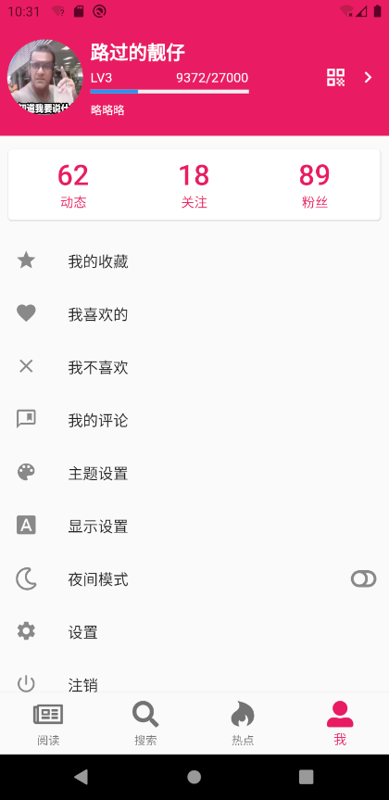
Without further ado, here are the screenshots.
Before the change, the top of the page only had three elements—avatar, name, and signature—which looked quite empty; after the change, I added social-attribute elements like level (experience), posts, following, and followers, plus a QR code icon. It looks a bit more high-end~
| Before | After |
|---|---|
 |
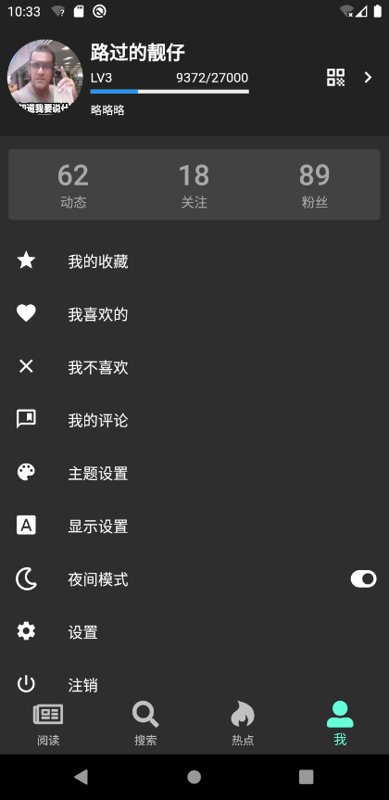
Different Themes and Night Mode
Take a look at the effect under different themes and night mode (actually this night mode still needs optimization, I feel the contrast is too high)
| Theme 1 | Theme 2 | Night Mode |
|---|---|---|
 |
Ideas for Improving the Page Header
For this page's header I referenced Coolapk App's design. I originally planned to reference the Bilibili client, but found that Bilibili's was a bit perfunctory, not to mention ugly (to my aesthetic), and it didn't even have interaction effects. It felt like a product of programmers being forced by a deadline (shrug)
First, take a look at my nested-doll structure
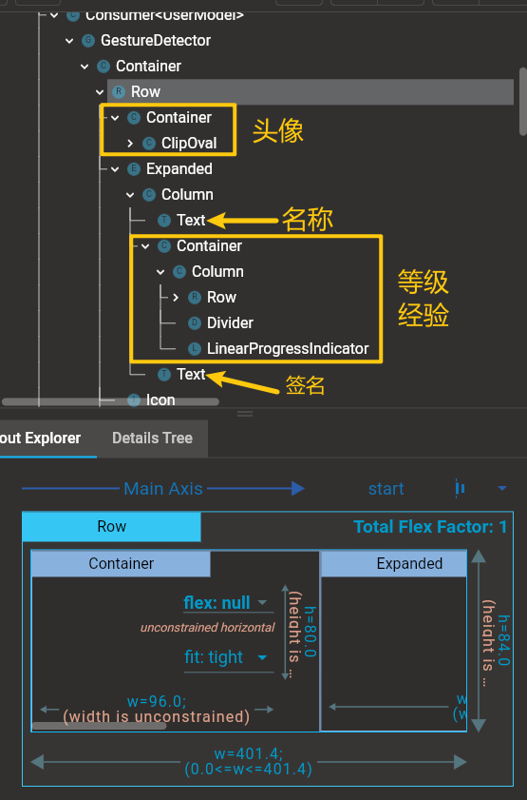
It's actually quite simple: just insert another Container in the middle of the original Column that held the name and signature to implement level, experience, and a progress bar, and that's ok~
The code is as follows (due to length, only the key code is shown here):
Widget _buildHeader() {
    return Consumer<UserModel>(
      builder: (BuildContext context, UserModel userModel, Widget child) {
        var row = Row(
          children: <Widget>[
            ClipOval(child: daAvatar(userModel.user.avatar)),
            Expanded(
              child: Column(
                children: <Widget>[
                  // 用户名
                  Text(userModel.isLogin ? userModel.user.nickname : '注册或登录'),
                  // 等级、经验
                  if (userModel.isLogin)
                    Container(
                      child: Column(children: [
                        Row(children: [
                            Text('LV3')),
                            Text('9372/27000'),
                          ]),
                        LinearProgressIndicator(value: 0.3, valueColor: AlwaysStoppedAnimation(Colors.blue)),
                      ]),
                    ),
                  // 个性签名
                  Text(userModel.isLogin ? (userModel.user.signature ?? '没有个性签名') : '请先登录以获得专属服务~'),
                ],
              ),
            ),
            // 二维码和右箭头
            Icon(Icons.qr_code, color: Theme.of(context).primaryTextTheme.headline6.color),
            VerticalDivider(width: 10),
            Icon(Icons.chevron_right, color: Theme.of(context).primaryTextTheme.headline6.color),
          ],
        );
      },
    );
  }
Design of the Posts, Following, and Followers Component
Below the page header there's also this component, used to display social-related information. This component is embedded in the listview below, and can slide along with the page.
The implementation is very simple, I'll just put the code:
Widget _buildCard() {
  return Container(
    margin: EdgeInsets.fromLTRB(5, 10, 5, 10),
    child: Card(
      child: Container(
        margin: EdgeInsets.fromLTRB(5, 10, 5, 10),
        child: Row(
          mainAxisAlignment: MainAxisAlignment.spaceAround,
          children: [
            _buildNumberTextWidget('62', '动态'),
            _buildNumberTextWidget('18', '关注'),
            _buildNumberTextWidget('89', '粉丝'),
          ],
        ),
      ),
    ),
  );
}
The implementation of _buildNumberTextWidget is as follows:
Widget _buildNumberTextWidget(String number, String text) {
  var foreColor = Global.profile.darkMode ? Colors.white54 : Theme.of(context).primaryColor;
  return TextButton(
    child: Column(children: [
      Text(number, style: TextStyle(fontSize: 30, color: foreColor)),
      Text(text, style: TextStyle(color: foreColor)),
    ]),
    style: ButtonStyle(padding: MaterialStateProperty.all(EdgeInsets.symmetric(horizontal: 40))),
    onPressed: () => BotToast.showText(text: '妙啊'),
  );
}
Because I needed to consider interaction feedback, I wrapped the content with a TextButton widget here. (Note: the TextButton widget was introduced in the new version of Flutter to replace the original FlatButton)
Interaction Effects
I recorded an animation, take a look at the final interaction effect:
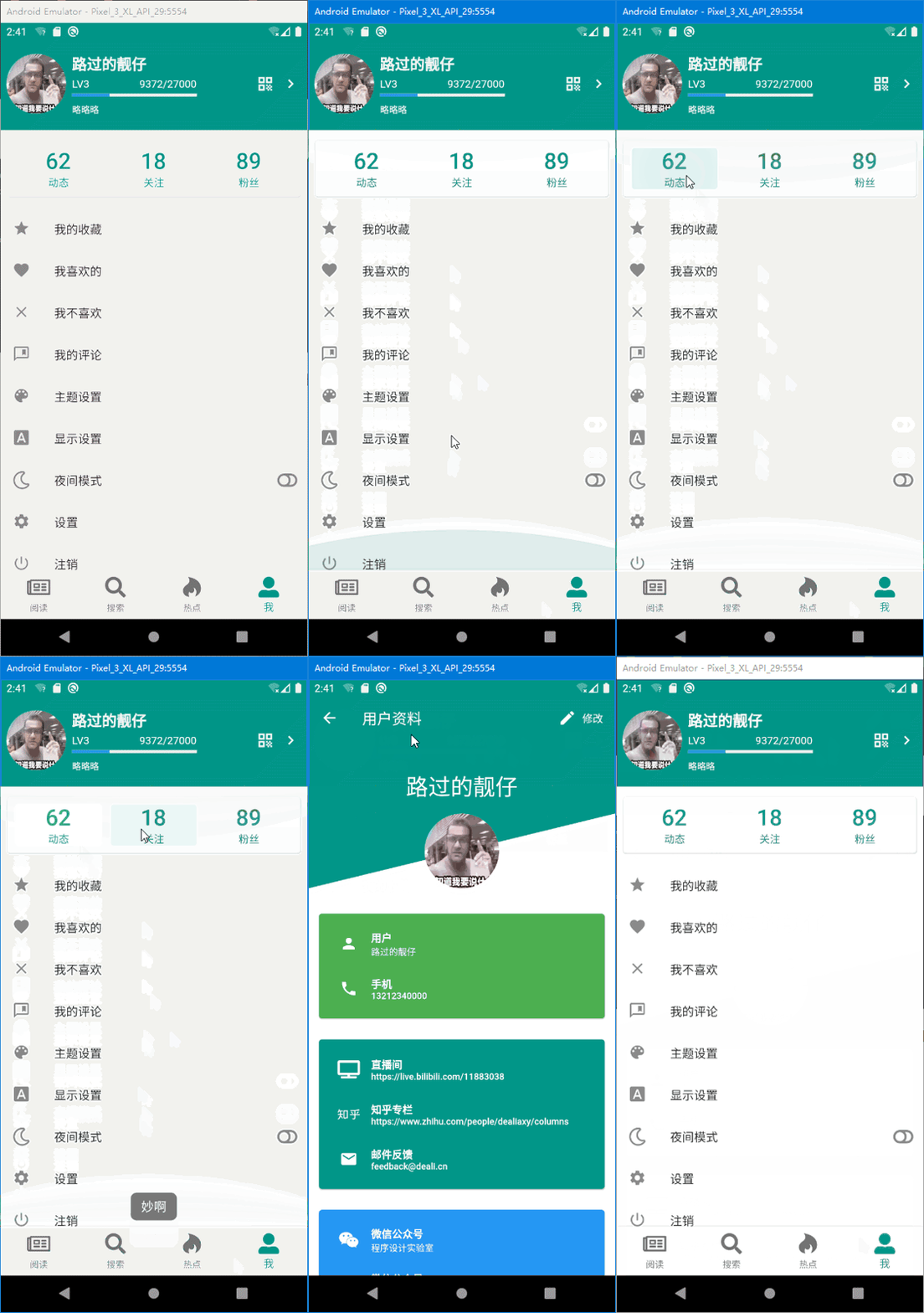
It's passable I guess (no UI, so I can only cobble something together myself hh)
Afterword
After more than half a year, coming back to Flutter, I found that Flutter has already been updated to version 2.x, and the new dart language has also added null safety, taking another step closer to kotlin/c#. Mainstream third-party libraries have also followed up, all releasing null safety versions of their libraries. Overall the development experience is still pretty good~
But the finished product, the feeling it gives me, still doesn't match native in performance, and it's hard to achieve the same silky smoothness as native. But Flutter is really fast for building UIs, and the Chinese community is very active. Domestically, thanks to several big companies taking the lead, attention is high. For basic CRUD scenarios, Flutter handles them with no pressure, and you can also get better performance and a better user experience than React Native or uni-app. The only regret is that you can't make WeChat mini programs…
This OneCat App, throughout such a long period of development and testing, has always had various small issues pop up, always some place that's not quite satisfactory, which made me once want to rewrite it in native. But later I thought Flutter is fast for writing UIs, so I let it go, just writing it for fun~
Welcome to Discuss
Programming Lab focuses on exploring popular new internet technologies and team agile development practices. Reply linux, flutter, c#, netcore, android, kotlin, java, python, etc. in the backend of the WeChat official account 「Programming Lab」 to get related technical articles and materials. At the same time, if you have any questions you can leave a message in the official account backend~

- Cnblogs: https://www.cnblogs.com/deali/
- Coding livestream: https://live.bilibili.com/11883038
- Zhihu: https://www.zhihu.com/people/dealiaxy
_EOF_
Using Flutter to Design a Nice "Me" Page
- 本文作者:
- 程序设计实验室
- 版权声明:
- 本博客所有文章除特别声明外,均采用 BY-NC-SA 许可协议。转载请注明出处!
相关文章
Flutter播放音乐简单解决方案-AudioPlayers-与填坑
目前flutter播放音乐好像只搜到AudioPlayers这个解决方案,我照着他的文档来,确实是可以播放音乐的。 项目主页:https://pub.flutter-io.cn/packages/audioplayers AudioCache介绍:https://github.com/luanpotter/audioplayers/blob/master/doc/audio_cache.md An
2021-12-18 · Flutter · 约 1 分钟
初见Flutter!框架简单介绍以及构建可发布的签名Apk包
哈喽!好久不见,算起来我已经一个多月没更新博客了,近期刚刚完成了一个项目,正好抽出时间整理一下学到的东西并且写写博客。 关于flutter 开始使用flutter还是春节后的事情,其实之前很早就想学一下flutter了,毕竟谷歌出的技术总是不会太差的,无奈一直没有时间和做app的需求,这次接触了flutter之后仿佛发现了新大陆,原来开发app还能这么方便,真的颠覆了我原来的认知啊,热更新也太好用
2021-12-18 · Flutter · 约 1 分钟
极简诗词app开发背后:Flutter移动应用快速构建实践——状态管理、国际化、数据持久化、性能优化(一)
前言 在开始之前的提示:虽然Flutter背靠Google这棵大树,但是毕竟还是一个年轻的技术,项目还处于初期阶段,更新非常快,问题也不是一般的多,使用Flutter的话就意味着必须忍受各种奇怪的bug和没有丰富中文资料的头疼,本文不是安利同学们入坑,只是对“极简诗词”app的开发过程进行记录。 另外app已经上架,有兴趣的同学可以下载试试:https://www.coolapk.com/apk/
2022-03-23 · Flutter · 约 1 分钟
从细节入手改善用户体验,Flutter跨平台App开发中设置Android和iOS的启动页
前言 flutter开发App方便快捷,就是冷启动的时候要加载dart引擎有短暂的白屏,严重影响用户体验,这个时候我们就需要设置一个启动图片,像国内大部分App那样(例如微信那个地球),启动App的时候显示这个图片,加载完再进入App,不至于影响用户体验。 Android启动页 首先要准备好启动图,本文命名为splash.png,按照不同的分辨率添加到对应的mipmap-hdpi / mipmap
2021-12-18 · Flutter · 约 1 分钟
讨论
共 0 条加载评论中…