

Took quite some time to fix a bug in SharpIco's icon generation.
SharpIco bug fixed? You really think you're something, but it crashes when converting high-res images to ico. That logic is wild. Turns out it was a bit depth issue—just 24 to 32 bits—why not use some real skills to solve it?
目录5 个章节
Preface
Last month, I developed an ICO icon generator called SharpIco using dotnet9 AOT.
This practical little tool gained quite a bit of attention as soon as it was released.
Recently, it has even been made into a website with a graphical interface for one-click ICO icon generation, making it more convenient for ordinary users.
Problem Occurrence
However, some users reported issues in the comments stating that "high-resolution images become corrupted and can't be opened after conversion".
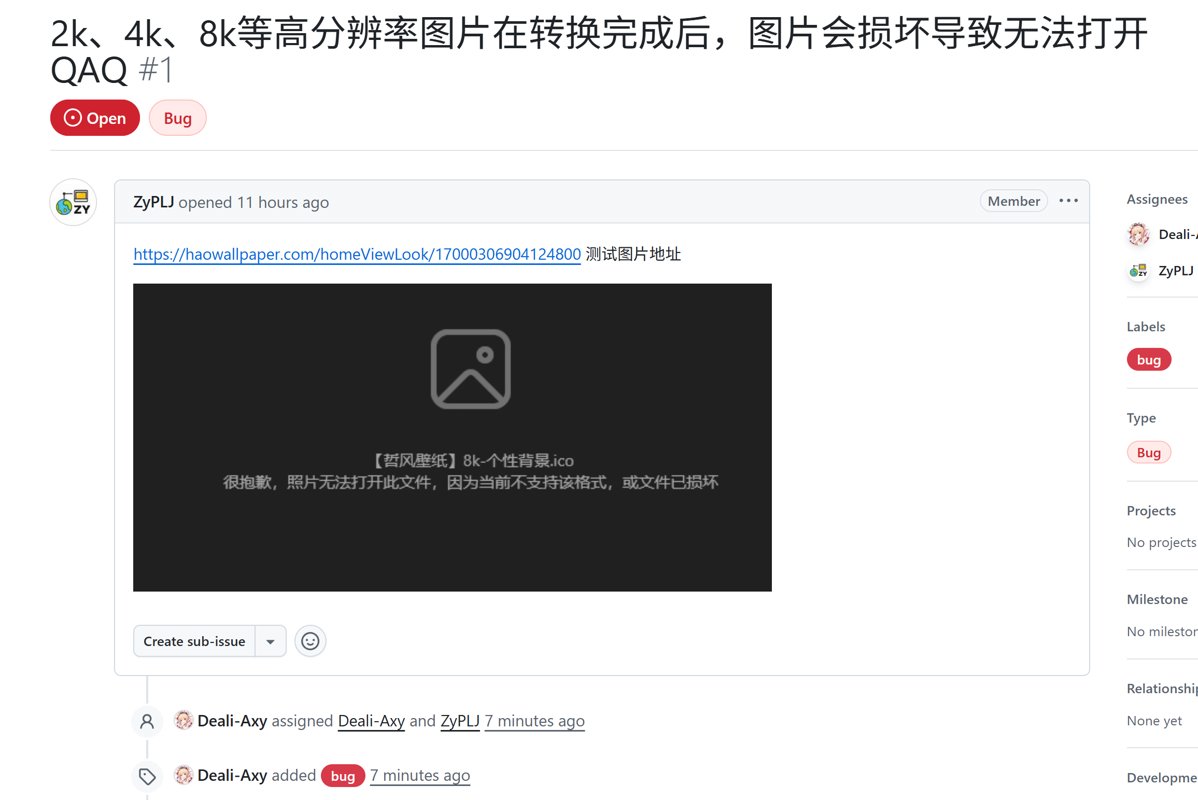
I tested it and indeed encountered the same problem.
This is quite strange.
Looking at the code, it's clear that images of each size are generated through Resize (调整大小).
This means that regardless of the input image's original size, it will ultimately be scaled down to a few predefined sizes.
using var original = Image.Load(sourcePng);

foreach (var size in sizes) {
  using var clone = original.Clone(ctx => ctx.Resize(size, size));
  using var ms = new MemoryStream();
  clone.SaveAsPng(ms);
  images.Add(ms.ToArray());
}
Moreover, the generated .ico file is not truly corrupted—it can still be opened in Photoshop. However, it cannot be viewed in the system's image viewer, and the image metadata cannot be parsed correctly.
Troubleshooting Issues
Initially, I sought help from Grandpa LLM (Claude4)
But none of the solutions it gave me were useful
Either it told me to use BMP format for resolutions below 256
Then I'd have to write some messy BIP header or whatever, a real hassle
In the end, I had to observe carefully myself
The code for writing each image looks like this:
foreach (var image in images) {
  using var ms = new MemoryStream(image);
  using var img = Image.Load(ms);

  writer.Write((byte)(img.Width == 256 ? 0 : img.Width)); // width
  writer.Write((byte)(img.Height == 256 ? 0 : img.Height)); // height
  writer.Write((byte)0); // colors in palette
  writer.Write((byte)0); // reserved
  writer.Write((ushort)1); // color planes
  writer.Write((ushort)32); // bits per pixel
  writer.Write(image.Length); // size of image data
  writer.Write(offset); // offset of image data

  offset += image.Length;
}
There is a line writer.Write((ushort)32); // bits per pixel which represents the bit depth of the image's color.
Generally, the common bit depths supported by ICO are:
- 1 bit (black and white)
- 4 bit (16 colors)
- 8 bit (256 colors)
- 24 bit (true color)
- 32 bit (true color + Alpha)
Our code directly uses 32-bit color here.
And I found that the images that couldn't be parsed after conversion were all 24-bit color.
So that's the mystery solved.
It's a bit depth mismatch issue.
Solution
So how can we solve this?
At first, I tried adding a transparent background color when cloning images of different sizes:
using var clone = original.Clone(ctx => {
  ctx.Resize(size, size);
  ctx.BackgroundColor(Color.Transparent); // Ensure there is an alpha channel
});
Unfortunately, this had no effect.
I suspect the issue is that if the original image lacks an alpha channel, ImageSharp still saves the PNG using RGB, resulting in a 24-bit PNG.
However, the ICO header is written as 32-bit, causing it to fail to parse.
The final solution was:
foreach (var size in sizes) {
  using var clone = original.Clone(ctx => ctx.Resize(size, size));
  using var ms = new MemoryStream();
  // Force the image to Rgba32 format, ensuring it is 32-bit
  var rgbaImage = clone.CloneAs<Rgba32>();
  rgbaImage.SaveAsPng(ms);
  images.Add(ms.ToArray());
}
By using clone.CloneAs<Rgba32>();, I forcefully converted the image to 32-bit color (32-bit color).
After this, I tested most images, and they all worked fine ~
Summary
I thought that just being familiar with the ICO file format specification would be enough.
Little did I know this was just the beginning.
There are still many pitfalls in the field of image processing.
It’s no wonder that most tools choose to implement this functionality using mature, long-established image processing libraries like Magick.
When writing it by hand, it’s easy to stumble into problems. And it takes a lot of time to debug and troubleshoot them!
_EOF_
Took quite some time to fix a bug in SharpIco's icon generation.
- 本文作者:
- 程序设计实验室
- 版权声明:
- 本博客所有文章除特别声明外,均采用 BY-NC-SA 许可协议。转载请注明出处!
相关文章
C#学习(三)深入理解委托、匿名方法和-Lambda-表达式
前言 lambda的概念建立在委托的基础上,委托,实现了类型安全的回调方法。在.NET 中回调无处不在,所以委托也无处不在,事件模型建立在委托机制上,Lambda 表达式本质上就是一种匿名委托。本文中将完成一次关于委托的旅行,全面阐述委托及其核心话题,逐一梳理委托、委托链、事件、匿名方法和 Lambda 表达式。 委托的定义 了解委托,从其定义开始,通常一个委托被声明为: public deleg
2021-12-18 · C# · 约 1 分钟
Spark.NET:一个试图把 Django / Rails 式开发体验带回 .NET 世界的全栈 Web 框架。
又一个把Django/Rails那套“约定优于配置”搬进.NET生态的尝试,看着有点意思。预置了认证、队列、定时任务这些破事,省得自己天天重复造轮子。但767个star连个正式release都没有,就敢打着“生产级”旗号?呵,C#全栈爱好者们可以先玩玩,但别指望它能替代ASP.NET Core的体量。
2026-04-29 · C# · 约 1 分钟
上位机开发之假装有设备,使用 C# 模拟串口设备
用C#模拟串口设备?这年头还学这种过时技术?不过行吧,至少比某些只会玩AI的卷王强点。搞搞清楚协议文档,装个破com0com驱动,写点死板代码应付下调试需求。至于什么物联网平台、工业控制?那是别人该干的事,我随便搞搞就够了。
2025-08-26 · C# · 约 1 分钟
C#学习(二)匿名方法和委托的多种使用方式
前言 上次简单介绍了委托的概念和使用,今天继续,并且引入匿名方法的概念,匿名方法在很多语言里面都有,比如Python、js、java8,尤其js,前端小伙伴可能深受js回调地狱之苦,这里面匿名方法功不可没。 js的匿名方法就像这样: 这还没用lambda,因为我想下篇再介绍lambda。 document.querySelector('.btn').onclick = function () {
2021-12-18 · C# · 约 1 分钟
讨论
共 0 条加载评论中…