Effortlessly Solve Linux+Windows Dual-Boot Time Inconsistency Issue
Foreword Many Linux users likely use dual-boot systems, as there are still many software applications that require opening Windows. However, there has always been a persistent issue: the time displays correctly in Linux, but when switching to Windows, the time is 8 hours behind = = This happens because Windows uses the hardware clock by default, whereas Linux uses network time. Now, a single command can resolve this issue. Solution Open a terminal in Linux and enter the command: timedatectl set-local-
目录3 个章节
Preface
Many Linux users probably use dual-boot setups, after all, there are still quite a few software applications that are only available on Windows and require you to switch over. However, there's always been a nagging issue: the time displays correctly in Linux, but when you switch back to Windows, the time is off by 8 hours ==. This happens because Windows uses the hardware clock by default, while Linux uses network time. The good news is, you can fix this problem with just a single command.
Solution
Open a terminal under Linux and enter the command:
timedatectl set-local-rtc 1
Then enter the following to verify (not strictly necessary):
timedatectl
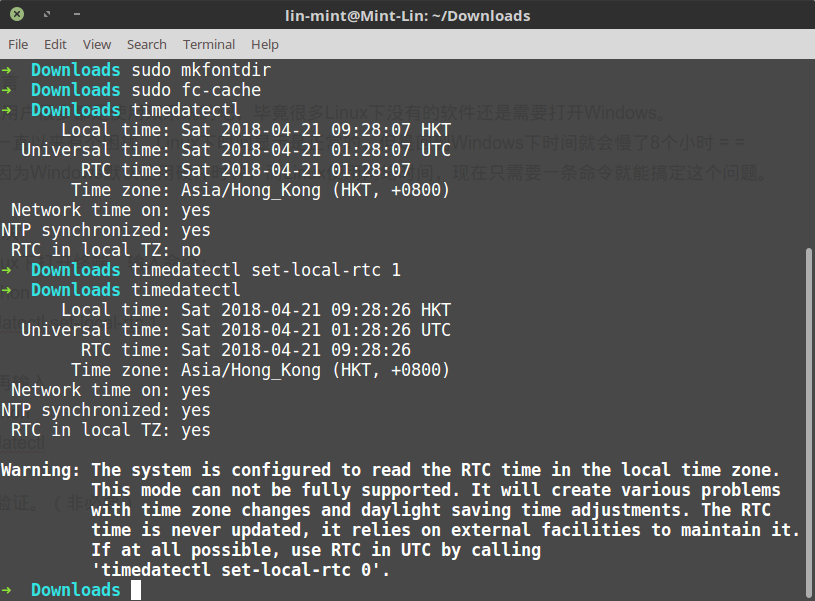
And just like that, the problem is solved—super simple, right?
About

Discover more interesting operations by following my WeChat official account (微信公众号): DealiAxy Every article is recorded on my blog: blog.deali.cn
_EOF_
Effortlessly Solve Linux+Windows Dual-Boot Time Inconsistency Issue
- 本文作者:
- 程序设计实验室
- 版权声明:
- 本博客所有文章除特别声明外,均采用 BY-NC-SA 许可协议。转载请注明出处!
相关文章
某些软件中无法切换fcitx输入法的问题
gsettings set org.gnome.settings-daemon.plugins.xsettings overrides "{'Gtk/IMModule':<'fcitx'>}"
2025-10-27 · FAQ & Tips · 约 1 分钟
How-to-change-mouse-cursor-and-theme-
In order to get your custom cursor to work with all applications do: Download a cursor theme. Extract it to /usr/share/icons or ~/.local/share/icons Open Gnome Tweak Tool and change the cursor theme.
2025-10-27 · FAQ & Tips · 约 1 分钟
How-to-Convert-OpenSSH-keys-to-Putty-(-ppk)-on-Linux
On Arch Linux pacman -S putty Then cd to path of key(s): puttygen keyname -o keyname.ppk On Debian/Ubuntu apt-get install putty-tools puttygen keyname -o keyname.ppk Notice! replace the “keyname” with
2025-10-27 · FAQ & Tips · 约 1 分钟
pip和git速度太慢?配置Linux终端代理教程
前言 现在做开发已经严重依赖网络了,但是没办法,很多工具都是国外的,我们国内访问速度太慢了,所以配置一下终端代理就很有必要了 ProxyChains介绍 ProxyChains是一个命令行预加载器,用于挂钩动态链接程序中的套接字,并通过一个或多个socks / http代理重定向它。 GitHub地址 https://github.com/rofl0r/proxychains-ng MacOS和L
2025-10-27 · FAQ & Tips · 约 1 分钟
讨论
共 0 条加载评论中…