Moan MIX7 vs. Boox Leaf2 Comparison Review
The Moaan Mix7's input method instantly outperforms the Onyx Boox, with a much better hand feel, though its UI looks ancient. The Onyx Boox Leaf2 has a refined interface and more features, but its performance lags behind. Charging and battery life are about the same, but the hand feel of the Moaan crushes the competition—the Onyx is slippery and hard to grip. In summary, each has its strengths, and it's luck which one you choose, but both are adequate enough.
目录16 个章节
Preface
Previously, I introduced the Moan MIX7 and the Boox Leaf2 separately. Now, let's compare the user experience of these two devices.
Tips:
- The Boox Leaf2 I have here is the white version, which offers better display quality compared to the older black version.
- Since the two products being compared are one black and one white, all images in this article do not require product annotations.
For more details on these two products, you can refer to the previous articles:
Parameter Comparison
First, let's look at a parameter comparison
| Moaan mix7 | Onyx Boox Leaf2 | |
|---|---|---|
| Screen Model | Carta 1100 | Carta 1200 |
| Screen Specs | 7 inches, 1264x1680, 300ppi | 7 inches, 1264x1680, 300ppi |
| Processor | RK3566 1.8Ghz | Qualcomm 2.0Ghz < 636 |
| Storage | 2GB LPDDR4x + 64GB eMMC 5.1 | 2GB LPDDR4x + 64GB eMMC 5.1 |
| Charging | 5V 1.5A | 5V 2A |
| Battery Capacity | 2300mAh | 2000mAh |
| Weight | 216g | 180g |
Just looking at the specifications, the two are quite similar, each with its own pros and cons.
Comparison
Let's go straight to the comparison images~
Desktop Comparison
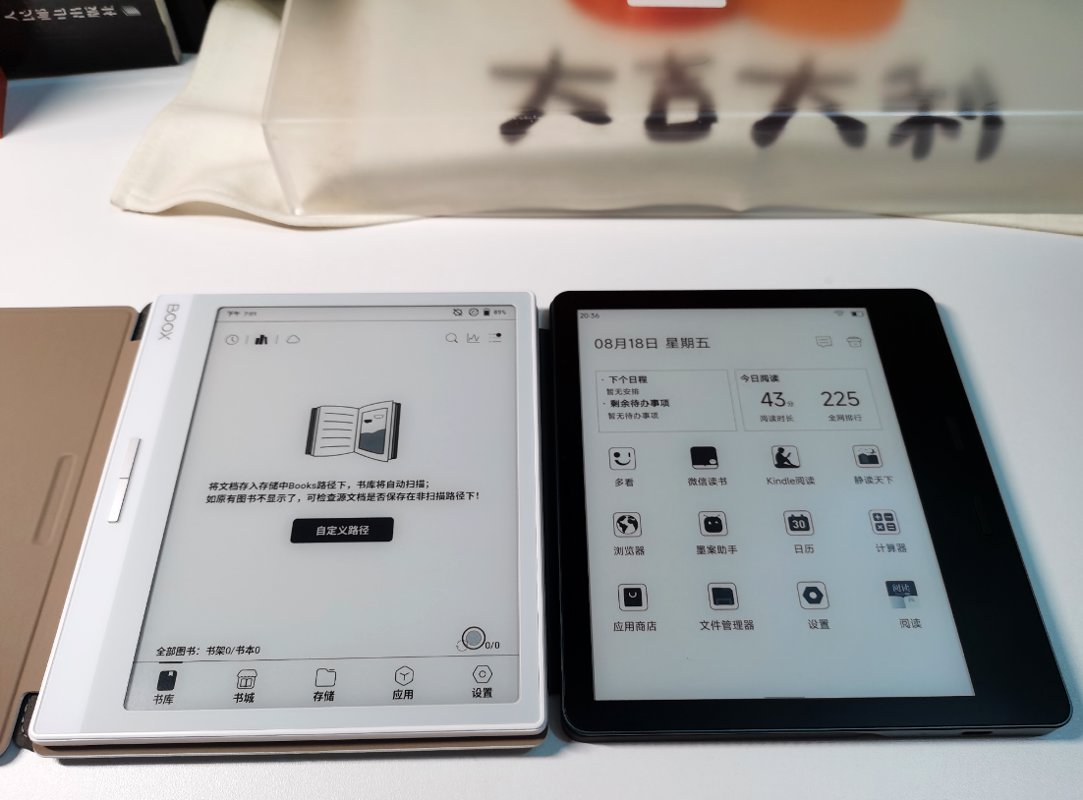
Moxie's desktop is very clean, with all apps displayed on the main screen and no other fancy features—oh, except for a mostly useless schedule in the top-left corner.
Wenshi (文石), on the other hand, has more functionality, and the two have different design philosophies. Wenshi's main interface is a bookshelf, with a navigation bar at the bottom to switch between the bookstore, files, apps, and settings pages. It feels like entering an app—not as simple, but it looks quite refined.
In comparison, Moxie's system appears somewhat basic.
File Management
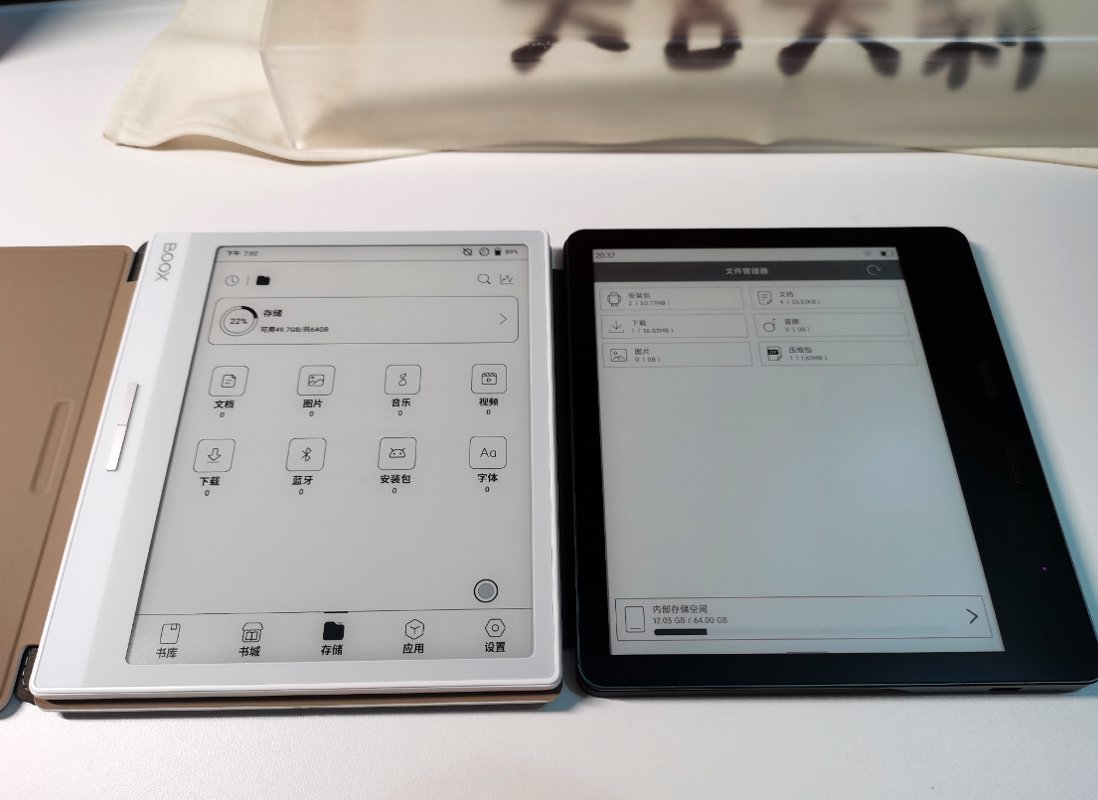
The file management functionality is quite similar, as both are standard operations in the Android system.
However, Boox's interface is much better-looking than Moaan's. Moaan's interface really takes you back to the days of Android 2.3~
Status Bar (Control Center)
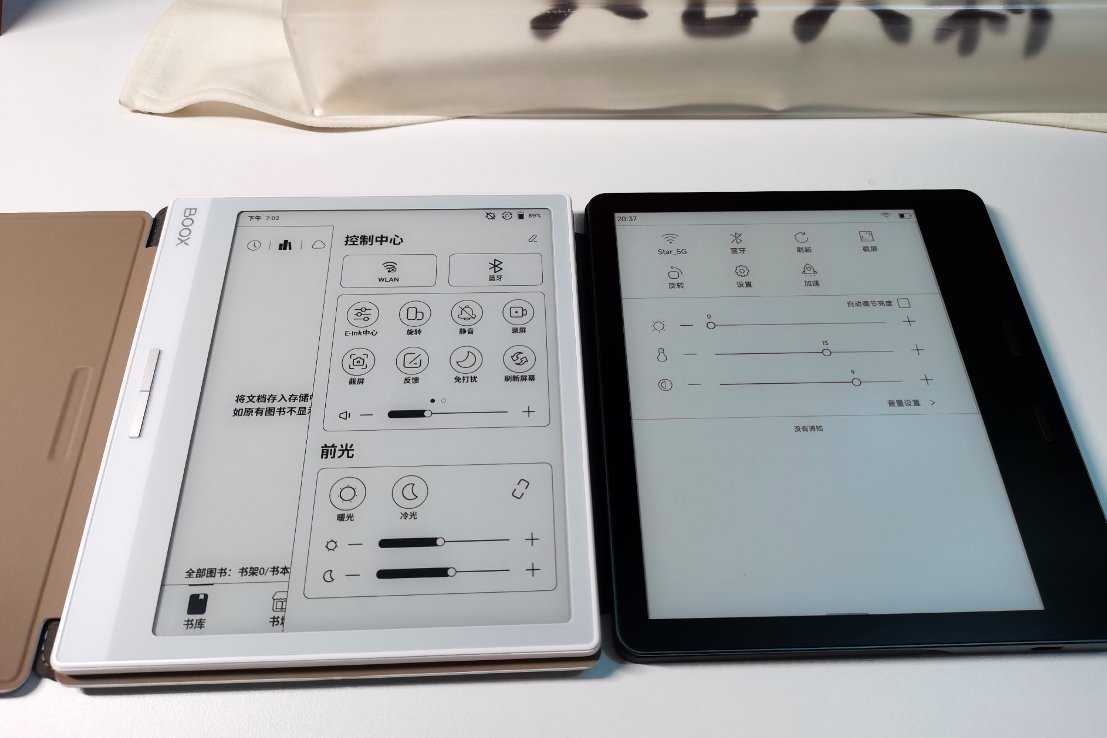
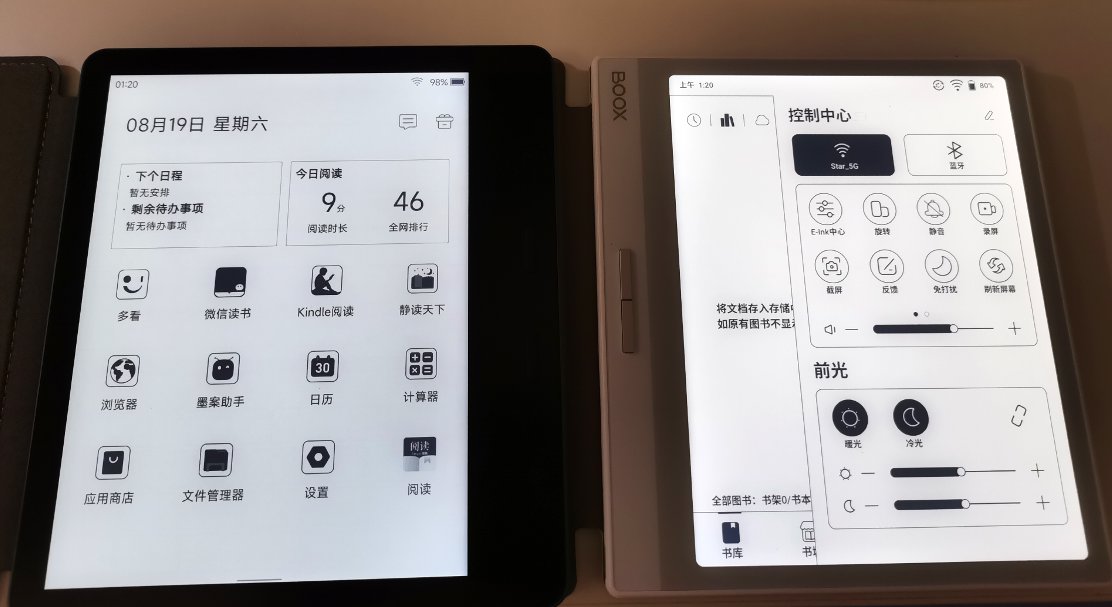
Let's compare the pull-down status bar, which is now commonly referred to as the "Control Center."
Just looking at the images, it’s clear that Boox wins once again~
The aesthetic appeal of the UI is one thing, but even in terms of functionality alone, Boox is already far ahead.
That said, I have to say Boox's status bar feels very familiar to me—it seems quite similar to the one on Huawei tablets…
The operating logic is exactly the same: pull down from the top right for the Control Center, and pull down from the top left for the Notification Bar.
Each shortcut menu also supports customization.
However, Moan doesn’t lag too far behind Boox in terms of basic features. Functions like rotation, refresh, screenshot, and controlling Wi-Fi and Bluetooth are all available. It’s just that Boox offers richer customization options.
(PS: There’s also a claim online that Huawei’s EMUI design was inspired by Samsung’s OneUI. I haven’t used Samsung devices, so I won’t comment on that.)
Settings Interface
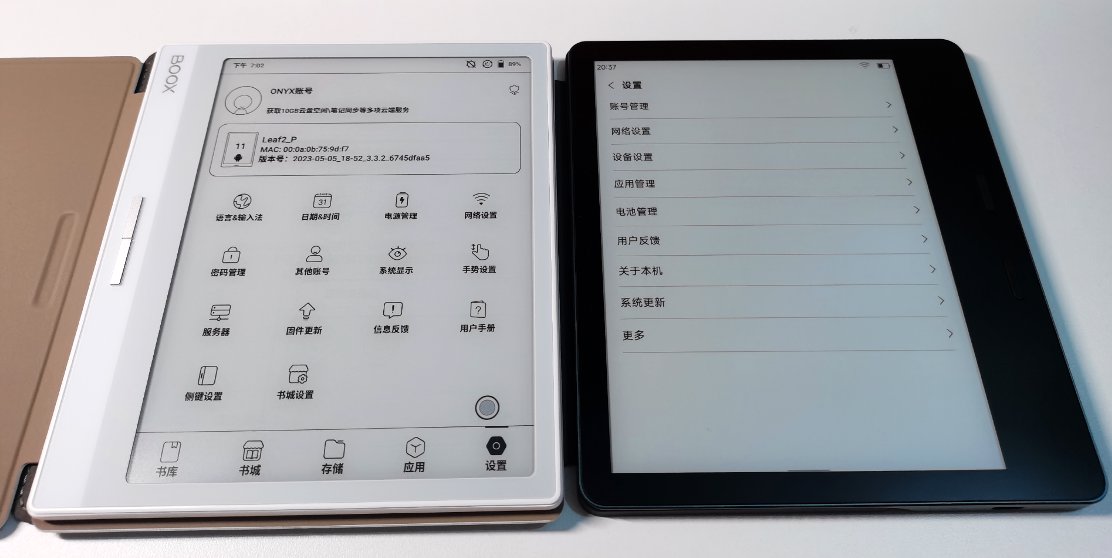
Let's take a look at the comparison of the settings interface.
Needless to say, Boox's UI still completely outshines Moaan's.
However, in my actual use, the settings functions of both are quite similar, after all, they both run on the Android 11 system. Besides the aesthetic appeal of the UI, there isn't much difference.
The primary purpose of purchasing an e-reader is for reading books, so some details of the system UI are not that important~
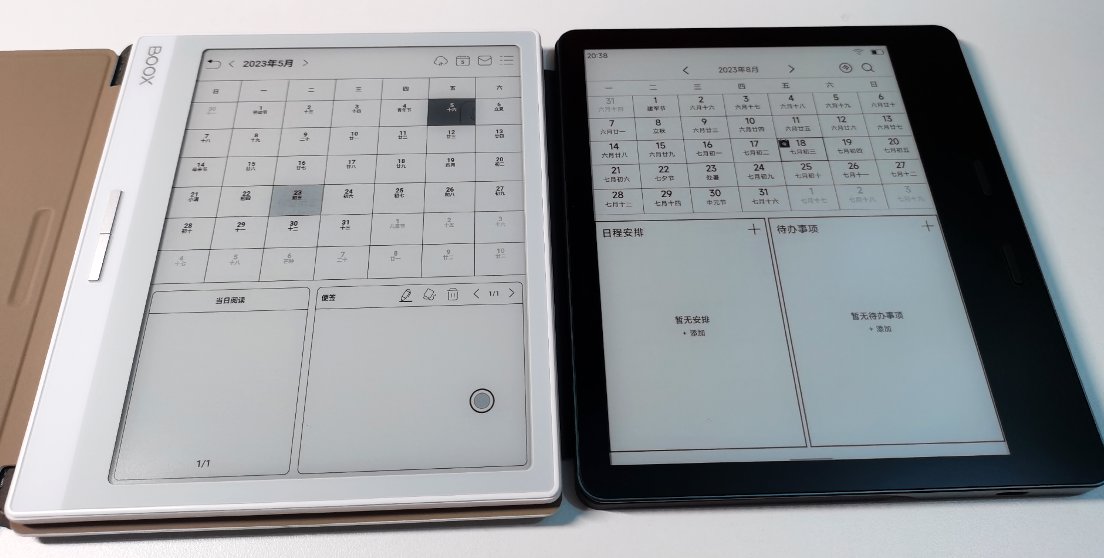
Calendar Interface
I'm not sure why e-book readers are so enthusiastic about including calendar functions. InkPalm has even integrated it into the main interface.
(PS: Who actually manages their schedule on an e-book reader?)
In any case, let's compare them.
As you can see, their interfaces are quite similar.
InkPalm likely uses the native Android calendar directly.
On the other hand, Boox has customized it significantly, changing the two lower tabs into more practical "Today's Reading" and "Notes" functions.
Calculator
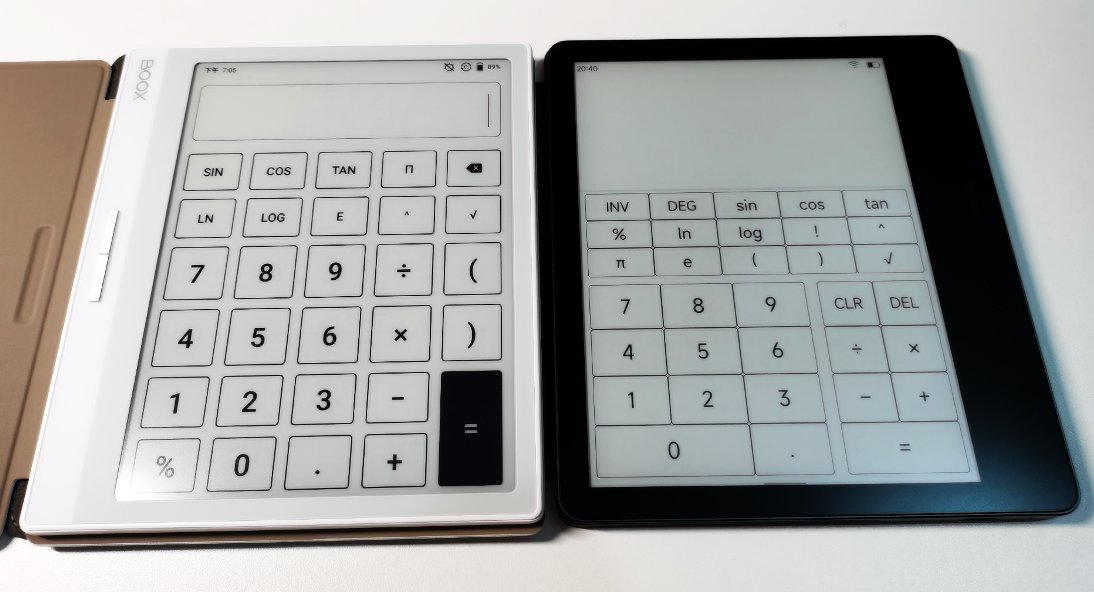
Besides the calendar, another thing I can't wrap my head around is why an e-book reader needs a built-in calculator... and it seems you can't uninstall it either.
It looks like the Moaan calculator has a few more features than the Onyx one~
(PS: Does anyone actually use the built-in calculator on an e-book reader?)
Input Method
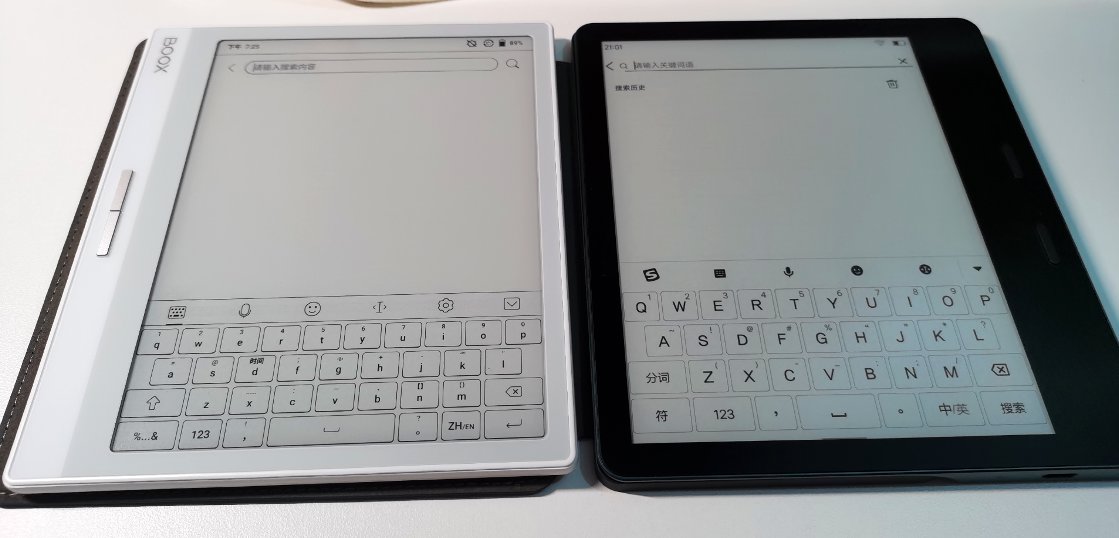
The input method on e-books is perhaps a point overlooked by many.
After all, e-ink screens have very low refresh rates, and typing has high latency.
However, when I use WeRead for reading, I often take notes by highlighting and underlining, so the input method is actually quite important.
From the images, Boox's input method keys are too small, the height is too low, and I couldn't find any customization options.
Moaan's built-in input method is much better. I looked into it and found that Moaan's input method is a customized version of Sogou Input specifically optimized for e-ink screens. This completely outperforms Boox in terms of input experience~
I also tried exporting Moaan's input method and installing it on the Boox Leaf2, but after installation, it couldn't be enabled, and I was prompted that it could only be used on Moaan devices.
It seems this is still an exclusive feature.
In short, in terms of input experience, Moaan is the clear winner.
Backlight Experience
I never use the backlight when reading books; I always read in well-lit environments. After all, if I use the backlight, I might as well just use a tablet instead~
However, many people online seem to care a lot about the backlight experience, so I decided to give it a try too~
Based on the specs:
- Boox - 32-level backlight
- Moaan - 24-level backlight
From my actual experience, both devices have warm and cool backlight options. Overall, Boox feels more comfortable, while Moaan’s backlight looks a bit odd.
As for the terms often debated online, like "阴阳屏" (yin-yang screen) or "发黑" (blackening), I don’t really understand what they mean, and since I don’t usually turn on the backlight, it doesn’t matter much to me~
Charging and Battery Life
So far, much of what we've discussed has been about the system.
Next, let's briefly compare charging and battery life.
Interestingly, based on specs alone, Moan supports 5V 1.5A charging, while Wenshi offers 5V 2A, which is 10W of power. Moreover, Wenshi has a smaller battery, so in theory, Wenshi should charge faster.
However, it turns out Moan actually charges faster.
On the other hand, battery life is the opposite. After 1 day of standby and 3 hours of reading, Moan had 91% battery remaining, while Wenshi had 94%.
This suggests Wenshi performs slightly better in this regard.
However, once the battery level drops below 90%, Wenshi's power consumption increases rapidly.
I didn't conduct precise battery life tests for each, but overall, they're likely comparable. Wenshi might have an edge due to better system optimization.
Both devices should comfortably last a week of reading without causing battery anxiety.
Hardware
- Boox supports a 1TB storage card expansion and has a speaker for basic audio, which is better than Moaan.
- Moaan's body is made of metal, and it feels really comfortable to the touch~
- The buttons on both devices are not great; Boox's buttons are stiff and hard to press.
- Moaan's buttons feel mushy, and when using WeRead (微信读书), pressing the button often skips two pages instead of one.
- When Boox is charging, a small red indicator light on the power button lights up—very subtle—and turns off once charging is complete. Also, the power button is on the top, while the charging port is on the lower side, making it a bit awkward to check the tiny light during charging.
- Moaan's charging indicator light is well-positioned, right next to the charging port. It's white and flashes during charging, staying lit steadily once fully charged.
- Boox's screen seems to have less glare than Moaan's?
- Boox's touchscreen doesn't seem as responsive as Moaan's?
- For now, these are all the thoughts I can come up with…
Performance
Although e-books don't need to prioritize performance much
The screen refresh rate is limited here
However, Boox has been quite dishonest this time
Using an unknown Qualcomm processor even worse than the previous generation's Qualcomm 636
The MobiScribe isn't great either, but in comparison, the domestic processor used by MobiScribe has much better performance than Boox!
When WeChat Reading cold starts, MobiScribe is 2-3 seconds faster than Boox
When switching WeChat Reading to the background and reopening it from the home screen, MobiScribe is over 1 second faster than Boox
Within WeChat Reading, opening a book is also 3-4 seconds faster on MobiScribe
Some money really can't be saved!
However, without comparison, there's no harm—if you only had one device, there wouldn't be any noticeable impact on the experience.
After all, people who use e-ink screens are already accustomed to slow response times.
When it comes to performance, Huawei's MatePad Paper is still the best. I'll write about it in a few days.
PS: Let me comfort myself quietly.
Although Boox's performance is poor, maybe it has lower power consumption?(Incorrect)
Hand Feel
A 7-inch e-reader is quite compact, making it comfortable to hold in hand.
This is why hand feel is so important!
In this regard, Moan absolutely wins—the asymmetric design is far superior to Wenshi's thin, flat tablet form, although Wenshi's design is quite sleek.
However, for handheld reading, Moan is undeniably more comfortable. Wenshi's back is too slippery, and holding it for a long time makes my hand tired.
Summary
Okay, the comparison is finally done. That's pretty much it. If I have any new thoughts during future use, I'll update the blog.
The reading experience of these two is still considered passable, and in terms of the feel in hand, the Moaan is clearly superior.
As for purchasing recommendations, I don't have any. Both have their pros and cons; it depends on how you weigh them yourself~
_EOF_
Moan MIX7 vs. Boox Leaf2 Comparison Review
- 本文作者:
- 程序设计实验室
- 版权声明:
- 本博客所有文章除特别声明外,均采用 BY-NC-SA 许可协议。转载请注明出处!
相关文章
海信HiReader开箱与海信墨水屏系列使用体验
海信HiReader开箱包装简约,却比其他两款环保过头;墨智键好用,但密码设置纯属多余。作者偏爱Touch Lite,888元性价比高,A9性能被忽悠,处理器名不副实。屏保功能是亮点,但微信读书不支持,太鸡肋;团队解散,墨水屏手机再见?
2025-10-28 · 墨水屏 · 约 1 分钟
文石leaf2开箱与使用体验
上一篇文章介绍了墨案 mix7,这篇文章来写一下文石 leaf2。
2025-10-28 · 墨水屏 · 约 1 分钟
华为MatepadPaper开箱与使用体验
华为的Matepad Paper在电子墨水屏中属于是硬件配置的天花板,使用麒麟820e作为CPU,性能超过了大部分的电子书产品,因为之前的文石leaf2和墨案mix7用的都不是很满意,所以我抱着试试看的想法下单了这个华为Matepad Paper。
2025-10-28 · 墨水屏 · 约 1 分钟
墨案mix7开箱与使用体验
我在18年第一次接触了 kindle 这种电子墨水屏设备,我在 kindle 上看完了诸如「刘慈欣全集」、「金庸全集」之类的大部头,电子墨水屏的看书效果确实非常好, 21年把 kindle 卖掉了,最近阅读量比较大,一直用平板看书也不是很好,于是打算入手国产开放系统的电子书。
2025-10-28 · 墨水屏 · 约 1 分钟
讨论
共 0 条加载评论中…