Use EarTrumpet to replace Windows' default volume control function.
Windows's default volume control is quite weak, requiring you to enter a secondary menu to adjust the volume of individual applications, which is very cumbersome. With this feature, it becomes much more convenient.
目录4 个章节
Foreword
https://github.com/File-New-Project/EarTrumpet
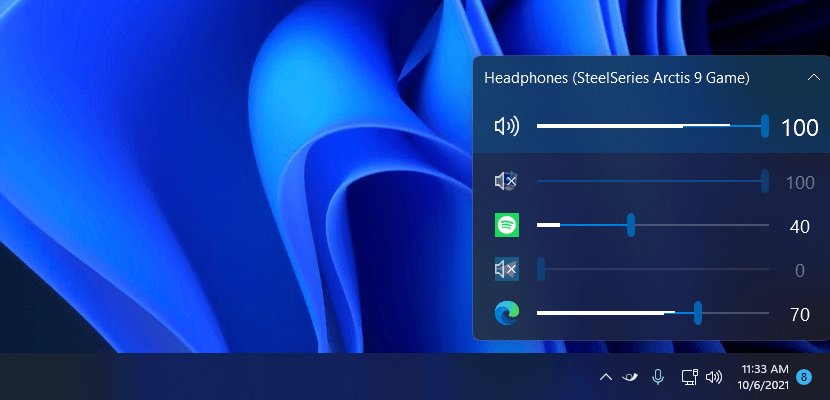
Windows' default volume control is pretty weak—you have to go into a nested menu to adjust the volume of each application separately, which is quite troublesome.
With this feature, it becomes much more convenient.
Screenshot
Installation
As usual, Github, Microsoft Store, choco, and scoop are all acceptable.
I chose scoop.
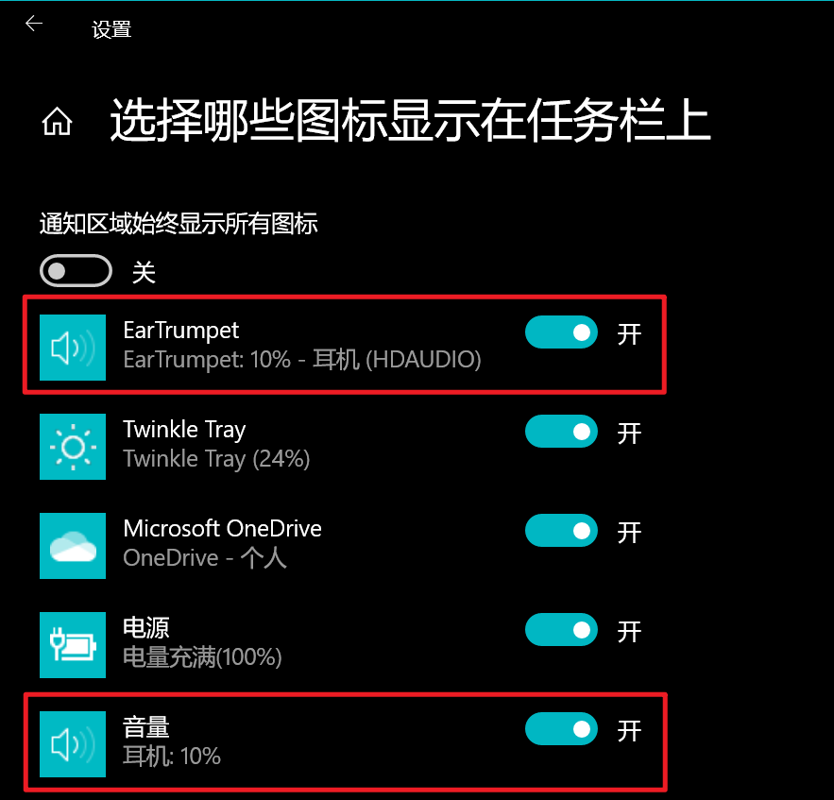
Extension: Replacing the System Volume Control
Within the taskbar icon controls,
Disable the default "Volume" option and enable "EarTrumpet".
_EOF_
Use EarTrumpet to replace Windows' default volume control function.
- 本文作者:
- 程序设计实验室
- 版权声明:
- 本博客所有文章除特别声明外,均采用 BY-NC-SA 许可协议。转载请注明出处!
相关文章
在 Windows 11 上使用 Hyper-V 虚拟机
WSL开了Hyper-V,VMware直接报废,嵌套虚拟化?做梦。改用原生Hyper-V管理器,开启倒简单。Windows Admin Center登录失败,懒得折腾,直接用控制台。
2026-03-10 · Windows · 约 1 分钟
在Windows上将git与ssh-agent搭配使用
Windows git 还自带 ssh?真是老土的兼容性思路。一行配置就能解决,不过得先管好 ssh-agent 的连接。 ProxyCommand 居然又添乱,难怪老出毛病。
2025-08-21 · Windows · 约 1 分钟
Windows设置Pageant开机自动启动并且加载秘钥
场景 用Linux的时候ssh和git这些很方便,因为只要一次ssh-add就可以一劳永逸,以后需要认证的时候ssh-agent会帮我们搞定,不需要输入秘钥的密码。 其实Windows也可以实现这种生产力解放,就是用putty附带的工具里的Pageant。 Pageant主要负责和服务器端进行身份验证,但是每次在启动Pageant后都需要手动的加载秘钥文件,本文就是要介绍让Pageant开机自动加
2021-12-18 · Windows · 约 1 分钟
忘记WSL的root密码怎么办
解决方法 首先,打开WSL是不需要输入密码的,如果你打开WSL时的默认用户不是root,请按照一下方式修改。 修改默认登录WSL用户 以管理员权限启动Powershell lxrun /setdefaultuser root 此时重新打开WSL就是root用户了,并且不需要密码。 然后输入以下命令修改密码。 passwd root About 了解更多有趣的操作请关注我的微信公众号:DealiA
2021-12-18 · Windows · 约 1 分钟
讨论
共 0 条加载评论中…