

Developing a Modern .NetCore Console Application: (4) Automating Build and Publishing NuGet Packages Using GitHub Actions
GitHub Actions automatically build and publish NuGet packages, saving time and effort. Secrets manage tokens, and the workflow works once and for all. Complaining about repeatedly entering tokens for NuGet push, annoying!
目录12 个章节
Preface
The previous article covered publishing nuget packages to GitHub Packages.
This article takes it a step further by using GitHub Actions to set up a CI/CD pipeline for automatic building and publishing of nuget packages. 😎
GitHub Actions works similarly to the GitLab CI/CD I used before. You can use runners provided by GitHub or configure your own servers as runners.
For details, you can refer to what I wrote previously: Continuous Integration Guide: Configuring and Using GitLab's CI/CD Tools
First, create a token
Address: https://github.com/settings/tokens
This was also covered in the previous article, so I won't go into detail here.
Make sure to save this token properly. Once you navigate away from this page, you won't be able to see it again, as it's only displayed once.
Configuring GitHub Secrets
Sensitive information is not suitable for storing in code. Here, GitHub provides the Secret and variables feature.
Address: https://github.com/Deali-Axy/fluent-dotnet-console/settings/secrets/actions
Add the token we created to the Action's secrets.
I named it TOKEN here.
When using it later in the GitHub Workflow configuration, it will look like this:
${{secrets.TOKEN}}
Writing Workflow Configuration
Create a new .github/workflows directory in the project root
PS: This can be done directly on the GitHub website by clicking "Add File" and typing
/in the filename field to automatically recognize it as a directory
Next, start writing the workflow configuration file. It's similar to the previous Gitlab CICD configuration and is also in YAML format.
Here, I'll create a file named publish-nuget.yml
# Publishing a New NuGet Package

name: publish-nuget
run-name: ${{ github.actor }} is publishing a nuget package 🚀

on: [push]

jobs:
  publish-nuget-packages:

    runs-on: ubuntu-latest

    steps:
    - uses: actions/checkout@v3
    - name: Setup .NET
      uses: actions/setup-dotnet@v3
      with:
        dotnet-version: 7.0.x
    - name: Restore dependencies
      run: dotnet restore ./src/Templates/FluentConsole.Templates.csproj
    - name: Build
      run: dotnet build --no-restore -c Release ./src/Templates/FluentConsole.Templates.csproj
    - name: Create the package
      run: dotnet pack -c Release ./src/Templates/FluentConsole.Templates.csproj
    - name: Add nuget source
      run: dotnet nuget add source --username DealiAxy --password ${{ secrets.TOKEN }} --store-password-in-clear-text --name github "https://nuget.pkg.github.com/Deali-Axy/index.json"
    - name: Publish the package to Github Packages
      run: dotnet nuget push ./src/Templates/bin/Release/*.nupkg --api-key ${{ secrets.TOKEN }} --source github --skip-duplicate
Introduction to Some Configurations
In this file, I configured a job named publish-nuget-packages to build NuGet packages and push them to GitHub Packages.
The on at the beginning of the file specifies the trigger conditions for this workflow. It can be configured to run only when the master branch is updated. The configuration is as follows:
on:
  push:
    branches: [ "master" ]
  pull_request:
    branches: [ "master" ]
The jobs.<job_id>.runs-on parameter specifies the type of computer to run the job on:
-
The target machine can be a GitHub-hosted runner, a larger runner, or a self-hosted runner.
-
You can target runners based on the labels assigned to them, their group membership, or a combination of both.
-
The
runs-onvalue can be specified in the following forms:- A single string
- A single variable containing a string
- An array of strings, a variable containing strings, or a combination of both
- A
key: valuepair using thegrouporlabelkeys
-
You can specify multiple runners, for example:
// The job will only run on a self-hosted runner with the labels linux, x64, and gpu
runs-on: [self-hosted, linux, x64, gpu]
This article simply leverages GitHub-hosted runners, so I won't elaborate on the process of setting up your own runner. For details, please refer to the documentation: https://docs.github.com/zh/actions/using-jobs/choosing-the-runner-for-a-job#choosing-self-hosted-runners
Regarding the Setup .NET step, this parameter uses: actions/setup-dotnet@v3 sets up the runtime environment. Similarly, GitHub also provides other environments like Node.js or Gradle, but they are not within the scope of this discussion.
About GitHub-Hosted Runners
When using GitHub-hosted runners, each job runs in a new instance of the runner image specified by runs-on.
Available GitHub-hosted runner types include:
| Virtual Machine | Processor (CPU) | Memory (RAM) | Storage (SSD) | Operating System (YAML Workflow Labels) | Notes |
|---|---|---|---|---|---|
| Linux | 2 | 7 GB | 14 GB | ubuntu-latest, ubuntu-22.04, ubuntu-20.04 | The ubuntu-latest label currently uses the Ubuntu 22.04 runner image. |
| Windows | 2 | 7 GB | 14 GB | windows-latest, windows-2022, windows-2019 | The windows-latest label currently uses the Windows Server 2022 runner image. |
| macOS | 3 | 14 GB | 14 GB | macos-latest, macos-12, macos-11 | The macos-latest workflow label currently uses the macOS 12 runner image. |
| macOS | 4 | 14 GB | 14 GB | macos-13 [Beta] | Unavailable |
Lastly, I want to complain about NuGet's push mechanism. I already specified the token in dotnet nuget add source, but I have to specify it again when using push…
Execute Action
Once done, commit the code.
You can view the execution results on the Action page.
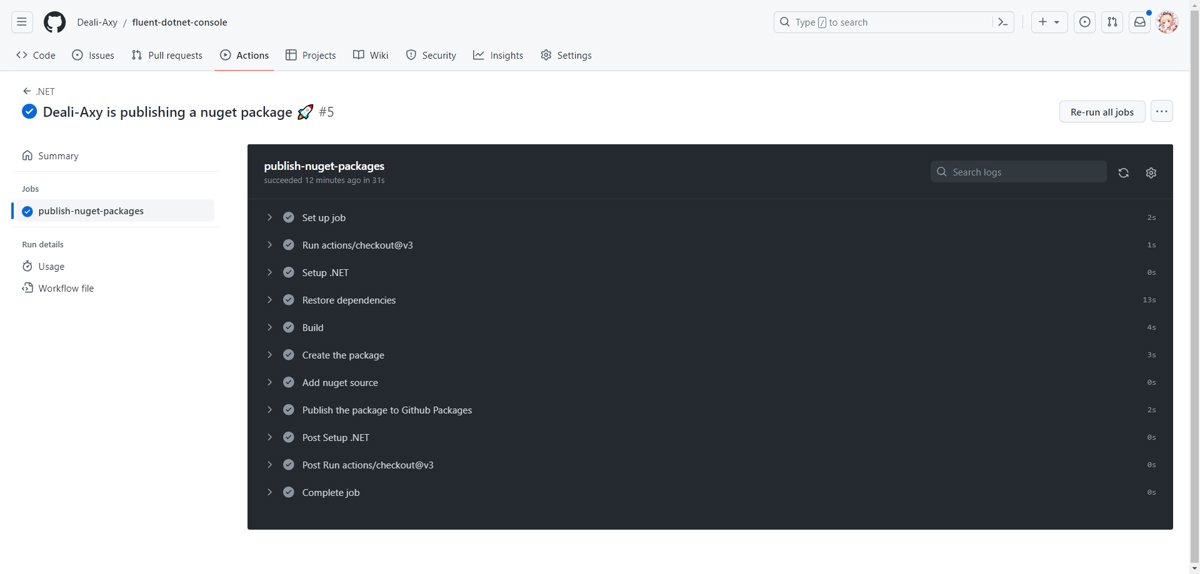
Perfect, hands-free! Plus, you can leverage GitHub's runner compute resources for free 😏
Pushing Packages to the Official NuGet Gallery
The first half of this article focuses on pushing NuGet packages to GitHub Packages using GitHub Actions, which requires installing them from a GitHub source.
Next, we'll investigate how to push to the official NuGet Gallery.
Creating an API Key
Address: https://www.nuget.org/account/apikeys
You can choose an expiration period, with a maximum of 365 days. Remember to update the token before it expires, otherwise all pipelines will become invalid.
After creation, click Copy to copy it. This is similar to GitHub, where the token is only displayed once, and it will be gone the next time you access it, so please save it properly.
Adding GitHub Action Secret
The steps are the same as before.
I added one named NUGET_GALLERY_TOKEN.
Modify Workflow
Modify the configuration of the workflow.
Add one more step at the end.
- name: Publish the package to Nuget Gallery
  run: dotnet nuget push ./src/Templates/bin/Release/*.nupkg --api-key ${{ secrets.NUGET_GALLERY_TOKEN }}  --source nuget.org --skip-duplicate
The default source is nuget.org, so specifying it is optional.
Use the following command to list the current source list.
dotnet nuget list source
Done~
References
- https://docs.github.com/zh/actions/quickstart
- https://docs.github.com/zh/actions/automating-builds-and-tests/building-and-testing-net
- https://docs.github.com/zh/packages/managing-github-packages-using-github-actions-workflows/publishing-and-installing-a-package-with-github-actions#upgrading-a-workflow-that-accesses-a-registry-using-a-personal-access-token
_EOF_
Developing a Modern .NetCore Console Application: (4) Automating Build and Publishing NuGet Packages Using GitHub Actions
- 本文作者:
- 程序设计实验室
- 版权声明:
- 本博客所有文章除特别声明外,均采用 BY-NC-SA 许可协议。转载请注明出处!
相关文章
在.NetCore(C#)中使用ODP-NET-Core+Dapper操作Oracle数据库
前言 虽然一直在说“去IOE化”,但是在国企和政府,Oracle的历史包袱实在太重了,甚至很多业务逻辑都是写在Oracle的各种存储过程里面实现的…… 我们的系统主要的技术栈是Django / Spring / AspNetCore,Java的不必说对Oracle支持肯定没问题,关键在于Django对Oracle版本有要求,兼容性不是特别好,Oracle版本没办法随意升级的,所以我想到用.Net
2021-12-18 · C# · 约 1 分钟
一次小而美的重构:使用 C# 在 Avalonia 中生成真正好看的词云
重构StarBlogPublisher中词云展示功能的过程。作者对比了两个流行的C#词云库,最终选择了功能更强大的Sdcb.WordCloud。文章详细说明了如何使用该库获取词频数据并生成词云图像,并展示了重构前后的效果对比。
2025-04-26 · C# · 约 1 分钟
并行化优化KD树算法:使用C#实现高效的最近邻搜索
本文介绍了如何使用并行计算技术优化 KD 树算法,并使用 C# 编程语言实现了高效的最近邻搜索。首先,我们简要介绍了 KD 树的原理和构建过程,然后详细讨论了如何利用并行计算库在多个 CPU 核心上并行构建 KD 树,从而加速搜索过程。通过实验验证,我们证明了并行化优化能够显著提高 KD 树的构建速度和搜索效率,为大规模数据集下的最近邻搜索问题提供了一种高效的解决方案。
2024-03-10 · C# · 约 1 分钟
Spark.NET:一个试图把 Django / Rails 式开发体验带回 .NET 世界的全栈 Web 框架。
又一个把Django/Rails那套“约定优于配置”搬进.NET生态的尝试,看着有点意思。预置了认证、队列、定时任务这些破事,省得自己天天重复造轮子。但767个star连个正式release都没有,就敢打着“生产级”旗号?呵,C#全栈爱好者们可以先玩玩,但别指望它能替代ASP.NET Core的体量。
2026-04-29 · C# · 约 1 分钟
讨论
共 0 条加载评论中…