Video Mid-Platform Solution: Organization Tree Component + Multi-Stream Live Video Interface Development
This domestically produced rugged-style project actually works? The 16-channel video playback interface is straightforward, but the on-site configuration and device management process is really a hassle. WVP and mpegts.js? B-station's open-source tendency—details are entirely guesswork.
目录10 个章节
Preface
I'm preparing to start a new project recently.
I should not delay this time, as I have written a complete plan.
If everything goes according to plan, the MVP should be launched within a month.
However, before starting the new project, I need to organize my previous work and write some notes to document it.
Introduction
This project is a sub-project within the middle platform, specifically a video platform.
Its main functions are to manage monitoring devices and cameras across various projects and to view live surveillance feeds.
Prior to this, I had only deployed a live streaming platform using SRS, achieving live streaming by pushing streams via the RTMP protocol.
However, this approach is more suited for scenarios like live streaming platforms such as Bilibili or Douyin.
For video surveillance, there is a more professional method within the industry: the GB28181-2016 standard.
This is commonly known as the 28181 protocol.
In the end, we chose the open-source WVP (https://github.com/648540858/wvp-GB28181-pro) as our surveillance backend.
At first glance at the project's homepage, a strong, rough-hewn domestic style hits you squarely, offering more of a "take it or leave it" vibe, with a simple document that outlines paid content and channels for paid consultation.
Yet, despite its unassuming appearance, this project turns out to be surprisingly... functional?
In short, it's this very project that supports the video surveillance playback for thousands of devices.
The primary devices are IPCs and NVRs from brands like Hikvision, Dahua, and Uniview. Initially, I separated NVRs (video recorders) from IPCs (cameras), but unexpectedly, this system does not differentiate between them. Later on, I also found that not separating them is better—everything is recorded as a device, and the actual video streams are then distinguished by channels.
Video Middleware Platform
From a technical perspective, the Video Middleware Platform is not overly complex.
The main workload and complexity lie in communication, coordination, and workflow processes, for the following reasons:
- It's not just about building the system itself; you also need on-site personnel to configure cameras and managers to input camera information.
- Many on-site staff are unfamiliar with operating computers—how do you guide them to configure cameras (similar to setting up a router)?
- How to manage existing equipment versus newly added devices?
- How should cameras and recorders be encoded?
- After encoding, how do you ensure on-site personnel know which code corresponds to which device?
- ……
This is just a partial list; in actual practice, there will only be more issues.
Honestly, these challenges are manageable as long as the entire workflow is clearly laid out—implementation is still feasible.
But once too many people are involved and no one takes charge of driving progress, it inevitably leads to blame-shifting and low efficiency, where even onboarding a single device might not be completed within a month.
OK, enough digression. Let's get back to the point and first take a look at the system interface.
Homepage
Let’s go straight to the screenshot—this is a screenshot from the video platform (all sensitive information and data have been replaced with dummy data, so feel free to check it out).
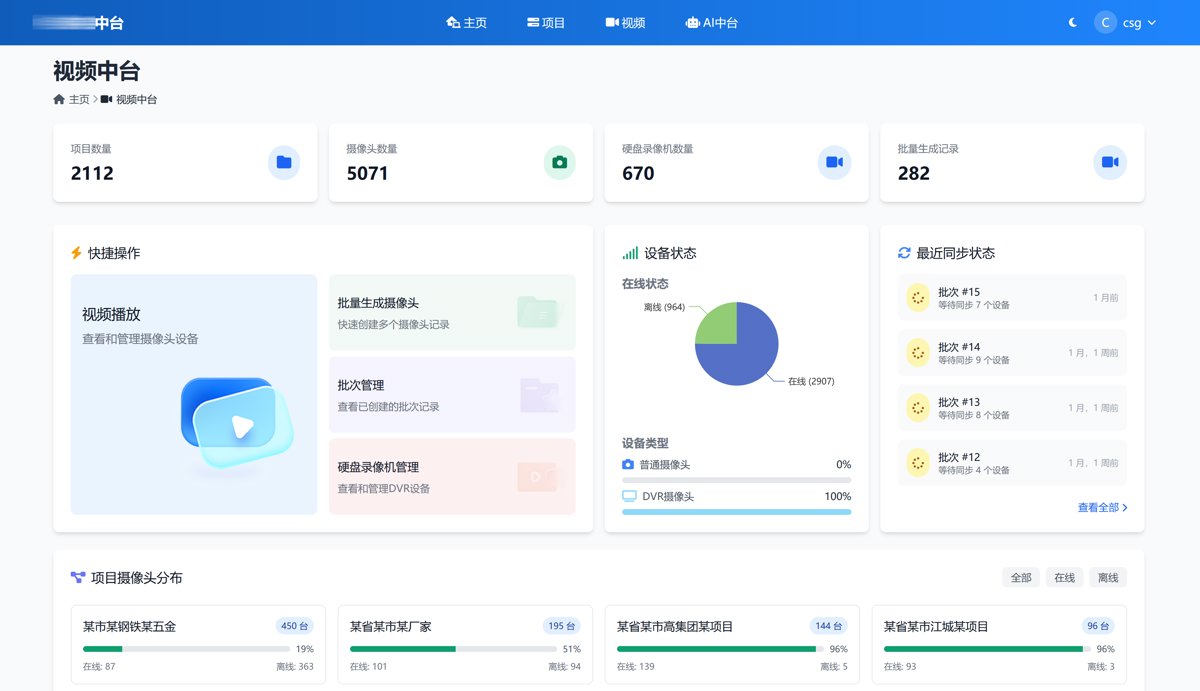
As you can see from the interface, the core functions are managing videos and playing videos.
Video Playback
PS: Sensitive information has been redacted for your peace of mind
The video playback interface is the main focus of this article.
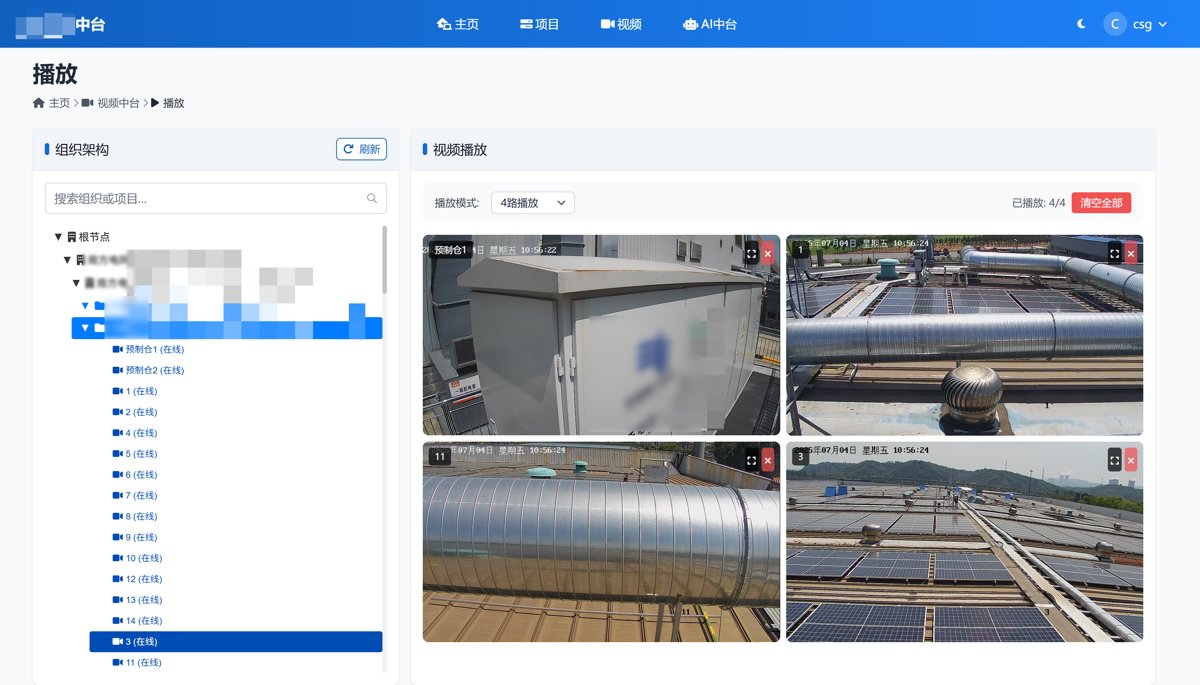
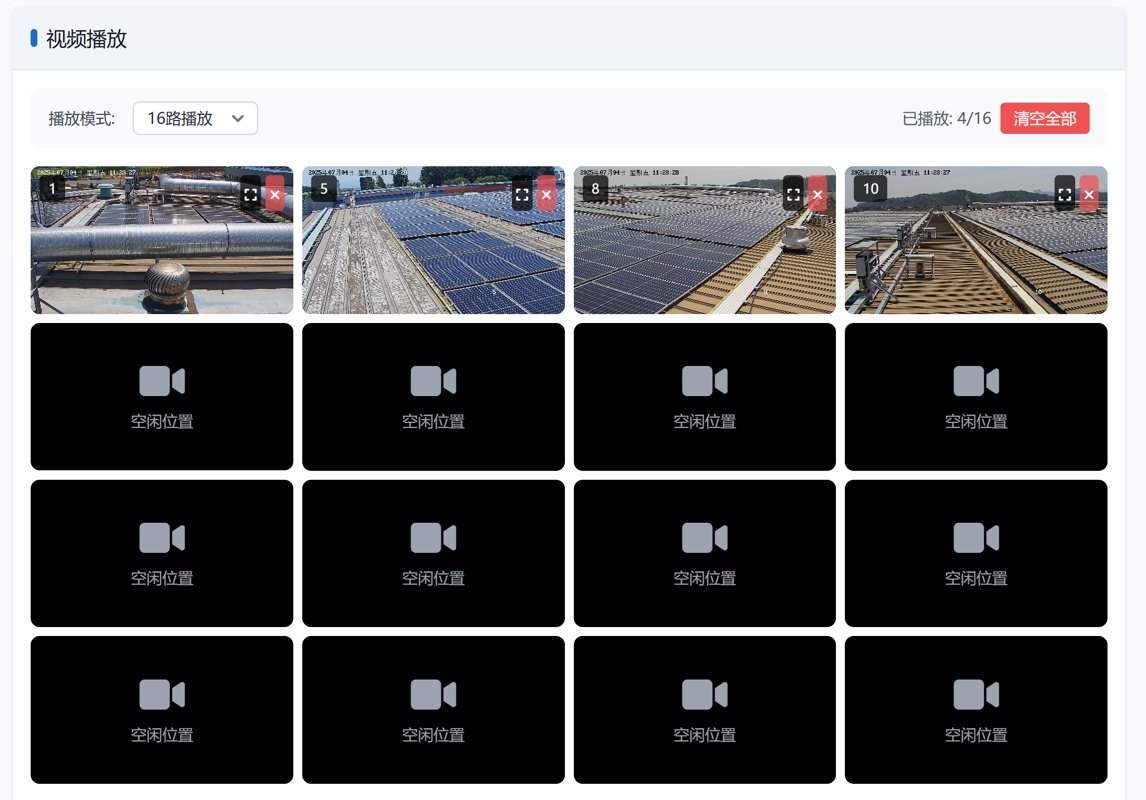
You can switch between 1-channel,4-channel,9-channel,and 16-channel playback. Let me take another screenshot of 16-channel video playback here. I won’t include the others,as I trust our clever readers will understand 😃.
Technical Implementation
Technically, I continue to follow the previous "Less is more" approach: Back to Basics! Developing Interactive Web Applications with Alpine.js, Ditching node_modules and webpack!
Using Alpine.js + HTMX to implement the entire page
Code
Page Layout
Page layout uses Tailwind CSS.
Interactive use of Alpine.js mentioned earlier
<main x-data="playApp()">
  <div class="grid grid-cols-12 gap-4">
    {# Left Organization/Project Tree #}
    <div class="col-span-4" id="tree-list">
      <div class="bg-white rounded-lg shadow h-full">
        <div class="border-b border-gray-200 bg-[#f1f5fa] px-4 py-3">
          <div class="flex items-center justify-between gap-2 h-8">
            <div class="flex items-center">
              <span class="w-1.5 h-4 bg-[#156bd2] rounded mr-2"></span>
              <h5 class="text-lg font-medium text-gray-900">Organization Structure</h5>
            </div>
            <button
                    type="button"
                    class="inline-flex gap-2 items-center px-2 py-1 bg-transparent border border-[#0f5cb9] shadow-sm text-sm font-medium rounded-md text-[#0f5cb9] bg-white hover:bg-gray-50 focus:outline-none focus:ring-2 focus:ring-offset-2 focus:ring-blue-500 disabled:opacity-50 disabled:cursor-not-allowed"
                    x-on:click="refreshTree()"
                    x-bind:disabled="isLoading"
                    >
              <i class="fa-solid fa-arrow-rotate-right"></i>
              <span x-text="isLoading ? 'Loading...' : 'Refresh'"></span>
            </button>
          </div>
        </div>
        <div class="p-4 h-full flex flex-col gap-4">
          <!-- Search Box -->
          <div x-show="!isLoading">
            <div class="relative">
              <input
                     type="text"
                     id="tree-search"
                     placeholder="Search organizations or projects..."
                     class="w-full px-3 py-2 border border-gray-300 rounded-md focus:outline-none focus:ring-2 focus:ring-blue-500 focus:border-transparent"
                     x-on:input="tree && tree.search($event.target.value)"
                     >
              <div class="absolute inset-y-0 right-0 flex items-center pr-3">
                <svg class="h-4 w-4 text-gray-400" fill="none" stroke="currentColor"
                     viewBox="0 0 24 24">
                  <path stroke-linecap="round" stroke-linejoin="round" stroke-width="2"
                        d="M21 21l-6-6m2-5a7 7 0 11-14 0 7 7 0 0114 0z"></path>
                </svg>
              </div>
            </div>
            <!-- Search Results Stats -->
            <div id="search-stats" class="mt-2 text-sm text-gray-500" style="display: none;"></div>
          </div>
      <div x-show="isLoading" class="space-y-3">
        <div class="animate-pulse">
          <div class="flex items-center space-x-3">
            <div class="w-4 h-4 bg-gray-300 rounded"></div>
            <div class="h-4 bg-gray-300 rounded w-3/4"></div>
          </div>
        </div>
        <div class="animate-pulse ml-6">
          <div class="flex items-center space-x-3">
            <div class="w-4 h-4 bg-gray-300 rounded"></div>
            <div class="h-4 bg-gray-300 rounded w-2/3"></div>
          </div>
        </div>
        <div class="animate-pulse ml-12">
          <div class="flex items-center space-x-3">
            <div class="w-4 h-4 bg-gray-300 rounded"></div>
            <div class="h-4 bg-gray-300 rounded w-1/2"></div>
          </div>
        </div>
        <div class="animate-pulse ml-6">
          <div class="flex items-center space-x-3">
            <div class="w-4 h-4 bg-gray-300 rounded"></div>
            <div class="h-4 bg-gray-300 rounded w-3/5"></div>
          </div>
        </div>
        <div class="animate-pulse">
          <div class="flex items-center space-x-3">
            <div class="w-4 h-4 bg-gray-300 rounded"></div>
            <div class="h-4 bg-gray-300 rounded w-4/5"></div>
          </div>
        </div>
        <div class="animate-pulse ml-6">
          <div class="flex items-center space-x-3">
            <div class="w-4 h-4 bg-gray-300 rounded"></div>
            <div class="h-4 bg-gray-300 rounded w-1/3"></div>
          </div>
        </div>
      </div>
      <div id="tree-container" class="tree-view" x-show="!isLoading"></div>
    </div>
  </div>
</div>
For the player, I chose mpegts.js - https://github.com/xqq/mpegts.js
mpegts.js is a player that directly plays MPEG2-TS streams on HTML5, optimized for low-latency live streaming. It can be used for low-latency playback of DVB/ISDB digital television streams or surveillance camera feeds.
This is a fork of Bilibili's open-source flv.js.
Like many major domestic companies, Bilibili has a habit of abandoning its open-source projects. The flv.js project hasn't been updated in over four years, with numerous issues left unattended, and is essentially in a deprecated state.
I suppose this was just a KPI-driven open-source project for Bilibili…
When I first saw it was from Bilibili, I thought it would work well and tried using flv.js for playback. It turned out it couldn't play at all—I soon realized flv.js only supports H.264 encoding.
And many modern cameras use H.265 encoding now…
The WVP project uses the Jessibuca player for playback.
However, the documentation for that project is even messier than WVP's, giving no desire to use it… (Although perhaps it has better compatibility and performance?)
Furthermore, because it uses wasm, it can't be installed via npm, and integration is complicated. I still opted for a pure JS implementation.
Installation is simple:
pnpm i mpegts.js
After configuration with gulp, it's integrated into static files:
<script src="{% static 'lib/mpegts.js/dist/mpegts.js' %}"></script>
The code for playing the video stream is also relatively straightforward:
console.log('Playing camera:', camera.name, 'GUID:', camera.guid);

// Get the camera's live stream URL
const url = window.API_URLS.cameraStreamUrl.replace('__camera_guid__', camera.guid);
axios.get(url)
  .then(res => {
  if (res.data.success && res.data.data && res.data.data.stream_url) {
    const streamUrl = res.data.data.stream_url.trim();
    console.log('Live stream URL:', streamUrl);
    this.addVideoToGrid(camera, streamUrl);
  } else {
    alert('Failed to get live stream URL: Invalid response data');
  }
})
  .catch(err => {
  console.error('Failed to get live stream URL:', err);
  alert('Failed to get live stream URL. Please try again.');
});
Pure Alpine.js Tree Component Implementation
When using React/Vue, there should be quite a few tree component options available.
However, pure JavaScript tree components are all a complete mess—none of them are even usable!
After some experimentation, I decided to write one myself using Alpine.js!
The effect is already shown in the screenshots above. It supports tree node expansion, real-time search filtering, and has all the required features. It's perfect~
Due to space limitations, I won't include the code here. If you're interested, you can reply with "Tree Component" in the backend of the official account to get the relevant code~
Summary
OK, that's it, I've finished organizing the work content.
I'm one step closer to starting my new project
_EOF_
Video Mid-Platform Solution: Organization Tree Component + Multi-Stream Live Video Interface Development
- 本文作者:
- 程序设计实验室
- 版权声明:
- 本博客所有文章除特别声明外,均采用 BY-NC-SA 许可协议。转载请注明出处!
相关文章
使用mock.js开发假数据接口
参考资料 Mockjs使用 - https://juejin.cn/post/6953199521031520292 http://wll8.gitee.io/mockjs-examples Mokcjs 文档 Vitepress版 - http://mock.pe666.cn/
2022-12-06 · Web前端 · 约 1 分钟
2025年底的 TailwindCSS 组件库简单横评
TailwindCSS组件库多到让人选择困难。shadcn/ui虽优雅但不够全,Origin UI倒是堆了500+组件——这年头连UI都要内卷?大而全还是小而精,选型前先想清楚自己要不要加班调样式。
2025-11-23 · Web前端 · 约 1 分钟
代码使我头疼之React初学习
前言 开始了,去年(2020)说要学的React,到现在2021年的12月底了,才来实施……(年底警告!~~年末总结还没开始写!~~) 不过前端为啥要学React呢?Vue不是很好用吗?Vue确实很好用,并且MVVM模式也更容易让人接受和理解,但大概是各种社区上都说react yyds啦,react一统江山啦什么的,加上我之前学Flutter做了很多项目,对声明式UI的思想已经基本掌握了,所以就想
2021-12-26 · Web前端 · 约 1 分钟
配置Chrome支持网页内的frame跨域
前言 跨域限制可以保证安全,但是调试的时候关掉会更方便,然而现在网络上能找到的关闭跨域限制方法,在新版的Chrome浏览器上根本没用…… 经过一番摸索,发现用旧版的Chrome就可以绕过跨域限制,刚好我做的这个需要跨域内嵌frame的网页只是单纯展示的,所以这个正好符合我的需求,奥利给! 然后我找到了旧版的Chrome软件,解压出来是绿色版的可以直接运行,不过运行后发现直接把系统的Chrome给调
2021-12-18 · Web前端 · 约 1 分钟
讨论
共 0 条加载评论中…