Personal Data Preservation Plan: Building a Private Music Library
Downloading music with anti-gray measures, is the toolchain tinkering worth it? Setting up a private streaming service, the client experience is mediocre. With data autonomy in hand, platform takedowns mean nothing.
目录19 个章节
Preface
Listening to music is much more convenient now than before, with various online services available. Most people probably don't need to download music themselves and import it to an MP3 player or phone like they used to.
But as the saying goes, it's always best to have your data under your own control. You never know when your favorite songs might become grayed out on music platforms one day. So, when you come across a song you like, download it locally as soon as possible to prevent it from becoming unavailable due to copyright issues.
This article documents the process of setting up a private music library, including: downloading, organizing, setting up a streaming service, local playback, and more.
Download
Most of my playlists are on NetEase Cloud Music (网抑云), so I currently use the pyncm tool to download them.
Exploration Process
I successively used the following tools:
- Beadd/Creamplayer - Electron-based, relatively basic, can download but frequently errors out. I used it briefly and gave up.
- Java-S12138/Music_Download - Appears to be PyQt-based. After using it, I found it couldn't download and abandoned it.
- magicdawn/yun-playlist-downloader - A node-based command-line tool that can batch download music from playlists. Pretty good. I used it to download a batch of songs, but it seemed unable to write metadata. Eventually, I abandoned it.
- mos9527/pyncm - This is what I ultimately settled on. It's quite convenient, has all the necessary features, and can write metadata. After logging into your account (provided you have a VIP membership), you can download VIP songs.
There's also one recommended by a netizen, but I haven't tried it yet:
QQFlacMusicDownloader - Can be used to download lossless music.
pyncm
This is a Python-based command-line tool that can also be invoked through Python code.
Installation
pip install pyncm
pip install mutagen
pip install tqdm
pip install coloredlogs
The following three are supplementary functional dependencies:
mutagen: Adds metadata to downloaded music.tqdm: Displays real-time download progress.coloredlogs: Provides colored log output.
Usage
Download songs from a playlist without logging in, using an anonymous account:
pyncm "https://music.163.com/playlist?id=123908306&userid=82133129" -m 4 -t "{artists} - {track}" --quality exhigh --no-overwrite
Parameter Explanation:
-m 4: Download 4 songs simultaneously.-t "{artists} - {track}": File name format is "Artist - Track Title".--quality exhigh: Download audio quality is higher.- hires
- lossless (lossless audio)
- exhigh (higher quality)
- standard (standard quality)
--no-overwrite: Do not overwrite existing music files.
Login to Account
pyncm --phone 123456 --pwd 123456 --save "login-session.conf"
Log in using a phone number and password, then save the login information to a file.
When downloading next time, use the --load xxx.conf parameter to load the saved login information.
Organizing
Local Organization
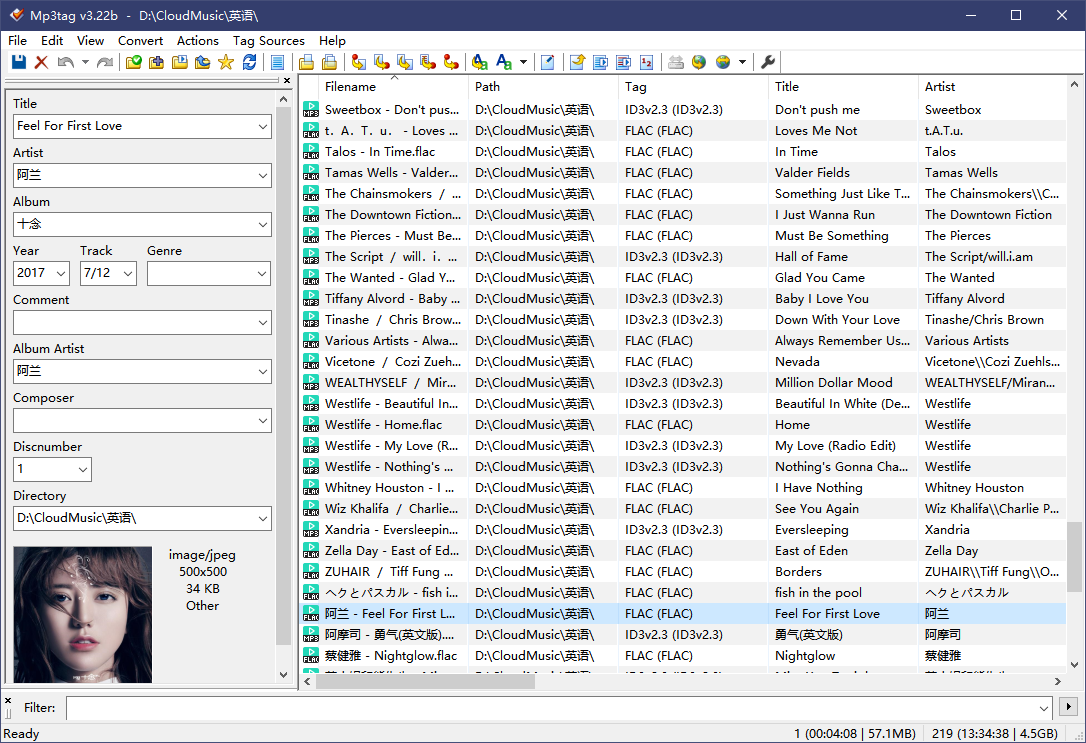
For organizing music locally, you can use the mp3tag application.
You can install it directly using scoop (this package manager is recommended for Windows users).
If you don't have scoop, you can download it from the official website: https://www.mp3tag.de/en/
scoop install mp3tag
After installation, you can run the following command to add it to the right-click context menu for convenient use.
PS: The specific path should follow the instructions provided after scoop installation.
start 'regsvr32' -Verb 'RunAs' -Args @("C:\Users\Deali\scoop\apps\mp3tag\current\Mp3tagShell.dll", '/s')
Once opened, you can edit the metadata of your songs.
Private Cloud
A music library is best paired with a NAS, naturally.
Once your music files are stored on a NAS, managing them with local metadata software becomes inconvenient. Setting up an online service makes things much easier.
This article recommends the project: xhongc/music-tag-web
Deploy using docker-compose:
version: '3'

services:
  music-tag:
    image: xhongc/music_tag_web:latest
    container_name: music-tag-web
    ports:
      - "8001:8001"
    volumes:
      - /path/to/your/music:/app/media:rw
      - /path/to/your/config:/app/data
    command: /start
    restart: always
Start it up in one go, and that’s it. For more details, check the project homepage documentation.
Setting Up a Streaming Media Service
For the streaming media part, I referred to the experiences of many fellow internet users.
jasonyang9 on V2EX provided a very detailed approach.
Pre-processing:
- Pre-processing - Transcoding: Transcoding is not recommended; the streaming server will automatically handle it dynamically for clients.
- Pre-processing - Splitting: CUE to individual MP3 tracks, etc., using mp3splt.
- Pre-processing - Splitting (Exceptions): Albums like Enigma should not be split, as there is transitional content between tracks.
- Pre-processing - Tagging: Using Picard for fully automatic or semi-automatic tagging.
- Pre-processing - Tagging Standard: albumartist-date-album-tracknumber-title-genre.
- Pre-processing - Unified ReplayGain: mp3gain, aacgain.
Streaming Server: Navidrome, Lightweight Music Server, Gonic (Docker or compiled installation), etc.
Client: Any player that supports Subsonic, Airsonic, Madsonic. Client Recommendations: DSub (Android), Strawberry (Linux), Clementine (currently the only legacy player supporting Windows 7).
I tried deploying both Navidrome and Gonic, and based on my experience, Navidrome is more user-friendly.
Deploy Navidrome using Docker
I followed the configuration provided on the official website.
version: "3"
services:
  navidrome:
    image: deluan/navidrome:latest
    user: 1000:1000 # should be owner of volumes
    ports:
      - "4533:4533"
    restart: unless-stopped
    environment:
      # Optional: put your config options customization here. Examples:
      ND_SCANSCHEDULE: 1h
      ND_LOGLEVEL: info
      ND_SESSIONTIMEOUT: 24h
      ND_BASEURL: ""
    volumes:
      - "/path/to/data:/data"
      - "/path/to/music:/music:ro"
Once started, it will automatically scan the music.
Web UI
Playback directly on the web is also supported.
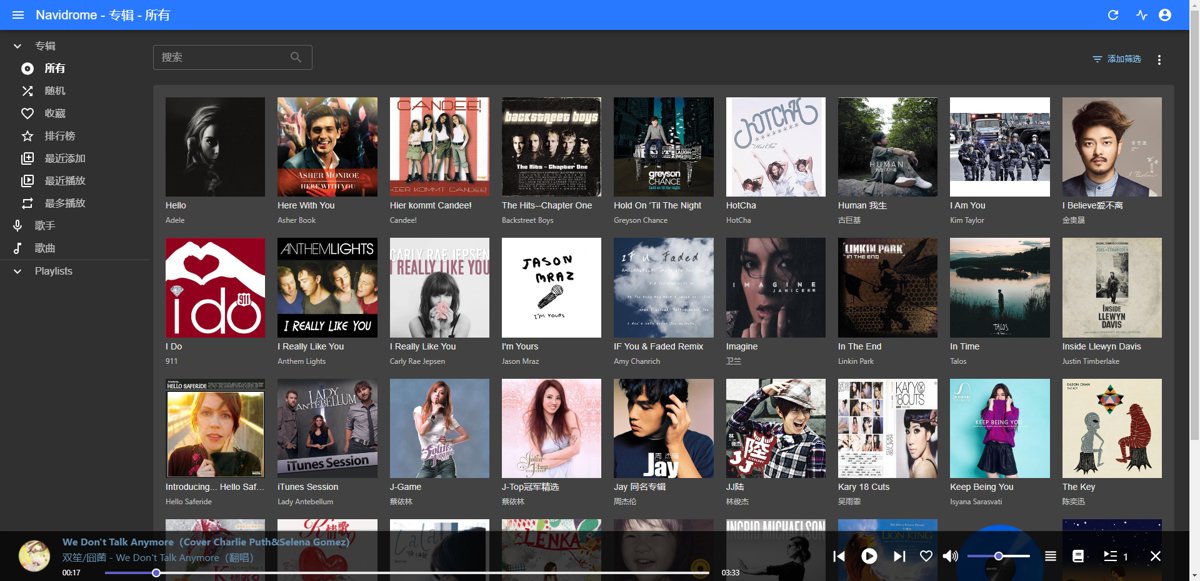
It's pretty good, similar to software like Jellyfin.
Clients
It's time for the open-source community to shine. Navidrome supports multiple protocols, such as Subsonic, Airsonic, and Madsonic, so any client that supports these protocols can be used.
Below is a list of some clients I've gathered from the internet. You can choose based on your own needs.
- iOS: play:Sub, substreamer, Amperfy and iSub
- Android: DSub, Subtracks, substreamer, Ultrasonic and Audinaut
- Web: Subplayer, Airsonic Refix, Aurial, Jamstash and Subfire
- Desktop: Sublime Music (Linux) and Sonixd (Windows/Linux/macOS)
- CLI: Jellycli (Windows/Linux) and STMP (Linux/macOS)
- Connected Speakers:
- Other:
Android Clients
I mainly tried several clients on my phone, and the experience was quite good for all of them.
Most are open source, and for open source apps on Android, it's recommended to use the F-droid store for downloading.
PS: Obtainium is also nice; you can manually add the GitHub or GitLab pages of open source app projects to it and directly track project updates.
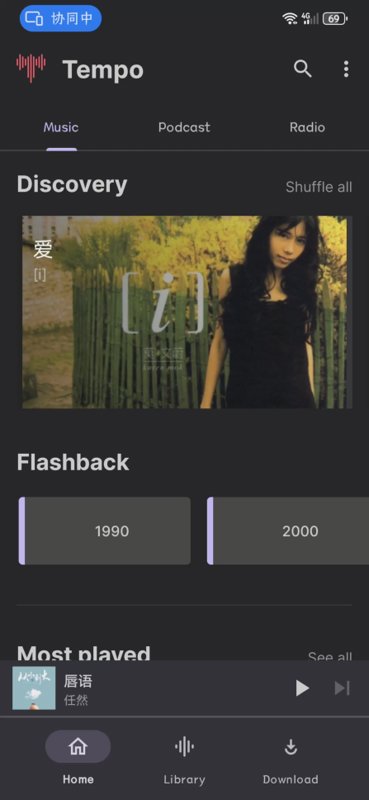
tempo
This app has a decent interface but tends to crash easily. I'm not sure if it's an issue with my phone.
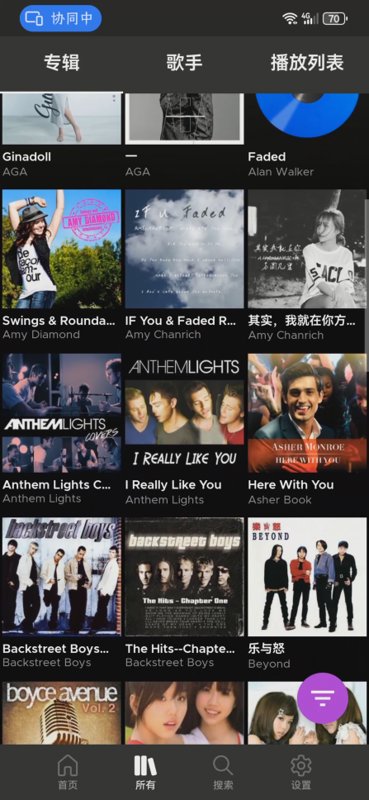
subtracks
It's open source and decent, but it seems like there's no complete music list—everything is displayed by albums or artists.
substreamer
This one is not open source and needs to be downloaded from Google Play.
Official website: https://substreamerapp.com/
substreamer Your Music. Your Way.
The best free client app for the subsonic music server. Get your music, your way with subsonic and substreamer.
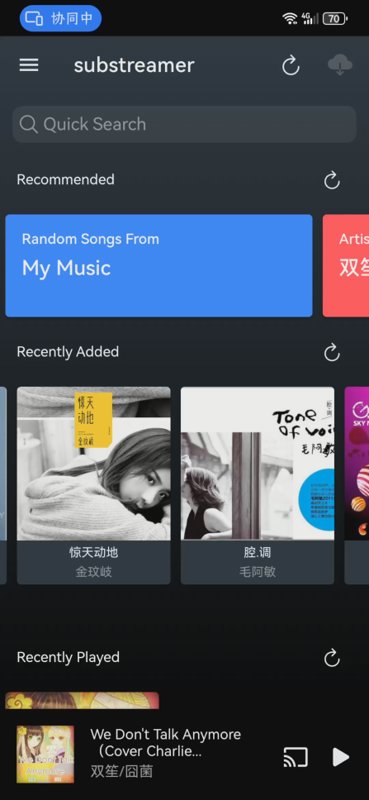
Summary
I have finally advanced my "Personal Data Preservation Plan" another step. This solution may not be perfect, but it is effective. It allows me to manage my favorite music independently, so I no longer have to worry about it suddenly becoming grayed out or removed from shelves one day~
The internet belongs to everyone, yet not everyone can control it.
After trying several Android streaming clients, the experience has been rather mediocre. Perhaps copying music directly to the phone and pairing it with a local player would offer a better experience (such as Jiaoyan Music (椒盐音乐)).
Modern phones have ample storage, and mine even supports expandable storage cards (a legacy of the Mate series). A thousand lossless music tracks take up only a few dozen gigabytes, which is quite manageable given today’s ridiculously affordable storage space~
References
- https://v2ex.com/t/964870
- Music Migration Project (音乐迁移计划) - https://blog.wayner.cn/music-go
- https://github.com/QiuChenlyOpenSource/QQFlacMusicDownloader
- https://github.com/mos9527/pyncm
- Still listening to local music in 2023: What are some good Android music player options?
- Navidrome – Open-source music server, build your own cloud music player
_EOF_
Personal Data Preservation Plan: Building a Private Music Library
- 本文作者:
- 程序设计实验室
- 版权声明:
- 本博客所有文章除特别声明外,均采用 BY-NC-SA 许可协议。转载请注明出处!
相关文章
个人数据保全计划:如何安全地备份数据
呵,用mc这种上古文件管理器备份数据还沾沾自喜?rsync干校验的姿势倒是勉强及格。最后还煞有介事地生成sha256清单——这年头不会真有人手动校验冷备吧?
2025-06-16 · 个人数据保全计划 · 约 1 分钟
为什么我给虚拟机分了 32G 硬盘,Ubuntu 却只识别 16G?
32G硬盘在PVE里明明分配好了,到Ubuntu就变15G,LVM这鬼东西把空间藏哪儿去了?根目录就分了一半?这算哪门子逻辑,简直离谱。扩容三步走倒是简单,但谁特喵会用到这种坑爹设计。
2025-10-10 · 个人数据保全计划 · 约 1 分钟
个人数据保全计划:从印象笔记迁移到joplin
事实上我已经很多年没用印象笔记了,上次使用似乎还是很多年前大学时,当时还开了好几年会员,用来收藏网页、微信公众号文章,挺好用的。 可惜印象笔记(evernote)从某一年开始搞了中国特供版和国际版彻底切割,吃相越来越难看,而且导出格式也改成了专有格式,越来越封闭,这不是一个好兆头,我最怕被绑定在某个平台或者生态里。
2025-01-24 · 个人数据保全计划 · 约 1 分钟
个人数据保全计划:(4)基础环境配置
关闭swap 内存足够的话(8G以上),可以考虑关闭swap提高系统性能 查看开启了哪些swap cat /proc/swaps 输出 | Filename | Type | Size | Used | Priority | | ------------------------------------- | ----
2022-11-13 · 个人数据保全计划 · 约 1 分钟
讨论
共 0 条加载评论中…