

Host computer development: Pretending to have a device, using C# to simulate serial port devices
Simulating serial port devices in C#? Still learning such outdated technology in this day and age? Well, fine—I guess it's at least a bit better than those who only know how to play with AI. Just figure out the protocol documents, install that flimsy com0com driver, and write some rigid code to handle debugging needs. As for IoT platforms or industrial control? That's someone else's job. I'll just dabble with it and that'll be good enough.
目录15 个章节
Preface
It is said that if you don't know how to develop host computer applications and games, you can't really call yourself proficient in C#.
Well, I'm not particularly skilled in either of those areas either 😂
So, here's me exploring the skill tree of host computer development.
The requirement for this task is quite simple: use C# to simulate a device protocol, enabling the development and debugging of the host computer program without needing to physically connect to the actual device.
The actual device communicates using the RS-485 standard. Once the simulation is successfully tested, on-site, you just need to plug the RS-485 bus (A/B differential lines) into a USB-RS485 converter to achieve data reading and command transmission.
A Few Screenshots as a Preview
The work introduced in this article is just the most basic preliminary preparation
In reality, this project aims to implement a simple IoT platform, not just connect a few devices
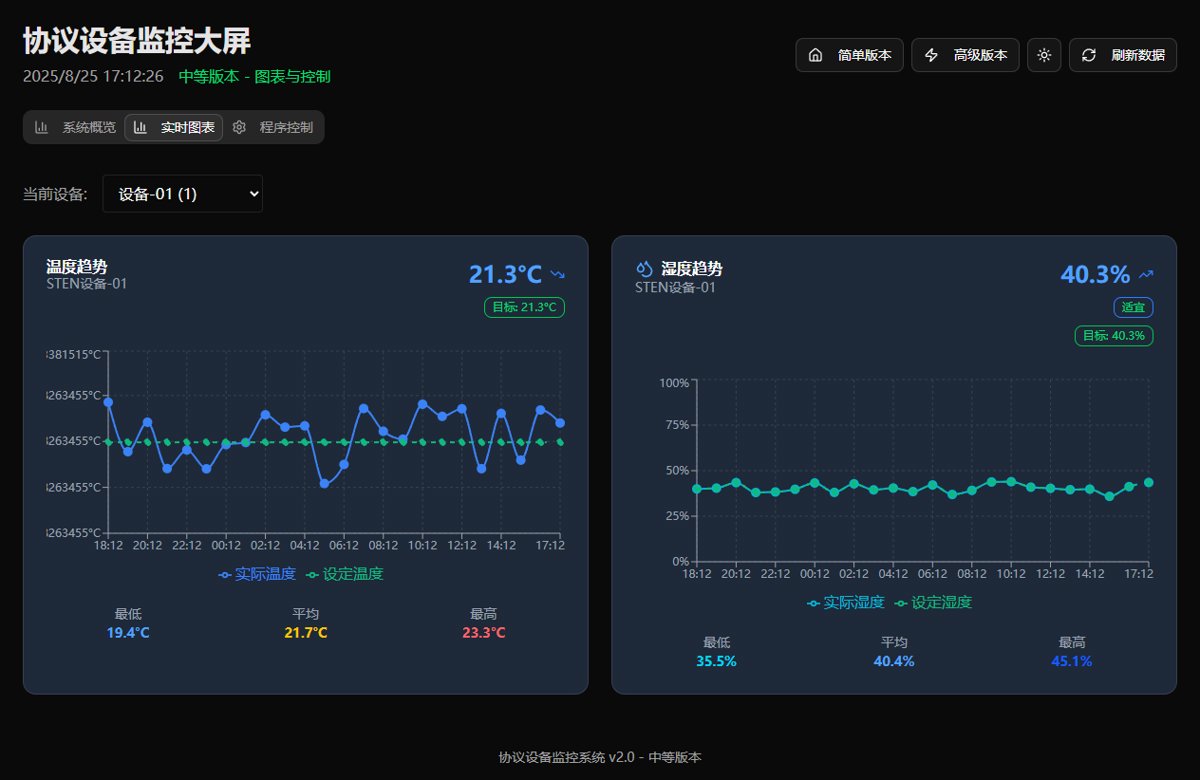
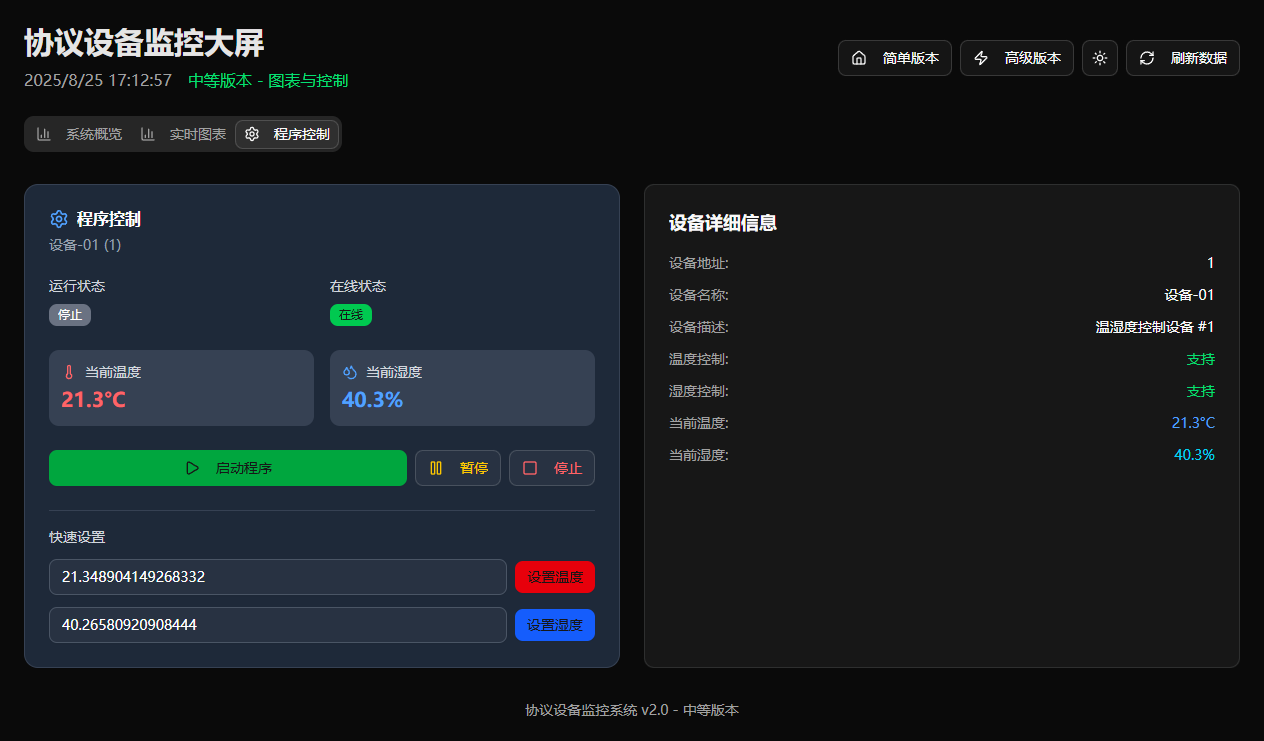
The initial version of the system is already complete, so I'll first share a few screenshots here
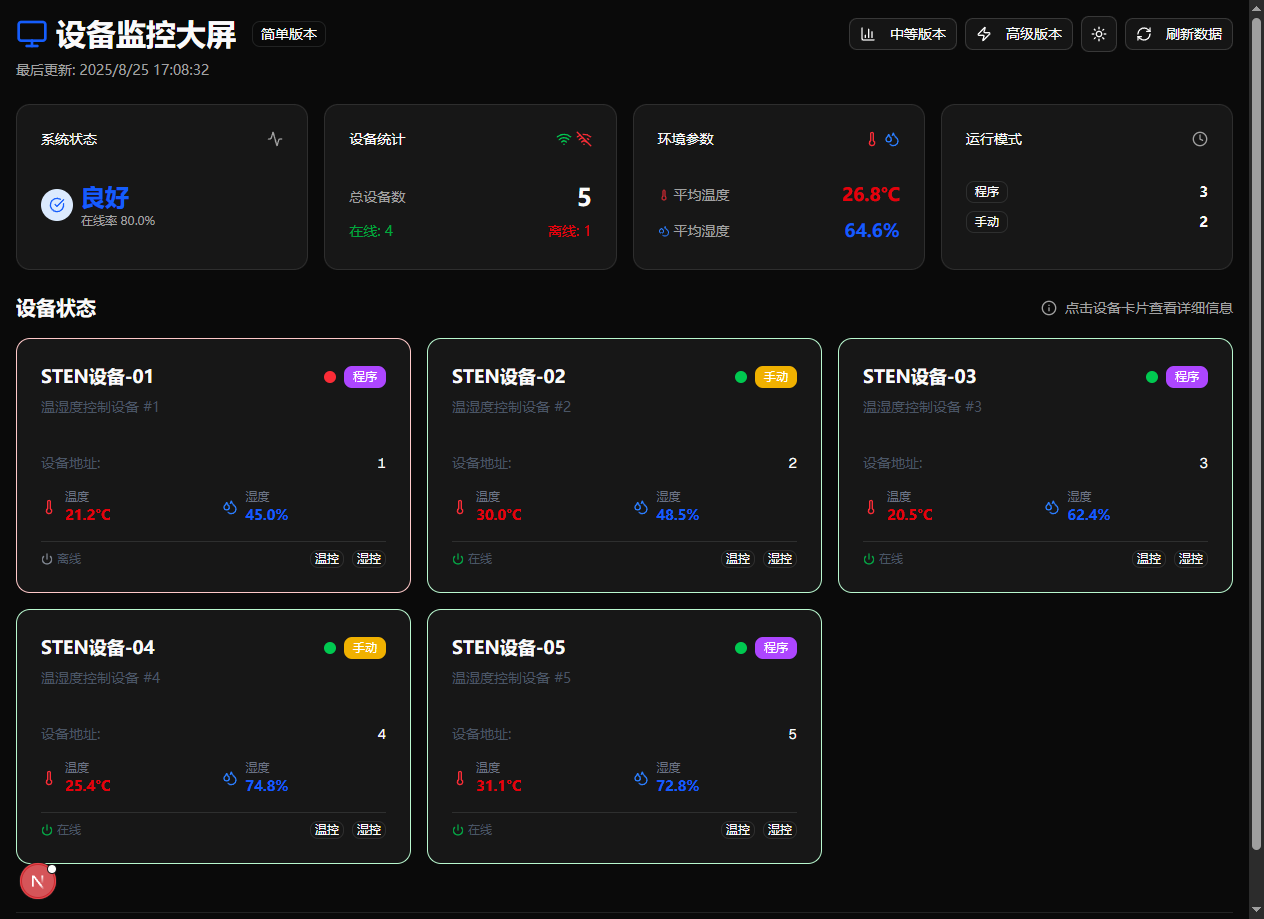
Real-time Charts
Device Control
These are just a few; the others are not quite refined yet
Prerequisites
OK, let's get back to business. The prerequisites for simulating a serial port device are as follows:
-
First, you need to have a detailed device protocol document.
This is crucial—no one can develop in the dark.
-
Operating System: Windows/Linux
Pretty surprising, right? Linux can actually be used to develop upper computers (上位机)? In fact, simulating devices on Linux can be even more convenient.
However, for the sake of easier development and debugging, I’ll use Windows as an example here.
Serial Port Driver
Simulating a serial port driver on Windows: com0com
This tool can create a pair of connected COM serial ports in the system, for example, com3 <-> com4.
Messages sent from either end can be read on the other end.
We use this method to simulate serial port devices.
PS: The GUI of com0com requires installing the ancient .NET Framework 3.5 to work, so I use the command line directly.
On Linux, you can use tty0tty.
Serial Port Debugging Tool
There are many open-source serial port debugging tools available.
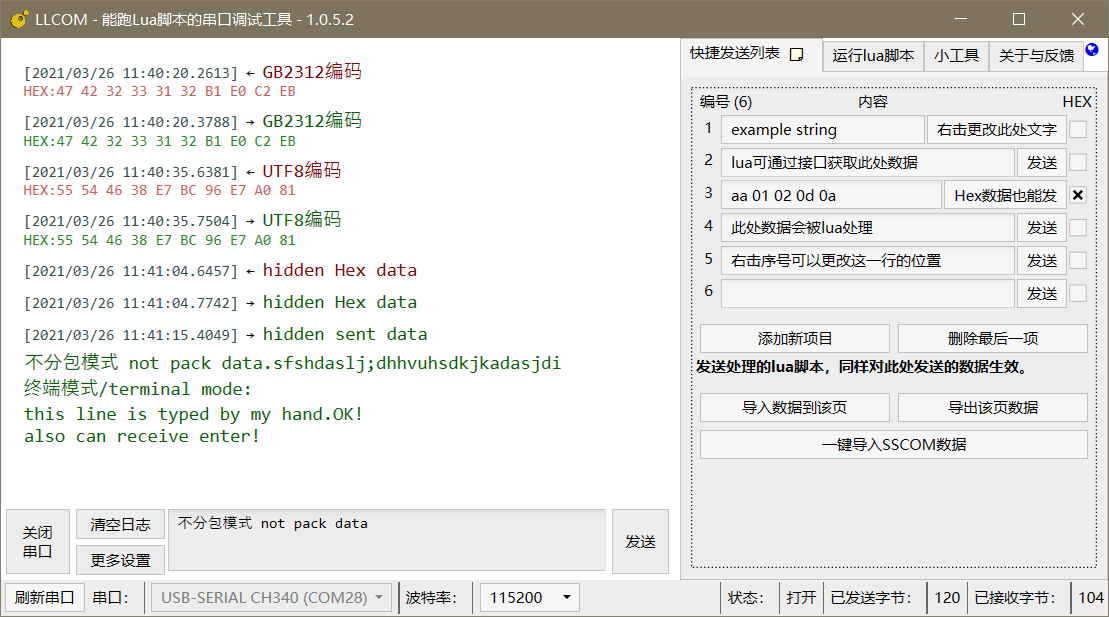
This time I tried llcom and Wu.CommTool.
I recommend llcom as it is more intuitive to use.
Project address: https://github.com/chenxuuu/llcom
You can install it directly from the command line.
winget install llcom
The interface looks like this.
Common Commands for com0com
As mentioned earlier, the graphical interface of com0com requires installing .NET Framework 3.5.
I certainly don't want to install such an outdated relic to pollute my computer environment.
Fortunately, the command line can still be used.
Here are some commonly used commands.
View Current Virtual Serial Ports
list
The output will display each pair of virtual serial ports, for example:
CNCA0 PortName=COM5
CNCB0 PortName=COM6
This indicates there is one pair of virtual serial ports: COM5 <-> COM6.
Creating a New Pair of Virtual Serial Ports
install PortName=COM5 PortName=COM6
This will create a pair of virtual serial ports named COM5 and COM6, which are connected to each other.
👉 Afterward, you can have:
- The emulator program listen on
COM5 - The host/main program open
COM6
This way, they can communicate with each other, equivalent to having RS-485 devices in the field.
Delete a pair of virtual serial ports
remove 0
Delete the pair with identifiers CNCA0 and CNCB0 (0 is the number, which can be found using list).
Modify Parameters of Existing Ports
For example, to modify the port number of CNCA0:
change CNCA0 PortName=COM7
Clear All Virtual Serial Ports
uninstall
⚠️ Note: This will delete all virtual ports created by com0com.
Development Workflow
-
Create a pair of virtual serial ports:
install PortName=COM3 PortName=COM4 -
Write a simulator program (C#) that listens on
COM3. -
The host program or serial debugging tool connects to
COM4, sends commands, and receives responses from the simulator.
PS: After creating the ports, you can verify them in Device Manager.
Serial Communication Program
Using C# with its built-in System.IO.Ports makes serial communication easy to implement. It's no wonder so many people use C# for host computer (上位机) development.
However, in the .NET Core era, this library needs to be installed via nuget.
dotnet package add System.IO.Ports
Here I've written a simple serial port simulation program.
using System.IO.Ports;
using System.Text;

Console.WriteLine("=== 协议模拟器 ===");

// 打开虚拟串口 (比如 COM5)
const string portName = "COM5";
var port = new SerialPort(portName, 9600, Parity.None, 8, StopBits.One);
port.Encoding = Encoding.ASCII;
port.Open();

Console.WriteLine($"模拟设备已启动,监听 {portName}...");

port.DataReceived += (s, e) => {
    try {
        var cmd = port.ReadExisting();
        Console.WriteLine($"收到: {cmd}");

        string response;

        // 协议模拟逻辑 (这里举例)
        if (cmd.Contains("temp", StringComparison.OrdinalIgnoreCase)) {
            // 模拟返回温度
            response = "01,temp=25.6\n";
        }
        else if (cmd.Contains("hum", StringComparison.OrdinalIgnoreCase)) {
            // 模拟返回湿度
            response = "01,hum=60%\n";
        }
        else {
            // 默认回应
            response = "01,ack\n";
        }
    }
    catch (TimeoutException) {
        // 超时继续监听
    }
    catch (Exception ex) {
        Console.WriteLine($"错误: {ex.Message}");
    }
};
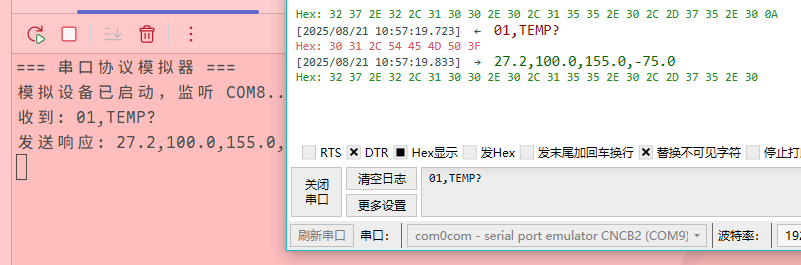
Implementation Effect
Using a serial port debugging tool to send commands, the C# written simulation program receives them and returns responses.
Summary
The so-called "IT winter" has been discussed many times before.
It's evident that the development potential of the internet has largely plateaued. The recent surge in AI has mainly reduced some lower-tier positions rather than expanding the overall market.
However, from another perspective, the fact that the internet is no longer a "blue ocean" is precisely what draws our attention back to those "traditional" yet always indispensable fields. Host computer development is one such direction. It may not be as competitive as the mobile internet sector, but it has stable and long-term demand in scenarios like industrial control, scientific experiments, and automated testing. Whether it's a single device in a laboratory or hundreds of PLCs on a production line, all ultimately require a reliable and visualizable host computer for management and monitoring.
For beginners, C# offers a friendly syntax and a robust ecosystem, making it quick to develop a first working demo—be it a serial port assistant, a data acquisition and visualization interface, or even a small-scale test management system. As learning progresses, one can delve into more complex protocols like Modbus, CAN bus, and OPC, gradually moving toward real industrial applications.
Future trends won't stop at "traditional host computers." Cross-platform frameworks (.NET MAUI, Avalonia), front-end and back-end integration (C# + web technologies), and even AI-assisted data analysis could become new directions for host computer development. In other words, this path isn't narrow—it simply requires shifting your perspective from "competing in the internet sector" to "deeply cultivating in specific industries."
So, if you're feeling uncertain about your career path, why not start with a simple host computer project? Even a serial port monitoring tool could become your first stepping stone into this field.
_EOF_
Host computer development: Pretending to have a device, using C# to simulate serial port devices
- 本文作者:
- 程序设计实验室
- 版权声明:
- 本博客所有文章除特别声明外,均采用 BY-NC-SA 许可协议。转载请注明出处!
相关文章
C#爬虫:CatSpider#-开发笔记
前言 (PS:我这里用了#号代替了Sharp这个单词) CatSpider是毕设里的数据采集模块,本来爬虫类的应用肯定使用python来开发嘛,不过用request_html做解析的时候,python的动态类型真的把我恶心到了,而且感觉这个库也不是很成熟,html5lib也不好用,也没心思去深入了,之前看到有大佬用.net core平台做爬虫,于是我也来试试,没想到效果贼好,特别是配合LinqPa
2022-05-27 · C# · 约 1 分钟
C#爬虫开发小结
前言 2023年以来一直很忙,临近春节,各种琐事更多,但鸽了太久没写文章总是不舒坦,忙中偷闲来记录下最近用C#写爬虫的一些笔记。 爬虫一般都是用Python来写,生态丰富,动态语言开发速度快,调试也很方便 但是 我要说但是,动态语言也有其局限性,笔者作为老爬虫带师,几乎各种语言都搞过,现在这个任务并不复杂,用我最喜欢的C#做小菜一碟~ 开始 之前做 OneCat 项目的时候,最开始的数据采集模块,
2023-01-24 · C# · 约 1 分钟
C#学习(一)委托的概念和使用
前言 C#学习系列是根据我以前的笔记整理出来复习,顺便发一下文章做个记录。 先引用一个介绍: C# 中的委托(Delegate)类似于 C 或 C++ 中函数的指针。委托(Delegate) 是存有对某个方法的引用的一种引用类型变量。引用可在运行时被改变。 委托(Delegate)特别用于实现事件和回调方法。所有的委托(Delegate)都派生自 System.Delegate 类。 根据使用其他
2021-12-18 · C# · 约 1 分钟
试一下用DotNetCore来做机器学习,ML-Net框架跑起来
ML.Net简介 官网:https://dotnet.microsoft.com/apps/machinelearning-ai/ml-dotnet 官方介绍:The ML.NET command line interface (CLI), provides tools for building machine learning models with ML.NET. ML.NET 是面向.NET
2021-12-18 · C# · 约 1 分钟
讨论
共 0 条加载评论中…