

C# integrates the ViewFaceCore face detection and recognition library.
Face detection and recognition are now quite mature. There's a very convenient library called ViewFaceCore available for C#, but libraries involving native calls usually have some pitfalls. This article documents the development and deployment process.
目录14 个章节
Preface
Face detection and recognition are now very mature. On C#, there is a convenient library called ViewFaceCore. However, libraries that involve native calls typically come with some gotchas. This article documents the development and deployment process.
The project for this article is AIHub. For details on the development process of this project, you can refer to my previous post: Project Summary: Building a Large Model Client with Blazor and gRPC.
Furthermore, after the past month's work, I have refactored this project. The interface has been switched to Ant Design, and many new features have been added. I will share more details in future blog posts.
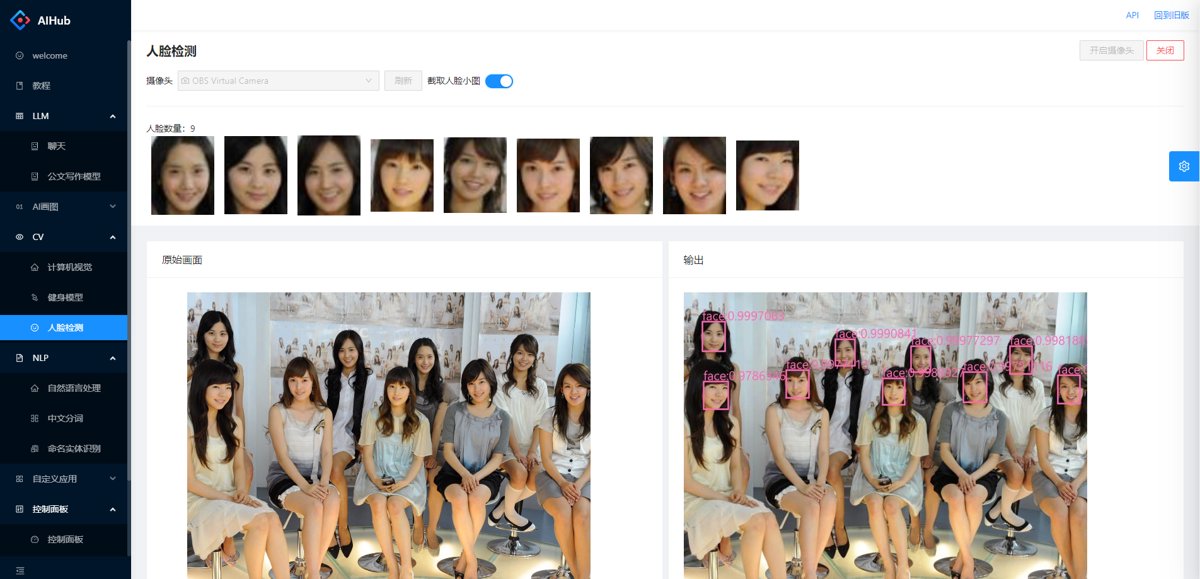
See the Result First
For multi-object detection, I immediately thought of "Girls' Generation" (少女时代), which was very popular back in my school days.
Introduction to ViewFaceCore
This is a .NET face recognition solution based on SeetaFace6.
SeetaFace6is the latest open-source commercial official version from CogniVisio (中科视拓). It breaks through the previous situation where the community and enterprise versions were not released in sync. This time, the open-source v6 version is officially synchronized with the commercial version.
The primary work involved creating a .NET wrapper for SeetaFace6.
It supports the following features:
- Age prediction
- Eye state detection
- Gender prediction
- Face detection
- Mask detection / Masked face keypoint localization, 5 key points
- Face keypoint localization (5 points / 68 points)
- Face recognition (5 points / 68 points)
- Liveness detection
- Head pose estimation
- Quality assessment
Using it in C# is very straightforward. However, since it calls a C++ library, there can be some minor pitfalls during deployment. This article documents these issues and their solutions.
Add Dependencies
First, add the following dependencies:
<PackageReference Include="ViewFaceCore" Version="0.3.8" />
<PackageReference Include="ViewFaceCore.all_models" Version="6.0.7" />
<PackageReference Include="ViewFaceCore.Extension.ImageSharp" Version="0.3.7" />
<PackageReference Include="ViewFaceCore.runtime.ubuntu.20.04.x64" Version="6.0.7" />
<PackageReference Include="ViewFaceCore.runtime.win.x64" Version="6.0.7" />
The runtimes starting with ViewFaceCore.runtime. need to be installed based on the development and deployment environment. In this case, I have installed both the Windows and Linux versions.
Note that the Linux version also depends on the libgomp1 library. If you encounter errors during usage, you need to install it first.
Face Detection
It's quite simple—first, create a FaceDetector object.
Since this model uses unmanaged resources, remember to use using or manually call the Dispose method to release resources.
using FaceDetector _faceDetector = new();
Then, pass in an image object to perform detection. If a face is detected, it will return the four coordinates of the bounding box.
It supports three image libraries:
- SkiaSharp
- ImageSharp
- System.Drawing
The third one is Microsoft's official library, but it's rumored to be deprecated. That's why I generally use ImageSharp—it's a pure C# implementation and works well cross-platform.
You need to install the ViewFaceCore.Extension.ImageSharp dependency to support ImageSharp images.
Simple Example
Let's start with the simplest example: detecting a face and drawing a frame around it.
public async Task<byte[]> DrawFaceFrame(byte[] imageBuffer, string format = "jpg") {
  using var inputStream = new MemoryStream(imageBuffer);
  using var image = await Image.LoadAsync(inputStream);
  var faceInfos = await _faceDetector.DetectAsync(image);
  foreach (var face in faceInfos) {
    image.Mutate(x => {
      x.Draw(
        Color.HotPink, 2.5f,
        new RectangleF(face.Location.X, face.Location.Y, face.Location.Width, face.Location.Height)
      );
    });
  }

  using var outputStream = new MemoryStream();
  await image.SaveAsync(outputStream, image.DetectEncoder($"demo.{format}"));
  return outputStream.ToArray();
}
The code above takes an image stream of type byte[] as input and outputs an image with the face frame drawn, also of type byte[].
It's quite simple, but ImageSharp's documentation is sparse. You still have to explore a bit to figure out how to draw a rectangular frame.
Complete Usage
Taking the previous "Preview the Effect" as an example, first define the data structure.
public class FaceItem {
  public FaceInfo FaceInfo { get; set; }
  public FaceMarkPoint[] FaceMarkPoints { get; set; }
  public float[]? FaceFeatures { get; set; }
  public byte[]? ImageBuffer { get; set; }
}

public class FaceDetectResult {
  public List<FaceItem> FaceItems { get; set; }
  public byte[] ImageBuffer { get; set; }
}
Three objects from ViewFaceCore are needed.
// Face detection
private readonly FaceDetector _faceDetector = new();

// Face landmark points
private readonly FaceLandmarker _faceMark = new();

// Face recognition
private readonly FaceRecognizer _faceRecognizer = new();
Key Code
PS: The code is quite rough, with average performance, just barely usable.
/// <summary>
/// Face Detection
/// </summary>
/// <param name="extractFeatures">Whether to extract face features</param>
/// <param name="cropEveryFace">Whether to crop each face into a small image</param>
/// <returns></returns>
public async Task<FaceDetectResult> Detect(
  byte[] imageBuffer, string format = "jpg",
  bool extractFeatures = false, bool cropEveryFace = false
) {
  var font = GetFont("segoeui.ttf");

  using var inputStream = new MemoryStream(imageBuffer);
  using var image = await Image.LoadAsync<Rgba32>(inputStream);
  using var resultImage = image.Clone();

  var result = new FaceDetectResult { FaceItems = new List<FaceItem>() };
  var faceInfos = await _faceDetector.DetectAsync(image);

  foreach (var face in faceInfos) {
    var faceItem = new FaceItem {
      FaceInfo = face,
      FaceMarkPoints = await _faceMark.MarkAsync(image, face)
    };

    // Extract face features
    if (extractFeatures) {
      faceItem.FaceFeatures = await _faceRecognizer.ExtractAsync(image, faceItem.FaceMarkPoints);
    }

    // Crop face small image
    if (cropEveryFace) {
      using var faceImage = image.Clone();
      var cropRect = GetCropRect(face, 5);
      try {
        faceImage.Mutate(x => x.Crop(cropRect));
      }
      catch (ArgumentException ex) {
        faceImage.Mutate(x => x.Crop(GetCropRect(face, 0)));
      }

      using (var faceImageStream = new MemoryStream()) {
        await faceImage.SaveAsync(faceImageStream, faceImage.DetectEncoder($"demo.{format}"));
        faceItem.ImageBuffer = faceImageStream.ToArray();
      }
    }

    result.FaceItems.Add(faceItem);

    // Draw face bounding box
    resultImage.Mutate(x => {
      x.Draw(
        Color.HotPink, 2.5f,
        new RectangleF(face.Location.X, face.Location.Y, face.Location.Width, face.Location.Height)
      );
      x.DrawText(
        $"face:{face.Score}", font, Color.HotPink,
        new PointF(face.Location.X, face.Location.Y - 20)
      );
    });
  }

  using var outputStream = new MemoryStream();
  await resultImage.SaveAsync(outputStream, resultImage.DetectEncoder($"demo.{format}"));
  result.ImageBuffer = outputStream.ToArray();

  return result;
}
Font and rectangle generation code
ImageSharp's documentation is very lacking; each step requires extensive searching...
private Font GetFont(string fontFileName) {
  var path = !string.IsNullOrWhiteSpace(_pathPrefix) ? Path.Combine(_pathPrefix, fontFileName) : fontFileName;
  FontCollection collection = new();
  FontFamily family = collection.Add(path);
  return family.CreateFont(20, FontStyle.Bold);
}

private static Rectangle GetCropRect(FaceInfo faceInfo, int cropOffset) {
  return new Rectangle(faceInfo.Location.X - cropOffset, faceInfo.Location.Y - cropOffset,
                       faceInfo.Location.Width + cropOffset * 2, faceInfo.Location.Height + cropOffset * 2);
}
Face Recognition
The approach to face recognition:
- Detect the face
- Determine the positions of facial landmarks (5-point/68-point)
- Extract features based on the landmarks
- Search for the person corresponding to that feature in a vector database
The last step uses a vector database, but it's not strictly necessary. The extracted face features are of type float[] and can theoretically be stored anywhere. During recognition, you can retrieve the face features and compare them by traversing your stored feature database.
The FaceRecognizer object provides a Compare function to calculate the similarity between two facial feature sets.
This feature is essentially a vector, so theoretically, you can calculate similarity using other algorithms yourself, such as
- Distance-based methods like Euclidean distance, Manhattan distance
- Cosine similarity
- Pearson correlation coefficient
In the "Complete Usage" section on face detection above, the steps for detecting faces, locating landmarks, and extracting features are already completed.
What needs to be done next:
- Entering face information: This requires a traditional relational database combined with a vector database, or a database like PostgreSQL that supports vector storage.
- Comparing face information: Use the vector search functionality of a vector database, or implement your own vector search algorithm.
Due to space limitations, this article will not expand on the face recognition topic. I will write a separate article when I have time.
Deployment
Next, we'll address the pending tasks.
Deploying the application using Docker
This project uses .Net Core 7.0, so we correspondingly use the mcr.microsoft.com/dotnet/aspnet:7.0 base image.
This image is based on the Debian 11 system.
By default, it does not include the libgomp1 library, which needs to be added manually.
APT Software Sources
First, prepare the sources.list file to modify the APT repository to a domestic source.
# By default, the source code mirror is commented out to improve apt update speed; uncomment it if needed
deb https://mirrors.tuna.tsinghua.edu.cn/debian/ bullseye main contrib non-free
# deb-src https://mirrors.tuna.tsinghua.edu.cn/debian/ bullseye main contrib non-free

deb https://mirrors.tuna.tsinghua.edu.cn/debian/ bullseye-updates main contrib non-free
# deb-src https://mirrors.tuna.tsinghua.edu.cn/debian/ bullseye-updates main contrib non-free

deb https://mirrors.tuna.tsinghua.edu.cn/debian/ bullseye-backports main contrib non-free
# deb-src https://mirrors.tuna.tsinghua.edu.cn/debian/ bullseye-backports main contrib non-free
# deb https://mirrors.tuna.tsinghua.edu.cn/debian-security bullseye-security main contrib non-free
# # deb-src https://mirrors.tuna.tsinghua.edu.cn/debian-security bullseye-security main contrib non-free

deb https://security.debian.org/debian-security bullseye-security main contrib non-free
# deb-src https://security.debian.org/debian-security bullseye-security main contrib non-free
dockerfile
During the base build stage, install the libgomp1 library.
FROM mcr.microsoft.com/dotnet/aspnet:7.0 AS base
COPY ./sources.list /etc/apt/sources.list
RUN apt update && apt install libgomp1
WORKDIR /app
EXPOSE 80
EXPOSE 443

FROM base AS final
WORKDIR /app
COPY . .
ENTRYPOINT ["./AIHub.Blazor"]
docker-compose.yml
version: '3.6'

services:
  web:
    image: ${DOCKER_REGISTRY-}web
    container_name: aihub
    restart: always
    environment:
      - ASPNETCORE_ENVIRONMENT=Production
      - ASPNETCORE_URLS=http://+:80
    build:
      context: .
    volumes:
      - .:/app
    networks:
      - default
      - swag

networks:
  swag:
    name: swag
    external: true
  default:
    name: aihub
Start!
Everything is ready.
C#, start!
docker compose up --build -d
References
- https://github.com/ViewFaceCore/ViewFaceCore/
- https://mirrors.tuna.tsinghua.edu.cn/help/debian/
- https://stackoverflow.com/questions/70183074/oserror-libgomp-so-1-not-found-when-importing-gluoncv-through-azure-app-service
- https://docs.sixlabors.com/api/ImageSharp.Drawing/SixLabors.ImageSharp.Drawing.Processing.DrawRectangleExtensions.html
_EOF_
C# integrates the ViewFaceCore face detection and recognition library.
- 本文作者:
- 程序设计实验室
- 版权声明:
- 本博客所有文章除特别声明外,均采用 BY-NC-SA 许可协议。转载请注明出处!
相关文章
并行化优化KD树算法:使用C#实现高效的最近邻搜索
本文介绍了如何使用并行计算技术优化 KD 树算法,并使用 C# 编程语言实现了高效的最近邻搜索。首先,我们简要介绍了 KD 树的原理和构建过程,然后详细讨论了如何利用并行计算库在多个 CPU 核心上并行构建 KD 树,从而加速搜索过程。通过实验验证,我们证明了并行化优化能够显著提高 KD 树的构建速度和搜索效率,为大规模数据集下的最近邻搜索问题提供了一种高效的解决方案。
2024-03-10 · C# · 约 1 分钟
C#爬虫:CatSpider#-开发笔记
前言 (PS:我这里用了#号代替了Sharp这个单词) CatSpider是毕设里的数据采集模块,本来爬虫类的应用肯定使用python来开发嘛,不过用request_html做解析的时候,python的动态类型真的把我恶心到了,而且感觉这个库也不是很成熟,html5lib也不好用,也没心思去深入了,之前看到有大佬用.net core平台做爬虫,于是我也来试试,没想到效果贼好,特别是配合LinqPa
2022-05-27 · C# · 约 1 分钟
C#移除字符串中的不可见Unicode字符
背景 最近发现某个数据采集的系统拿下来的数据,有些字段的JSON被莫名截断了,导致后续数据分析的时候解析JSON失败。 类似这样 {title: 你好 或者这样,多了个双引号啥的 {title:你好} 因为数据库是Oracle,起初以为是Oracle这老古董出问题了,结果一番折腾,把每条写入数据的SQL语句都拿出来,看起来里面的JSON格式都没问题。 这也太诡异了吧,看起来没毛病,但就为啥JSON
2023-02-02 · C# · 约 1 分钟
纯 C#实现+AOT 打造的多功能图片处理工具 ImageGlider
纯C#+AOT打造的ImageGlider,图像处理功能堆得像山,还非得标榜零依赖?ImageSharp封装得倒是挺顺溜,就是不知道这模块化架构能走多远。Web API和CLI工具有点东西,但别指望我夸太离谱。
2025-08-05 · C# · 约 1 分钟
讨论
共 0 条加载评论中…