

How to Set Up a Flutter Development Environment on Windows? This Article Walks You Through It
Preface Doing development on Windows, one word: a pain. But sometimes when you're out you can only bring a laptop. Linux isn't very compatible on some laptops, driver support isn't perfect, and power management isn't good enough, so in a pinch you have to make do with Windows for now—just like now, when I need to set up a Flutter development environment on Windows. Such a pain. Getting to the point Install the Android SDK first First, you need a way to download the Android SDK, which can be a VPN, or a China mirror; as for the details, I
目录20 个章节
Preface
Doing development on Windows, one word: a pain. But sometimes when you're out you can only bring a laptop. Linux isn't very compatible on some laptops, driver support isn't perfect, and power management isn't good enough, so in a pinch you have to make do with Windows for now—just like now, when I need to set up a Flutter development environment on Windows. Such a pain.
Getting to the Point
Install the Android SDK First
First, you need a way to download the Android SDK—either a VPN, or a China mirror. I won't go into the details.
1. Install Android Studio
2. The first time you run it, you'll be prompted to install the SDK
3. Or follow these steps
File | Settings | Appearance Behavior | System Settings | Android SDK
4. Add environment variables
-
Environment variables on Windows are a hassle, unlike Linux where one profile file does it all. The specific steps are to open the Control Panel, as shown

-
Select System and Security

-
Select System

-
Advanced system settings

-
Environment Variables

-
Double-click this Path

-
Select New
 Then just paste in the SDK installation directory.
5. Set the ANDROID_HOME environment variable
While setting the Path variable, you also need to add the SDK installation directory to ANDROID_HOME. Specifically, create a new environment variable named ANDROID_HOME, with the value being the SDK directory.
Download the Flutter SDK
- Flutter official website: https://flutter.dev/
- Official installation guide: https://flutter.dev/docs/get-started/install
1. First, add two environment variables to set up Flutter's China mirrors:
PUB_HOSTED_URL=https://pub.flutter-io.cn FLUTTER_STORAGE_BASE_URL=https://storage.flutter-io.cn The method for setting variables was covered earlier, but this is different from the Path environment variable—you need to add new variables. The steps are as follows:
-
Click New in the Environment Variables dialog

-
Fill in the name and variable value respectively
 (That's a hands-on walkthrough for you—clear enough, right?)
2. Next, there are three ways to install Flutter
- Use Git to clone the Flutter source. For using Git on Windows, please refer to a previous blog post of mine or search on your own
- Use Chocolatey to install Flutter. I'll cover how to use Chocolatey in a later blog post
- Download the official installer package, link: https://flutter.dev/docs/get-started/install/windows
3. After downloading the Flutter source, you likewise need to add this path to the Path environment variable. I won't repeat the steps—they've all been covered above. Just append the Flutter path to the Path environment variable.
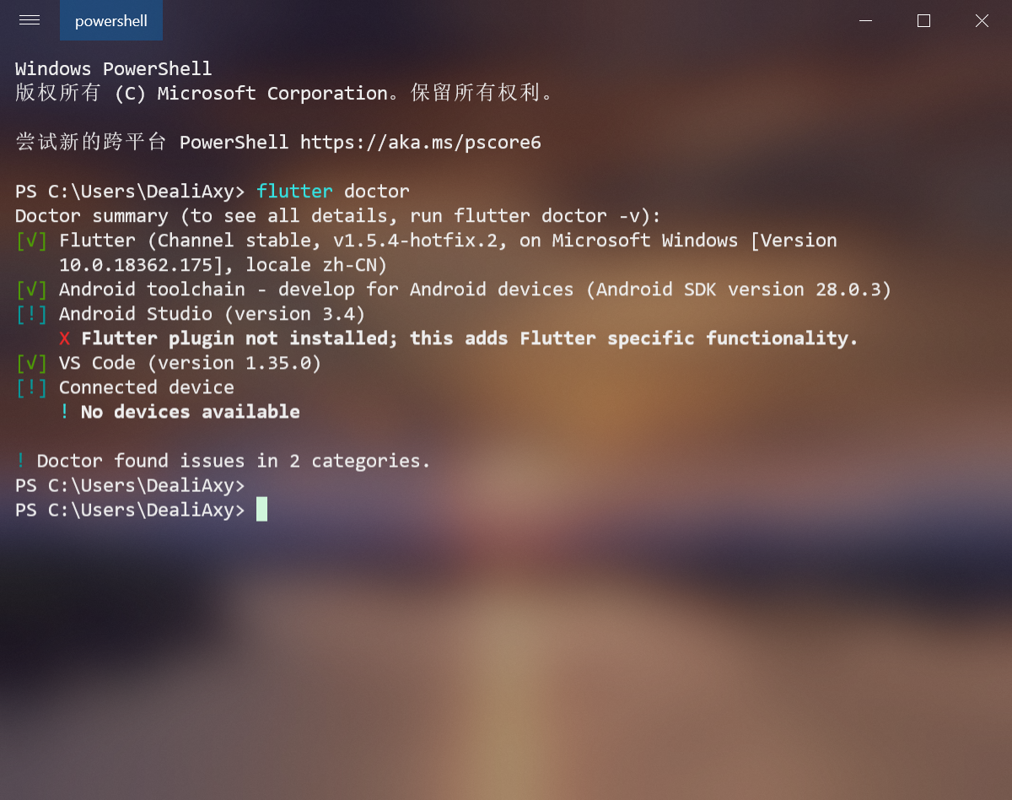
4. Run flutter doctor
Open Powershell and enter the command:
flutter doctor
Then Flutter will automatically download various dependencies and so on, then compile the Flutter SDK. If the result looks something like the following, you're all set:
Install Plugins
Whether you use VSCode or Android Studio, you need to install the Flutter plugin either way. Android Studio requires a restart after installing it.
Configure Gradle
Update 2023: This is no longer needed, but you still need to configure Gradle China mirrors
Another real pain point is configuring the Gradle path environment variable.
- Create a
GRADLE_HOMEenvironment variable - Fill in the Gradle directory. You'll have to find it yourself—it's different on different computers
- Add GRADLE_HOME to the Path variable:
Add a variable in Path with the value
%GRADLE_HOME%\bin. - To avoid any more weird issues, also add a CLASS_PATH environment variable,
with the value:
%GRADLE_HOME%\lib
Configure Gradle China Mirrors
Refer to this GitHub project: https://china-speed.github.io/
gradle bin
The official CDN domain downloads.gradle-dn.com used to have a presence in China, but it has been discontinued and can no longer be used.
sed -i 's/services.gradle.org\/distributions\//mirrors.cloud.tencent.com\/gradle\//g' ./gradle/wrapper/gradle-wrapper.properties

# 腾讯云
distributionUrl=https\://mirrors.cloud.tencent.com/gradle/gradle-6.6.1-bin.zip

# 默认国外
distributionUrl=https\://services.gradle.org/distributions/gradle-6.6.1-bin.zip
Gradle maven
Google Maven used to have a presence in China, but it has been discontinued and needs acceleration for mainland China.
mkdir ~/.gradle
cat > ~/.gradle/init.gradle << \EOF
def repoConfig = {
    all { ArtifactRepository repo ->
        if (repo instanceof MavenArtifactRepository) {
            def url = repo.url.toString()
            if (url.contains('repo1.maven.org/maven2')
                || url.contains('jcenter.bintray.com')
                || url.contains('maven.google.com')
                || url.contains('plugins.gradle.org/m2')
                || url.contains('repo.spring.io/libs-milestone')
                || url.contains('repo.spring.io/plugins-release')
                || url.contains('repo.grails.org/grails/core')
                || url.contains('repository.apache.org/snapshots')
            ) {
                println "gradle init: [buildscript.repositories] (${repo.name}: ${repo.url}) removed"
                remove repo
            }
        }
    }

    // 腾讯云 maven 镜像聚合了:central、jcenter、google、gradle-plugin
    maven { url 'https://mirrors.cloud.tencent.com/nexus/repository/maven-public/' }
    // 阿里云 https://help.aliyun.com/document_detail/102512.html
    maven { url 'https://maven.aliyun.com/repository/central' }
    maven { url 'https://maven.aliyun.com/repository/jcenter' }
    maven { url 'https://maven.aliyun.com/repository/google' }
    maven { url 'https://maven.aliyun.com/repository/gradle-plugin' }
    maven { url 'https://maven.aliyun.com/repository/spring' }
    maven { url 'https://maven.aliyun.com/repository/spring-plugin' }
    maven { url 'https://maven.aliyun.com/repository/grails-core' }
    maven { url 'https://maven.aliyun.com/repository/apache-snapshots' }
}

allprojects {
    buildscript {
        repositories repoConfig
    }

    repositories repoConfig
}
EOF
ok...
Finally done configuring. After struggling through it myself, I can finally understand why some beginners say they spent a whole week setting up their Flutter environment~ Windows really isn't developer-friendly—there are so many extra hoops to jump through, especially for beginners who end up taking a lot of detours. When all is said and done, Linux or Mac is still better (flees)
Feel Free to Reach Out
- Coding livestream: https://live.bilibili.com/11883038
- WeChat official account: DealiAxy
- Zhihu: https://www.zhihu.com/people/dealiaxy
- Blog: https://blog.deali.cn
- Jianshu: https://www.jianshu.com/u/965b95853b9f
_EOF_
How to Set Up a Flutter Development Environment on Windows? This Article Walks You Through It
- 本文作者:
- 程序设计实验室
- 版权声明:
- 本博客所有文章除特别声明外,均采用 BY-NC-SA 许可协议。转载请注明出处!
相关文章
有模有样解决Flutter里Webview无法访问HTTP页面的问题
探索过程 Android9(好像是吧)开始谷歌就默认不让开发者访问不安全HTTP内容了,如果非要用HTTP,那必须在networkSecurityConfig里配置cleartextTrafficPermitted才行。谷歌这个设计的出发点本是好的,HTTPS固然更安全咱都懂,但有时候这个后端接口你选择不了要HTTP还是HTTPS,比如要使用没有提供HTTPS的第三方服务,或者是本文的这种情况:在
2021-12-18 · Flutter · 约 1 分钟
Flutter播放音乐简单解决方案-AudioPlayers-与填坑
目前flutter播放音乐好像只搜到AudioPlayers这个解决方案,我照着他的文档来,确实是可以播放音乐的。 项目主页:https://pub.flutter-io.cn/packages/audioplayers AudioCache介绍:https://github.com/luanpotter/audioplayers/blob/master/doc/audio_cache.md An
2021-12-18 · Flutter · 约 1 分钟
Flutter开发:迁移Flutter应用到AndroidX
首先上官方文档:https://flutter.dev/docs/development/packages-and-plugins/androidx-compatibility 有两种方式,一种由Android studio自动完成,一种手动修改依赖配置。 官方推荐第一种,不过在我这不好使,于是我用了第二种,也成功跑起来了~ 自动方式 Use Android Studio to migrate y
2021-12-18 · Flutter · 约 1 分钟
Flutter编译失败:java-nio-file-NoSuchFileException--build-app-intermediates
FAILURE: Build failed with an exception. * What went wrong: Execution failed for task ':app:mergeExtDexDebug'. A failure occurred while executing com.android.build.gradle.internal.tasks.Workers$Acti
2021-12-18 · Flutter · 约 1 分钟
讨论
共 0 条加载评论中…