

From Cryptomining Trojan Intrusion to Docker Rootless Hardening: My Server Security Recap
Do you really have to wait until your server becomes a mining farm before you'll admit that Docker's default root privileges are a backdoor for hackers? Setting up Rootless is tedious, but still cheaper than reinstalling the OS. If you can't even handle port mapping and ACL permissions, you might as well shut down and disconnect—don't run naked in production.
目录13 个章节
Preface
Recently several of my servers in a row were hit with cryptomining trojans. CPU, bandwidth, and disk I/O were maxed out, and the servers locked up so badly I couldn't even connect.
After investigating, I found the core cause was overly high Docker privileges + exposed service vulnerabilities, which let attackers break through permission controls via containers.
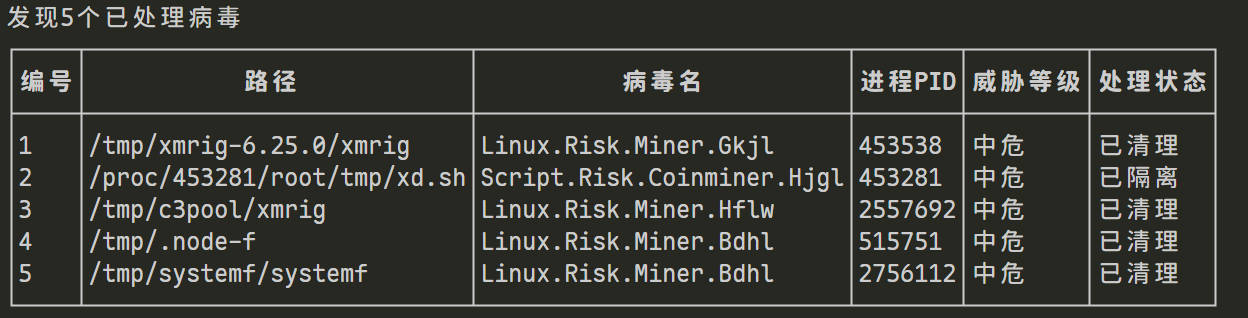
PS: I originally wanted to write an article covering the investigation process, but I couldn't be bothered, so I'll include it in this post~
After reinstalling the OS, when deploying Docker I noticed the official hint about Rootless mode — this mode can fundamentally reduce the risk of container escape, so I researched it in depth and put it into practice. I'm organizing and sharing the complete process here, hoping it helps developers who also care about Docker security.
What Is Rootless Mode
Normally, the Docker daemon (dockerd) runs with root privileges. Even if you run docker run as a regular user, the underlying process still has root privileges, which is a security risk (for example, a container escape could obtain host root).
Rootless mode lets the Docker daemon run with regular user privileges. Even if something goes wrong with a container, it cannot obtain the host's root privileges, so security is greatly improved.
Benefits naturally come with costs: the cost of Rootless is complex configuration, and some features are limited (for example, you cannot map ports < 1024).
That's okay though — these can also be solved through configuration. Let's start with installation.
Installing Docker
Installation would have been very simple, but add one qualifier: in China's network environment, it becomes extremely complicated.
This article covers the simplest installation method: using the official Docker script + the Tsinghua mirror.
export DOWNLOAD_URL="https://mirrors.tuna.tsinghua.edu.cn/docker-ce"
# 如您使用 curl
curl -fsSL https://ghfast.top/https://raw.githubusercontent.com/docker/docker-install/master/install.sh | sh
# 如您使用 wget
wget -O- https://ghfast.top/https://raw.githubusercontent.com/docker/docker-install/master/install.sh | sh
Note that the raw.githubusercontent.com domain is also inaccessible; you can use ghproxy to accelerate it.
Post-Install Prompt
After installation there will be a prompt, which is also the key entry point for enabling Rootless mode:
================================================================================

To run Docker as a non-privileged user, consider setting up the
Docker daemon in rootless mode for your user:

    dockerd-rootless-setuptool.sh install

Visit https://docs.docker.com/go/rootless/ to learn about rootless mode.


To run the Docker daemon as a fully privileged service, but granting non-root
users access, refer to https://docs.docker.com/go/daemon-access/

WARNING: Access to the remote API on a privileged Docker daemon is equivalent
         to root access on the host. Refer to the 'Docker daemon attack surface'
         documentation for details: https://docs.docker.com/go/attack-surface/

================================================================================
This is where I started using Rootless mode.
Key takeaways from the prompt:
- It is recommended to enable Rootless mode via
dockerd-rootless-setuptool.sh install, so a regular user can run Docker without root privileges; - If you insist on running Docker with root privileges, you can refer to the docs to grant access to regular users (e.g. adding them to the docker group), but the risk is higher;
- Critical warning: exposing the Docker remote API (e.g. port 2375) = directly opening host root privileges. This is a frequent cause of server intrusions!
Installing Required Dependencies
When I ran dockerd-rootless-setuptool.sh install directly, it reported missing dependencies
$ dockerd-rootless-setuptool.sh install
[ERROR] Missing system requirements. Run the following commands to
[ERROR] install the requirements and run this tool again.

########## BEGIN ##########
sudo sh -eux <<EOF
# Install newuidmap & newgidmap binaries
apt-get install -y uidmap
EOF
########## END ##########
Enter the command shown in the prompt:
sudo sh -eux <<EOF
# Install newuidmap & newgidmap binaries
apt-get install -y uidmap
EOF
After installation, run dockerd-rootless-setuptool.sh install again
From then on, when operating the Docker service, add --user
systemctl --user start docker.service
Configuration
In Rootless mode:
- All Docker commands must be executed under the regular user who installed Rootless (do not use root);
- If Docker does not start automatically after a server reboot, run:
systemctl --user enable --now docker; - For data backups, look in the
~/.local/share/dockerdirectory (not/var/lib/docker).
Image Accelerator
By default, Rootless Docker's configuration file is stored under the current user's XDG config directory, at: ~/.config/docker/daemon.json
# 先创建目录(如果不存在)
mkdir -p ~/.config/docker

# 编辑配置文件(用 nano 或 vim 都可以)
nano ~/.config/docker/daemon.json
Configure the accelerator
{
  "registry-mirrors": ["https://你的阿里云镜像加速地址.mirror.aliyuncs.com"],
  "log-driver": "json-file",
  "log-opts": {
    "max-size": "100m",
    "max-file": "3"
  }
}
Note: Most of the previously stable, reliable accelerators have stopped service, so I can't recommend anything now — you're on your own.
Fixing the “Cannot Bind Ports 1-1023” Problem
You need to grant the current user permission to “bind low-numbered ports”:
# 给当前用户授权绑定 1-1023 端口(仅对当前会话生效)
sudo sysctl net.ipv4.ip_unprivileged_port_start=0

# 永久生效(重启后也有效)
echo "net.ipv4.ip_unprivileged_port_start=0" | sudo tee -a /etc/sysctl.conf
sudo sysctl -p  # 立即生效
After running this, you'll be able to map ports 80, 443, etc. normally.
Restart to Apply
The restart command for Docker in Rootless mode is different from the system-level one. Run:
# 重启当前用户的 Docker 服务
systemctl --user restart docker

# 验证配置是否生效
docker info
# 能在 "Registry Mirrors" 部分看到你配置的镜像加速地址就是成功的
Example of normal output:
Rootless: true
Registry Mirrors:
 https://你的阿里云镜像加速地址.mirror.aliyuncs.com/
Configuration Items Not Supported in Rootless Mode
Some system-level settings have no effect under Rootless (because there is no root privilege), for example:
iptables: false(network rules are managed by slirp4netns, not iptables);storage-driver: overlay2(already enabled by default, no need to configure manually);- Remote API related settings (e.g.
hosts: ["tcp://0.0.0.0:2375"], not recommended to enable under Rootless). - Any configuration involving system-level paths (e.g.
/var/run/docker.sock).
Volume Issues
After switching to Rootless, I also found that SWAG's config could no longer be read or written.
SWAG's compose.yaml configuration looks like this:
services:
  swag:
    image: linuxserver/swag
    container_name: swag
    cap_add:
      - NET_ADMIN
    environment:
      - PUID=1000
      - PGID=1000
    volumes:
      - ./config:/config
In Rootless Docker, UID=1000 inside the container ≠ UID=1000 on the host
So when SWAG chowns /config inside the container, what the host sees is a “mapped unfamiliar UID (100999)”
Solution
The Rootless official docs recommend using named volumes, but I frequently need to modify files in config, so that's definitely not practical.
There's another method: use ACL to grant access.
First install the related tools:
sudo apt update
sudo apt install -y acl
In the swag directory, run:
setfacl -m u:ecs-user:rwx config
setfacl -R -m u:ecs-user:rwx config
setfacl -d -m u:ecs-user:rwx config
Verify:
getfacl config | sed -n '1,20p'
You should see something like:
user::rwx
user:ecs-user:rwx
group::r-x
mask::rwx
other::r-x
Wrap-up
Rootless mode is a bit more tedious to configure than regular Docker, but it can fundamentally reduce container-escape risk, and is especially suitable for production servers that provide services to the outside. Core summary:
- Installation: combine the Tsinghua mirror to solve download issues in China, and prefer installing Rootless mode as a regular user;
- Permissions: never expose the Docker remote API; granting regular users permission to bind low-numbered ports is enough for daily use;
- Configuration: remember that Rootless mode's config files and data directories all live under the user directory, separate from system-level Docker;
- Security: even with Rootless enabled, you still need to pay attention to service security when running containers (e.g. add a password to Redis, restrict port access with security groups).
This round of pitfalls made me deeply realize: server security is no small matter. Even a foundational tool like Docker needs least-privilege controls at the permission layer, so that cryptomining trojans and other malware cannot slip in.
_EOF_
From Cryptomining Trojan Intrusion to Docker Rootless Hardening: My Server Security Recap
- 本文作者:
- 程序设计实验室
- 版权声明:
- 本博客所有文章除特别声明外,均采用 BY-NC-SA 许可协议。转载请注明出处!
相关文章
解决Centos下docker容器无法联网
vi /etc/sysctl.conf 找到net.ipv4.ip_forward 设置允许转发 # Controls IP packet forwarding net.ipv4.ip_forward = 1 #使之生效 sysctl -p #重启docker systemctl restart docker
2021-12-18 · docker · 约 1 分钟
使用python-slim镜像遇到无法使用PostgreSQL的问题
python-slim镜像用PostgreSQL?报错libpq.so.5缺失,谁在乎?换psycopg2-binary搞定,或者手动安装库,麻烦死了。slim镜像小,PostgreSQL却不行,缺库谁管?用预编译包省事点。
2024-08-20 · docker · 约 1 分钟
在python项目的docker镜像里使用pdm管理依赖
PDM在Docker里替代pip?改Dockerfile调compose,禁用虚拟环境设路径,uwsgi要gcc镜像slim不行。PDM比poetry顺,勉强能用。
2024-08-11 · docker · 约 1 分钟
一次生产环境的docker MySQL故障
问题 昨天下午本来要去吃下午茶,然后前端小伙伴突然说接口怎么崩了,我登上sentry一看,报错了 (2005, Unknown MySQL server host 'mysql' (-3)) 啥意思啊,连不上数据库,host是mysql因为这是在docker环境里 直接ssh连上服务器查看,没啥问题呀,MySQL容器也正常运行着 奇怪 然后我重启了一波docker,结果发现MySQL容器没有正常重
2022-05-27 · docker · 约 1 分钟
讨论
共 0 条加载评论中…