

How to Check the ADB Port Number of an Android Emulator?
Find the emulator process Use tasklist to view the process pid tasklist Find the PID of the emulator process, then use the netstat command. netstat -ano | findstr 1000 Here, 1000 is the process PID found above. With the obtained port number, you can connect using ADB. adb connect 127.0.0.1:端口号 Of course, the best method is still to look it up on the emulator provider's website, which is the most convenient. For example I
目录3 个章节
Find the emulator process
Use tasklist to view the process pid
tasklist
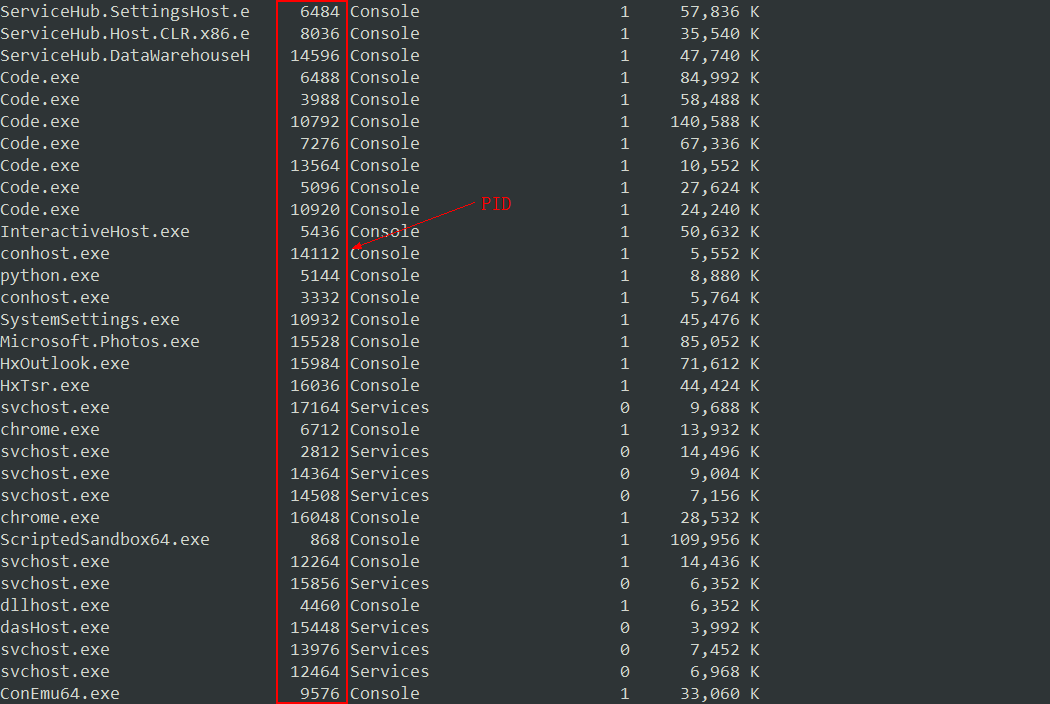
Find the PID of the emulator process, then use the netstat command.
netstat -ano | findstr 1000
Here, 1000 is the process PID found above.
With the obtained port number, you can connect using ADB.
adb connect 127.0.0.1:端口号
Of course, the best method is still to look it up on the emulator provider's website, which is the most convenient. For example, I use the NetEase emulator, whose official website says the port is 7555, so I just used that.
For ADB usage, you can check: Google official documentation
About

To learn more interesting operations, please follow my WeChat official account: DealiAxy Every article is collected on my blog: blog.deali.cn
_EOF_
How to Check the ADB Port Number of an Android Emulator?
- 本文作者:
- 程序设计实验室
- 版权声明:
- 本博客所有文章除特别声明外,均采用 BY-NC-SA 许可协议。转载请注明出处!
相关文章
Android-x86-7-1-稳定版初体验
前言 最近Android x86发布了7.1的稳定版本,作为一名~~伪极客~~,自然是要安装体验一下。 关于在电脑上可以用的Android系统,可能大部分人了解的都是 Remix OS 和 Phoenix OS 这两个。不过这两个也是基于Android x86的nightly版本构建的,还是原版的才原汁原味呐。 这里不得不吐槽一下,这个Android x86项目的官网真是简陋,只有这么一个捐赠的海
2021-12-18 · Android · 约 1 分钟
一加3升级Android9-0的刷机折腾之路
前言 你能想象一个16年发布的手机,到现在三年了,从一开始的Android6.0到现在的Android9.0吗?这系统更新的周期,可以说是比较良心了~ 不过这次升级Android9.0 虽然说是官方给出的ROM包,不过还是有一些小坑的,折腾了一个下午和晚上才最终装上去,也可能是我太久没有刷机了,生疏了不少吧。 先放截图 系统镜像下载 首先去官方通道下载镜像: 官方的Android9.0现在出到第二
2021-12-18 · Android · 约 1 分钟
电脑上的安卓系统——PhoenixOS浅度体验
前言 其实这篇关于PhoenixOS的浅度评测在几个月前就准备发了,当时是刚看到新闻说Android 7.0 x86的正式版刚刚发布,于是就下载来安装一番,结果.....体验极差= =,只能用这4个字来形容,不过既然体验Android x86,就不能扫兴而归,所以就把国产基于Android x86深度定制而颇有名气的PhoenixOS安装体验一番。 本文不涉及如何安装,因为安装过程很简单,如果有需
2021-12-18 · Android · 约 1 分钟
在Android模拟器里取得root权限
前言 android 开发过程中程序很多时候免不了需要对系统目录下的内容进行操作,虽然android的内核是linux系统,但是在linux中切换到root下的方式是sudo root,但是在的android中并没有提供我们su文件。 So我们要向需要root的系统中添加su文件,同时改变su二进制文件的权限。 操作步骤 步骤一 将需要root的模拟器运行起来 步骤二 在有 supersu.apk
2022-06-17 · Android · 约 1 分钟
讨论
共 0 条加载评论中…