ASP.NET Core Learning Notes: gRPC Quick Start
gRPC is very smooth to use, and I haven't encountered any pitfalls so far. It integrates seamlessly with existing projects, and if you have a similar scenario, I highly recommend giving gRPC a try! gRPC has many features; this article only covers the most basic usage. For more details, please refer to the documentation. With the foundation laid out in this article, readers will find it easier to dive into the documentation for deeper usage.
目录13 个章节
Preface
Previously, when I needed cross-language communication, I used Facebook's Thrift. It was lightweight and worked well.
Thrift is an interface description language and binary communication protocol used for defining and creating cross-language services. It operates as a remote procedure call (RPC) framework, developed by Facebook for "scalable cross-language services development." It combines a software stack with a code generation engine to create seamlessly efficient cross-platform services to varying degrees. It supports development with C#, C++ (POSIX-compatible systems), Cappuccino, Cocoa, Delphi, Erlang, Go, Haskell, Java, Node.js, OCaml, Perl, PHP, Python, Ruby, and Smalltalk. In 2007, it was open-sourced by Facebook, entered the Apache Incubator in May 2008, and became a top-level Apache project in October 2010.
A recent project had similar requirements, and this time I decided to use Google's gRPC. The reasons are that gRPC is highly regarded, I had always wanted to use it but lacked the opportunity, and the ASP.NET Core documentation introduces it, indicating that it is officially recommended for RPC communication.
So, I confidently began implementing gRPC, and the final result was satisfactory (more on that later).
This article primarily introduces how to use gRPC for cross-language communication between C# and Python.
Concept Introduction
What is RPC?
Remote Procedure Call (RPC) is a computer communication protocol. This protocol allows a program running on one computer to call a subroutine on another computer, without programmers needing to program specifically for this interaction. For example, Java RMI (Remote Method Invocation) allows an object on one Java Virtual Machine to invoke methods on an object in another Java Virtual Machine as if it were a local call).
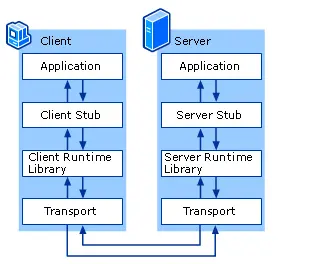
From the above diagram, we can see that RPC itself is a client-server model and also a request-response protocol. Some implementations have extended the remote call model to enable bidirectional service invocations. However, regardless, the call process is still initiated by a client, and the server provides the response; the basic model remains unchanged. The service invocation process is as follows:
- The client calls the client stub, which is a local procedure call.
- The client stub packs the parameters into a message and sends this message. The packing process is also called marshalling.
- The client's system sends the message to the server.
- The server's system delivers the received packet to the server stub.
- The server stub unpacks to obtain the parameters. This unpacking is also known as unmarshalling.
- Finally, the server stub calls the service procedure. The return result is passed back to the client following the reverse steps.
About gRPC
gRPC is a language-agnostic, high-performance Remote Procedure Call (RPC) framework.
As mentioned earlier, this was developed by Google. The following is an introduction to gRPC from the ASP.NET Core documentation.
The main advantages of gRPC are:
- A modern, high-performance, lightweight RPC framework.
- Contract-first API development, using Protocol Buffers by default, allowing for language-agnostic implementation.
- Tooling available for a variety of languages to generate strongly-typed server and client code.
- Support for client, server, and bidirectional streaming calls.
- Reduced network usage with Protobuf binary serialization.
These advantages make gRPC suitable for:
- Lightweight microservices where efficiency is critical.
- Polyglot systems requiring multiple languages for development.
- Point-to-point real-time services that need to handle streaming requests or responses.
gRPC uses .proto files to define interfaces and data types, and it provides tools to generate code for different languages from these .proto files.
Project Introduction
The project in this article uses C# to call a Python-based service, which is a large language model.
In this project, the C# project acts as the client, while the Python project serves as the server.
Writing a .proto File
The first step is to write a .proto file to define the interfaces and data structures.
Save the following code into a chat.proto file. Later, you'll need to copy this file into every project that will connect to gRPC.
syntax = "proto3";

import "google/protobuf/wrappers.proto";

option csharp_namespace = "AIHub.Blazor";

package aihub;

service ChatHub {
  rpc Chat (ChatRequest) returns (ChatReply);
  rpc StreamingChat (ChatRequest) returns (stream ChatReply);
}

message ChatRequest {
  string prompt = 1;
  repeated google.protobuf.StringValue history = 2;
  int32 max_length = 3;
  float top_p = 4;
  float temperature = 5;
}

message ChatReply {
  string response = 1;
}
Here, two Chat methods are defined: one is a unary call (一元调用) and the other uses server-streaming output (流式输出).
gRPC services can have different types of methods. How a service sends and receives messages depends on the type of method defined.
- Unary: Returns after the call is completed; a synchronous method.
- Server streaming: The server streams data back.
- Client streaming: The client streams data in.
- Bidirectional streaming
These are all fairly easy to understand, and they are also straightforward in the .proto definition. Wherever you see stream, that indicates streaming.
If
streamis placed in the request parameter, then the client's input is streaming. If it's placed before the return value, then the server's response is streaming.Placing it on both sides means bidirectional streaming.
Next, the data structures used are defined: one input parameter ChatRequest and one return parameter ChatReply.
The line string prompt = 1; assigns a position to the parameter. This isn't the same as assigning a variable value 😂. I was almost confused the first time I used it.
Server-side Python Project
First, set up the gRPC server within the Python project.
Copy the chat.proto file mentioned above into the Python project directory.
The Python project requires installing dependencies.
pip install grpcio
pip install grpcio-tools
Execute the command to generate code.
python -m grpc_tools.protoc -I . --python_out=. --pyi_out=. --grpc_python_out=. ./chat.proto
The command above can generate the following code based on the proto file.
- chat_pb2_grpc.py
- chat_pb2.py
- chat_pb2.pyi
Write the server code.
from concurrent import futures
import logging
import grpc
import chat_pb2
import chat_pb2_grpc

class Greeter(chat_pb2_grpc.ChatHubServicer):
    def Chat(self, request: chat_pb2.ChatRequest, context):
        response, history = model.chat(
            tokenizer,
            request.prompt,
            history=[],
            max_length=request.max_length,
            top_p=request.top_p,
            temperature=request.temperature)
        return chat_pb2.ChatReply(response=response)

    def StreamingChat(self, request: chat_pb2.ChatRequest, context):
        past_key_values, history = None, []
        current_length = 0
        for response, history, past_key_values in model.stream_chat(
                tokenizer, request.prompt, history=history,
                past_key_values=past_key_values,
                return_past_key_values=True):
            print(response[current_length:], end="", flush=True)
            yield chat_pb2.ChatReply(response=response)
            current_length = len(response)

def serve():
    port = '50051'
    server = grpc.server(futures.ThreadPoolExecutor(max_workers=10))
    chat_pb2_grpc.add_ChatHubServicer_to_server(Greeter(), server)
    server.add_insecure_port('[::]:' + port)
    server.start()
    print("Server started, listening on " + port)
    server.wait_for_termination()

if __name__ == '__main__':
    logging.basicConfig()
    serve()
The two methods defined earlier in the proto file: Chat and StreamingChat need to be implemented by yourself. Here, I directly call the Transformer. The unary method directly returns the result, while for streaming output, yield is used to generate the results.
Extension: Python gRPC Client
This article uses the Python project as the gRPC server for the AspNetCore project to call.
The reverse is also possible.
The code for Python as the client is as follows.
import logging
import grpc
import chat_pb2
import chat_pb2_grpc

def run():
    print("Will try to greet world ...")
    with grpc.insecure_channel('localhost:50051') as channel:
        stub = chat_pb2_grpc.ChatHubStub(channel)
        response = stub.Chat(chat_pb2.ChatRequest(prompt='你好'))
    print("Greeter client received: " + response.message)

if __name__ == '__main__':
    logging.basicConfig()
    run()
Client AspNetCore Project
The integration of AspNetCore with gRPC is very straightforward
First, add the proto file mentioned above to the project
In this project, I placed it in Protos/chat.proto
First, install the nuget package
dotnet add Grpc.AspNetCore
Then edit the .csproj file and add the following configuration
<ItemGroup>
  <Protobuf Include="Protos\chat.proto" GrpcServices="Both" />
</ItemGroup>
Here, GrpcServices="Both" means generating both server-side and client-side code simultaneously
After completion, build the project, and the corresponding code will be generated in the obj\Debug\net6.0\Protos directory
However, you don't need to directly reference this code; the compiler will handle it automatically.
Client
Edit the Program.cs file
Register a gRPC client
builder.Services.AddGrpcClient<ChatHub.ChatHubClient>(options => {
    options.Address = new Uri(builder.Configuration.GetValue<string>("gRPCServer"));
});
To register multiple identical clients, you can add a name for differentiation
builder.Services.AddGrpcClient<ChatHub.ChatHubClient>("client1", options => {
    options.Address = new Uri(builder.Configuration.GetValue<string>("gRPCServer"));
});
builder.Services.AddGrpcClient<ChatHub.ChatHubClient>("client2", options => {
    options.Address = new Uri(builder.Configuration.GetValue<string>("gRPCServer"));
});
When using it, simply inject it directly.
For named clients, first inject the GrpcClientFactory object
var clinet1 = grpcClientFactory.CreateClient<ChatHub.ChatHubClient>("client1");
var clinet2 = grpcClientFactory.CreateClient<ChatHub.ChatHubClient>("client2");
Initiate a request (unary mode)
var request = new ChatRequest { Prompt = "Hello" };
ChatReply reply = ChatClient.Chat(request);
Read streaming response data
using (var call = ChatClient.StreamingChat(request)) {
  await foreach (var resp in call.ResponseStream.ReadAllAsync()) {
    Console.Write(resp.Response);
  }
}
Simple and done~
Server Side
It's equally simple.
Register the service and configure the middleware.
builder.Services.AddGrpc();
app.MapGrpcService<ChatService>();
The ChatService code.
public class ChatService : ChatHub.ChatHubBase {
  private readonly ILogger<ChatService> _logger;

  public ChatService(ILogger<ChatService> logger) {
    _logger = logger;
  }
  public override Task<ChatReply> Chat(ChatRequest request, ServerCallContext context) {
    return new Task<ChatReply>(() => new ChatReply { Response = $"Hello, {request.Prompt}" });
  }

  public override async Task StreamingChat(ChatRequest request, IServerStreamWriter<ChatReply> responseStream,
                                           ServerCallContext context) {
    for (var i = 0; i < 5; i++) {
      await responseStream.WriteAsync(new ChatReply { Response = $"{i}" });
      await Task.Delay(TimeSpan.FromSeconds(1));
    }
  }
}
It's the same here—it implements the two methods defined in the protobuf.
The code is quite readable and similar to the Python version above, so I won't repeat the explanation here.
Summary
gRPC is extremely smooth to use, and I haven't encountered any pitfalls so far. It integrates very seamlessly with existing projects. If you have a similar scenario, I highly recommend giving gRPC a try!
gRPC has many features; this article only covers the most basic usage. For more information, please refer to the documentation. I believe that with the foundation laid in this article, readers will find it easier to dive into the documentation for advanced use.
PS: I'll write a summary blog post soon about the project that utilized gRPC—stay tuned~
References
_EOF_
ASP.NET Core Learning Notes: gRPC Quick Start
- 本文作者:
- 程序设计实验室
- 版权声明:
- 本博客所有文章除特别声明外,均采用 BY-NC-SA 许可协议。转载请注明出处!
相关文章
Asp-Net-Core学习笔记:1.MVC入门篇
Asp.Net Core 学习 基于.Net Core 2.2版本的学习笔记。 常识 像Django那样自动检查代码更新,自动重载服务器(太方便了) dotnet watch run 托管设置 设置项目文件的AspNetCoreHostingModel属性。 PropertyGroup TargetFrameworknetcoreapp2.2/TargetFramework Asp
2022-02-16 · Asp-Net-Core学习笔记 · 约 1 分钟
Asp-Net-Core学习笔记:2.MVC视图、模型、持久化、文件、错误处理、日志
TagHelper 入门 优点:根据参数自动生成,不需要手写超链接,类似Django模板里面的url命令。 在ViewImport中添加TagHelper @addTagHelper *,Microsoft.AspNetCore.Mvc.TagHelpers 比如,链接TagHelper使用 a class=btn btn-outline-primary asp-controller=st
2022-08-12 · Asp-Net-Core学习笔记 · 约 1 分钟
Asp-Net-Core学习笔记:WebApi开发实践
前言 用AspNetCore做Api开发也有一段时间了,正好年底在做总结,做一个WebApi开发实践笔记。 暂时想到的一些技术关键词,同时也作为本文的大纲,现在对这套技术体系的了解还不够深入,以后会持续更新这个Api开发实践~ 身份认证:JwtBearer 分页:X.PagedList 缓存 ResponseCache Redis:StackExchange.Redis 数据持久化 / ORM F
2022-07-04 · Asp-Net-Core学习笔记 · 约 1 分钟
Asp-Net-Core学习笔记:4.Blazor-WebAssembly入门
本来今天开始是有其他的安排了,也没办法抽出那么多时间来学NetCore,不过我想做事情有始有终吧,除了gRPC还没跑起来之外,Blazor这部分也了解了一点。目前来说还不是很完善,真正的离线单页应用还处于预览版阶段。
2023-07-12 · Asp-Net-Core学习笔记 · 约 1 分钟
讨论
共 0 条加载评论中…