

Asp-Net-Core Study Notes: WebApi Development Practices
Preface I've been doing API development with AspNetCore for some time now. Since I'm wrapping things up at the end of the year, I decided to write some notes on WebApi development practices. Here are some technical keywords I thought of for now, which also serve as the outline of this article. My understanding of this tech stack isn't deep enough yet, so I'll keep updating these API development practices going forward~ Authentication: JwtBearer Pagination: X.PagedList Caching ResponseCache Redis: StackExchange.Redis Data persistence / ORM F
目录37 个章节
Preface
I've been doing API development with AspNetCore for some time now. Since I'm wrapping things up at the end of the year, I decided to write some notes on WebApi development practices.
Here are some technical keywords I thought of for now, which also serve as the outline of this article. My understanding of this tech stack isn't deep enough yet, so I'll keep updating these API development practices going forward~
-
Authentication: JwtBearer
-
Pagination: X.PagedList
-
Caching
- ResponseCache
- Redis: StackExchange.Redis
-
Data persistence / ORM
- FreeSQL
- Dapper
- EF Core
- MongoDB
-
API documentation (OpenApi)
- Swagger: Swashbuckle.AspNetCore
- IGeekFan.AspNetCore.Knife4jUI
- IGeekFan.AspNetCore.RapiDoc
-
Serialization
- NewtonsoftJson
- System.Text.Json
-
Web scraping
- HttpClient(System.Net.Http)
- System.Net.Http.Json
- AngleSharp
-
Logging & monitoring
- NLog
- ExceptionLess
- Sentry
-
Real-time communication: SignalR
-
Object mapping: AutoMapper
-
Scheduled tasks / async task queues: Hangfire
CRUD
The essence of web development is...
RESTFul
For WebApi development, as far as I know the commonly used approaches are none other than HTTP and RPC. Our team currently uses HTTP quite a bit more, and for elegant, easy-to-use API design, RESTFul is a must~
REST, short for REpresentational State Transfer, is an architectural style for applications, used to build simple, reliable, high-performance web applications. REST proposes a series of constraints; applications that follow these constraints are called RESTful API applications.
REST is a resource-based architectural style. In REST, a resource (Resource) is the most fundamental concept. Any object that can be named is a resource, such as document, user, order, etc. Typically, it represents an entity to be operated on in a web service. A resource has a Uniform Resource Identifier (URI), such as
users/1234, through which the resource can be identified and accessed.Besides individual resources, a resource collection represents multiple resources of the same type, such as users. When designing a system, different entities often have some kind of association, e.g. a user has multiple orders. Likewise, in REST, this association can also be reflected by the hierarchical relationship between resources, such as
users/1234/orders/1.Because REST is resource-centric, REST API endpoints (Endpoint) all end with a resource or resource collection. Unlike other forms of web services that end with a verb, such as api/GetUserInfo or api/UpdateUserInfo. In REST, actions or operations on resources are performed via HTTP methods (GET / POST / PUT / DELETE / PATCH / HEAD / OPTION).
I pasted a quote of the concept. To design good APIs, you really need to grasp the ideas behind REST. Only by following the conventions can you slow down the rate at which shit-mountain code is produced and increase project maintainability hhh
I won't go into specifics, lest I turn into a parrot again…
Pagination
Pagination is important, otherwise the data is too long to transmit.
Actually many ORMs already have pagination. Implementing it yourself isn't hard either, but using a ready-made library is more comfortable for being lazy.
And this X.PagedList I use can also be used in MVC—you only need one line of @Html.PagedListPager to auto-generate an HTML pager. (Since this article is about WebApi practices I won't expand on that)
When used in a WebApi, the pagination parameters are placed in the response headers, with a parameter named X-Pagination added, looking roughly like this:
x-pagination: {"PageCount":22,"TotalItemCount":218,"PageNumber":1,"PageSize":10,"HasPreviousPage":false,"HasNextPage":true,"IsFirstPage":true,"IsLastPage":false,"FirstItemOnPage":1,"LastItemOnPage":10}
Then a simple controller method to get a list, without filtering, search, sorting, etc., looks like this:
[HttpGet]
public ActionResult<IPagedList<Tag>> GetList(int page = 1, int pageSize = 10) {
    var paged = _tagRepo.GetAll().ToPagedList(page, pageSize);
    Response.Headers.AddXPagination(paged);
    return Ok(paged);
}
According to the REST conventions above, this endpoint's address is /api/tags/, using the GET method to request all tag objects.
In the code, _tagRepo.GetAll() returns a List, then pagination is done with the extension method provided by X.PagedList. The next line Response.Headers.AddXPagination(paged) is an extension method I wrote for IHeaderDictionary. It's simple—just serialize the pagination info to json and add it to the headers, defined as follows:
public static void AddXPagination(this IHeaderDictionary headers, IPagedList page) {
    headers.Add("X-Pagination", page.ToPaginationMetadataJson());
}
To implement this, I also wrote an extension method for IPagedList, oh wait, two of them
public static PaginationMetadata ToPaginationMetadata(this IPagedList page) {
    return new PaginationMetadata {
        PageCount = page.PageCount,
        TotalItemCount = page.TotalItemCount,
        // ...省略
    };
}
public static string ToPaginationMetadataJson(this IPagedList page) {
    return JsonSerializer.Serialize(ToPaginationMetadata(page));
}
So that completes a simple pagination implementation. Of course for complex features it's still better to implement them yourself. Third-party libraries are convenient to use but if you need to customize you still have to reinvent the wheel~
Miscellaneous
- C# anonymous objects are very handy when creating Json or calling APIs. Now .Net6 has a new writable JSON DOM API that's also convenient
- Convert Json to C# Classes Online: https://json2csharp.com/
- To request other APIs from your program you can use the HttpClient that comes with .NetCore, it's pretty good
References
- Understanding C# 4 dynamic(1) - Differences among var, object, and dynamic, and using dynamic: https://www.cnblogs.com/justrun1983/p/3163350.html
- Official docs What's new in .NET 6: https://docs.microsoft.com/zh-cn/dotnet/core/whats-new/dotnet-6#systemtextjson-apis
- Official docs Controlling serialization behavior: https://docs.microsoft.com/zh-cn/dotnet/standard/serialization/
- Using HttpClient in ASP.NET Core (2)—Sending POST, PUT, and DELETE requests: https://www.cnblogs.com/hhhnicvscs/p/14515922.html
Caching
There are many scenarios for using cache~ I mainly divide caching into two kinds: client-side cache and server-side cache. One is to reduce the server's burden, the other to reduce the database's burden.
Client-side cache
Client-side cache is HTTP-based response caching. The response is not cached on the server; it requires client implementation (browsers support this by default). When the server returns a resource, it includes HTTP cache headers in the response message. These headers tell the client the caching behavior (whether to use cache, how long the cache is valid, etc.), mainly Cache-Control and Expires. If caching is used, after the first request the client saves the result, and next time for the same request if the cache hasn't expired the client just uses the cache, without bothering the server~
In AspNetCore this is mainly implemented with the response caching middleware (won't expand on this, it's pretty basic)
Server-side cache
That's just putting the cache on the server. Generally used to reduce database pressure, or to temporarily store some things, because REST is designed to be stateless, like SMS verification codes and such~
I've used these two:
- AspNetCore's built-in in-memory cache
MemoryCache - Redis, using the
StackExchange.Redislibrary
In-memory cache
The built-in memory cache is convenient. Like Redis it's a key-value store, no extra libraries to install. First register the service services.AddMemroyCache(), then just dependency-inject it where you need it~
// C# 伪代码
IMemoryCache _memoryCache;
ctor(IMemoryCache memoryCache) {
    _memoryCache = memoryCache;
}
Usage is also simple Get and Set. You can set cache expiration. For example if a verification code should be valid for five minutes, you can set
_memoryCache.Set<string>(phone, codeStr, new MemoryCacheEntryOptions {
    // 验证码 5分钟过期
    AbsoluteExpiration = DateTime.Now.AddMinutes(5)
});
Redis
A typical NoSQL database, storing data in key - value form, with high performance—simply the best choice for caching! And it can persist data too. As a mainstream technology you can find lots of material to tinker with in depth~
Using Redis in .NetCore is simple, just use the StackExchange.Redis library. A search online should turn up plenty of examples, but I plan to write a blog post next to introduce it with sample code~
I use it to cache some database query results, because some of our projects are continued development based on old projects (a.k.a. taking a dump on a shit mountain), and the old projects are basically the DBA writing business logic in an Oracle database, exposing functions or views to call, so I have to query the needed data with SQL in the AspNetCore project.
I implemented this simple cache myself: base64-encode the SQL statement as the cache key, then json-serialize the database result as the value and store it, and that's it~
Some of you might ask why not md5-encode the SQL statement into a fixed-length key. The reason is I think md5 might collide (even though the probability is tiny), and then reading the cache might give the same result for two different SQL statements…
Also this method of mine doesn't consider high concurrency. Don't ask—if you ask, it's because there's no such scenario, hahaha
Redis tools
If you have Redis installed locally, you can install some visual Redis management tools to more intuitively see the data in Redis, which is convenient for debugging.
Here are a few recommended tools
- redis-desktop-manager: relatively lightweight and fast, though the latest version seems to be paid. The 2020 version I downloaded still works, hehe
- another redis desktop manager: as the name suggests, another Redis client. This one is developed with electron, has a nicer UI, is open source and free—worth recommending!
Data persistence / ORM
Finally we get to this part
I won't ramble on about why we need data persistence. ORM is short for bject relational mapping, which in Chinese means object-relational mapping…… I'll just copy a bit of the ORM concept
ORM can handle the mapping between the database and objects in high-level programming languages, so developers don't need to write SQL statements directly. Using ORM can significantly improve application development efficiency.
The tools I've used in projects so far are these four:
- FreeSQL
- Dapper
- EF Core
- MongoDB
(Although MongoDB isn't an ORM, this NoSQL database is simple to operate and doesn't seem to need ORM support… so I included it anyway)
A brief intro to each below
FreeSQL
This is a Chinese ORM. I've noticed the .Net community makes a lot of wheels. There are so many Chinese frameworks and tools you can't even use them all. I came across FreeSQL one day while browsing blogs—the author posted their own ad—and I happened to have a project need. At that time I wasn't very familiar with EF Core yet, so with a “might as well try it” attitude I started using this ORM.
This ORM has a feature I really like: lightweight. It's not limited to the AspNetCore framework; you can use it in any project. The most basic usage is installing the FreeSQL NuGet package and a database driver. Connect to the database with a simple one-liner, then you can operate directly. It also supports DB Frist and Code First.
Generally used for new projects. In that case, for tech choice both EFCore and FreeSQL work. The former is Microsoft's official ORM with more docs online. For beginners, if you can pick EFCore, pick EFCore. Many Chinese ORMs have incomplete documentation, and when something goes wrong it's hard to find materials.
Dapper
This one's impressive, known as “the king of ORM”. The biggest feature of this ORM is its formidable performance—it has long dominated various ORM performance benchmark rankings. Super strong!
But Dapper is generally used to execute SQL statements. Its own “ORM” capabilities are so-so—it only provides mapping query results to objects, no Insert. To do Insert mapping you need an extension. So I generally use it for some pure database interactions. See the team scenario below for details.
Team scenario
I generally use FreeSQL and Dapper more. I don't use EFCore much, because our team has dedicated DBAs (quite a few people). All the old business logic was written inside the Oracle database, using functions, stored procedures, triggers and the like, which can implement anything you want—they almost wish they could write APIs directly in SQL……
(PS: Apparently there's a plugin that can export PL/SQL as web APIs. Dare not try it hahaha, data security is not something to joke about)
All kinds of historical reasons, batch after batch of people, ever-growing business, piling lump after lump of SQL code into Oracle, eventually becoming an unshakable “shit mountain”
Against this background, I and a few other developer teammates, as representatives of new technology, naturally couldn't keep using the Oracle + ASP stack. Maintainability is really not strong.
So early on the team settled on the tech frameworks: projects that need to use Oracle (that deal with Oracle directly) use the .Net Core stack; those that don't need to deal with it directly (e.g. mini programs, official accounts) use the Django stack.
Question: why not use Java when using Oracle? After all they're from the same company.
Answer: I don't like Java~~ (runs away~~
DB First
This is used a lot at work. Seems the domestic environment at large (ancient business shit-mountain code written in the database) is also mostly this pattern (so is that why Mybatis is so popular?)
In this case using FreeSQL's DB First tool to generate entity classes from database tables is very convenient.
The command I use is as follows:
FreeSql.Generator -Razor 1 -NameOptions 1,0,0,0 -NameSpace "ProjectName.Data.OracleModels" -Filter View+StoreProcedure -DB "Oracle,DATA SOURCE=host/name; USER ID=user_id; PASSWORD=password; PERSIST SECURITY INFO=True"
There should be other tools for this kind of thing, but I didn't look into it much—as long as something works, that's fine~
After generating the entity classes, you can use FreeSQL for queries and inserts. Or for simpler projects where you don't want to install FreeSQL, you can just use Dapper, which has better performance~ (for example, our data middle platform just uses Dapper directly)
Currently queries are split about fifty-fifty between FreeSQL and Dapper, because in some projects all the business logic is written in Oracle by the DBA, and many queries just provide a function for me to call. In those cases I just get it done with Dapper, then for cases involving CRUD, FreeSQL is a bit more convenient~
Code First
Define the entity classes first, then create the database tables.
Generally used for new projects. In this case, for technology selection both EFCore and FreeSQL work. The former is Microsoft's official ORM, with more documentation and tutorials available online. For beginners getting started, if you can choose EFCore, go with EFCore. Many domestic Chinese ORMs have incomplete documentation, and when problems come up it's hard to find resources.
Why I chose FreeSQL before was mainly two points:
- Lightweight
- Support for multi-table operations (I only used associations like one-to-many and many-to-many)
- Automatic table structure synchronization
EFCore in the 2.0 era seemed to have mediocre support for multi-table operations, while FreeSQL was clearly more convenient to work with—kind of like that Django feel from before—so I quite like this FreeSQL~
But now EFCore has improved a lot too. With official Microsoft support, it won't be lacking.
As for automatic table structure synchronization, neither EFCore nor Django ORM that I used before had this. Both of those require you to design the entity classes and then run database migrations before the changes are reflected in the database. In debug mode, enabling FreeSQL's automatic table structure sync is so convenient without migrations—whatever you change gets synced immediately when you operate on the table~
Repository Pattern
Generally, various tutorials will teach you to extract the data access code and abstract it into a data layer. ASP.NET Core development generally has two styles: EFCore's DbContext or DDD's repository pattern. I prefer the more intuitive repository pattern.
I usually write my own set: at the top level is an IRepository interface, then extend it with an IAppRepository interface, then write an implementation class BaseSqlRepo, and anything else needed is extended under this implementation class.
Definition of the IRepository interface:
public interface IRepository<TEntity, TPrimaryKey> where TEntity : class {
    TEntity GetById(TPrimaryKey id);
    TEntity Get(Expression<Func<TEntity, bool>> expression);
    IEnumerable<TEntity> GetAll();
    TEntity Insert(TEntity obj);
    int Update(TEntity obj);
    int Delete(TPrimaryKey id);
}
The IAppRepository interface is a sub-interface that specifies the entity's primary key type. Considering that not all entities necessarily have the same primary key type, I wrote these two interfaces separately.
public interface IAppRepository<TEntity> : IRepository<TEntity, string> where TEntity : class {
}
Then implement this interface as a base class. If there are no special requirements, you can use this implementation class directly.
Taking the open-source project CrawlCenterNet that I've been working on recently as an example, here are the current repositories and their service registrations:
services.AddScoped<IAppRepository<CrawlTask>, CrawlTaskRepo>();
services.AddScoped<IAppRepository<Project>, ProjectRepo>();
services.AddScoped<IAppRepository<ProjectTag>, BaseSqlRepo<ProjectTag>>();
services.AddScoped<IAppRepository<RecurringTask>, RecurringTaskRepo>();
services.AddScoped<IAppRepository<User>, UserRepo>();
The repository for the ProjectTag entity class uses this base implementation class, while the others all inherit from BaseSqlRepo and re-implement it, because they need to handle relationship fields.
However, if it's just simple CRUD, defining your own set is indeed quite a hassle and unnecessary. FreeSQL comes with generic repository layer functionality. In the official words:
FreeSql.Repository references the abp vnext interface, defining and implementing a basic repository layer (CURD). It should count as a fairly generic approach.
Reference: http://freesql.net/guide/repository.html
I've also used it in previous projects. It's indeed convenient, more flexible than our own defined repository layer, and with less code as well.
After injecting with services.AddFreeRepository();, just inject the IBaseRepository<T> type and you can use it. It feels much more convenient than wrapping your own repository layer. Of course, doing this creates a strong dependency between the project and FreeSQL, making it quite troublesome if you want to switch ORMs later.
The point of implementing your own repository is more about abstraction, reducing coupling dependency on the ORM. But for small projects it doesn't feel necessary~ Don't abstract for the sake of abstraction~
MongoDB
This isn't an ORM, but it's also a commonly used data persistence method/tool. MongoDB is a document-oriented NoSQL database, a NoSQL database that everyone is quite familiar with. Relational databases store tables; it stores JSON objects. I generally use MongoDB to store data collected by crawlers, and I also built a crawler platform whose configuration center uses MongoDB to store configuration data.
Although it's not an ORM, operations are just as convenient as an ORM~
Another point: in C#, MongoDB can be queried with lambdas, which is very convenient:
// 通过 name 属性查询
collection.Find(a => a.Name == "name").FirstOrDefault();
// 通过 Id 查询
collection.Find(a => a.Id == 123).FirstOrDefault();
Just use it like a regular ORM, convenient~
To use MongoDB in ASP.NET Core, you need to install this NuGet package: MongoDB.Driver
In the CrawlCenterNet project, I didn't use MongoDB via dependency injection; I created MongoDB objects directly in the repository implementation class:
Client = new MongoClient(MongodbSettings.ConnectionString);
Database = Client.GetDatabase(MongodbSettings.DatabaseName);
Collection = Database.GetCollection<ConfigSection>(MongodbSettings.ConfigCollectionName);
However, this MongodbSettings is an injected configuration object, with the configuration stored in appsettings.json (for this configuration mapping, you can refer to the official docs: https://docs.microsoft.com/zh-cn/aspnet/core/fundamentals/configuration/?view=aspnetcore-6.0)
Once you have an IMongoCollection<T> object, you can do CRUD on MongoDB data just like with an ORM~
Example:
// 查
Collection.Find(a => a.Id == id).FirstOrDefault();
// 增
Collection.InsertOne(obj);
// 改
Collection.ReplaceOne(item => item.Id == obj.Id, obj);
// 删
Collection.DeleteOne(a => a.Id == id);
Simple to use, extremely comfortable!
References
Summarizing the references for this section
- Lightweight ORM Framework Part 1: Quick Start with Dapper: https://www.cnblogs.com/huangxincheng/p/5828470.html
- FreeSQL Official Documentation: http://freesql.net/
- FreeSql and AutoMapper Handling Many-to-Many Query Mapping: https://blog.csdn.net/XinShun/article/details/104755959
- EFCore Official Documentation: https://docs.microsoft.com/zh-cn/ef/
API Documentation (OpenAPI)
It seems OpenApi + Swagger has become the de facto standard for API documentation. Having the backend generate interactive API docs right after writing the APIs is still very convenient.
I mainly use these components:
Swagger:Swashbuckle.AspNetCoreIGeekFan.AspNetCore.Knife4jUI(note that the latest version has a bug where you cannot modify theRoutePrefixpath; you need to use version0.0.8)IGeekFan.AspNetCore.RapiDoc
The first one above is the Swagger implementation in ASP.NET Core. It's fully featured (I haven't explored everything yet). Generally the first one is enough.
Then the next two are Swagger wrapper skins packaged by community experts. Those who write Spring Boot should be quite familiar with the Knife4j component. This is a Swagger skin made by xiaoymin. The two-column left-right layout has a clearer structure than the original Swagger. If there are many APIs, the original Swagger page becomes very, very long; Knife4j's two-column layout is more convenient to use~
Also, in Knife4j you can configure global request headers and such, a bit like Postman. Some APIs that require login authorization need to include a token, and this feature is very useful. Technically the original Swagger can also support login authorization, but it requires configuration, and it's not as nice as Knife4j, hhh
However, Knife4j also has a drawback: if the API response content is too long, it won't display it. Sometimes when debugging you think the API has a problem~ You could at least truncate part of it, why just not display it at all…
The third one, RapiDoc, is also good. The interface and features are similar to Knife4j, it's more lightweight, and the UI feels a bit nicer.
Anyway, you can try them all. Adding these documentation components to a project is very simple—after installing via NuGet, just configure with a few lines of code.
First install the NuGet package: Swashbuckle.AspNetCore
Then add the service:
services.AddSwaggerGen(options => {
    options.SwaggerDoc("v1", new OpenApiInfo { Title = "CrawlCenter.Web API V1", Version = "v1" });
    options.AddServer(new OpenApiServer {
        Url = "",
        Description = "vvv"
    });
    options.CustomOperationIds(apiDesc => {
        var controllerAction = apiDesc.ActionDescriptor as ControllerActionDescriptor;
        return $"{controllerAction?.ControllerName}-{controllerAction?.ActionName}";
    });
    var xmlPath = Path.Combine(System.AppContext.BaseDirectory, $"{typeof(Startup).Assembly.GetName().Name}.xml");
    options.IncludeXmlComments(xmlPath, true);
});
Configure the middleware, using all three components:
app.UseSwagger();
app.UseSwaggerUI(options => {
    options.RoutePrefix = "api-doc/swagger";
    options.SwaggerEndpoint("/swagger/v1/swagger.json", "V1 Docs");
});
app.UseRapiDocUI(options => {
    options.RoutePrefix = "api-doc/rapi";
    options.SwaggerEndpoint("/swagger/v1/swagger.json", "V1 Docs");
    options.GenericRapiConfig = new GenericRapiConfig {
        Theme = "light",
        RenderStyle = "focused"
    };
});
app.UseKnife4UI(options => {
    options.RoutePrefix = "api-doc/knife";
    options.SwaggerEndpoint("/swagger/v1/swagger.json", "V1 Docs");
});
Obviously, just visit http://localhost:5000/docs/swagger to see the API docs (the specific URL depends on the launchSettings.json configuration)
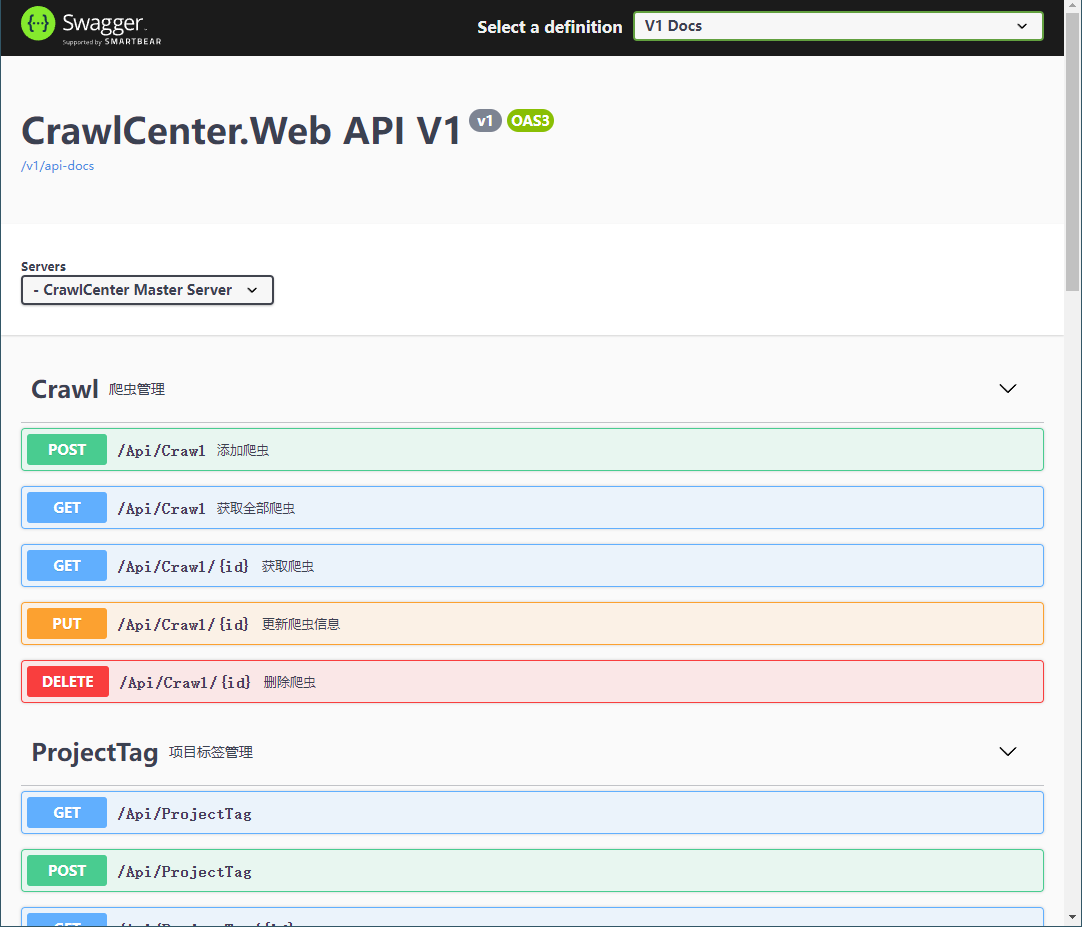
Other Third-Party Swagger UIs
To be honest, Swagger's default UI is just so-so. It's not that it's ugly—it's just that the top-to-bottom layout isn't efficient when there are many APIs.
At this point you can try third-party Swagger UIs. I've only tried these:
- Knife4jUI: Originally made by an expert in the Spring community; luoyunchong packaged an ASP.NET Core version
- RapiDoc: Also packaged by luoyunchong
- Redoc: Built into Swashbuckle.AspNetCore
In the CrawlCenterNet project, I configured all of these. Only kids make choices—I want them all!
app.UseKnife4UI(c => {
    c.RoutePrefix = "docs/knife4j";
    c.SwaggerEndpoint("/v1/api-docs", "V1 Docs");
});
app.UseRapiDocUI(c => {
    c.RoutePrefix = "docs/rapi";
    c.SwaggerEndpoint("/v1/api-docs", "V1 Docs");
    c.GenericRapiConfig = new GenericRapiConfig {
        Theme = "light",
});
app.UseReDoc(c => {
    c.RoutePrefix = "docs/redoc";
    c.SpecUrl = "/v1/api-docs";
});
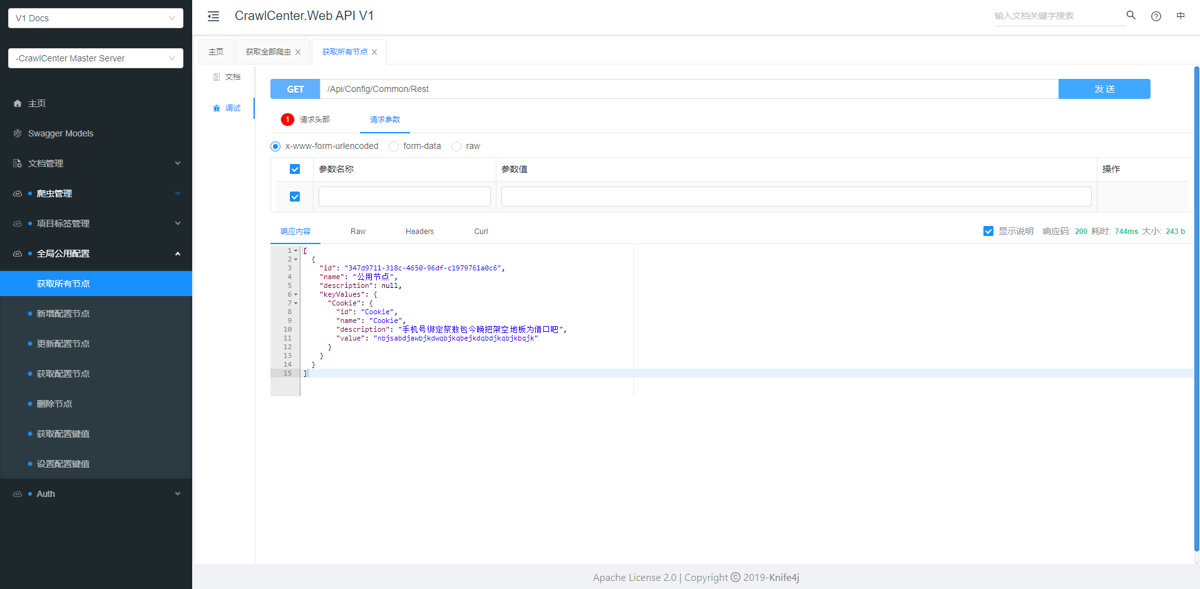
Knife4jUI
Just look at the screenshot. Two-column layout, you can configure global parameters (header, query)—super convenient for testing APIs that require a token!
It also supports exporting offline docs (markdown, HTML, word, PDF). Nice extra, but I barely used it.
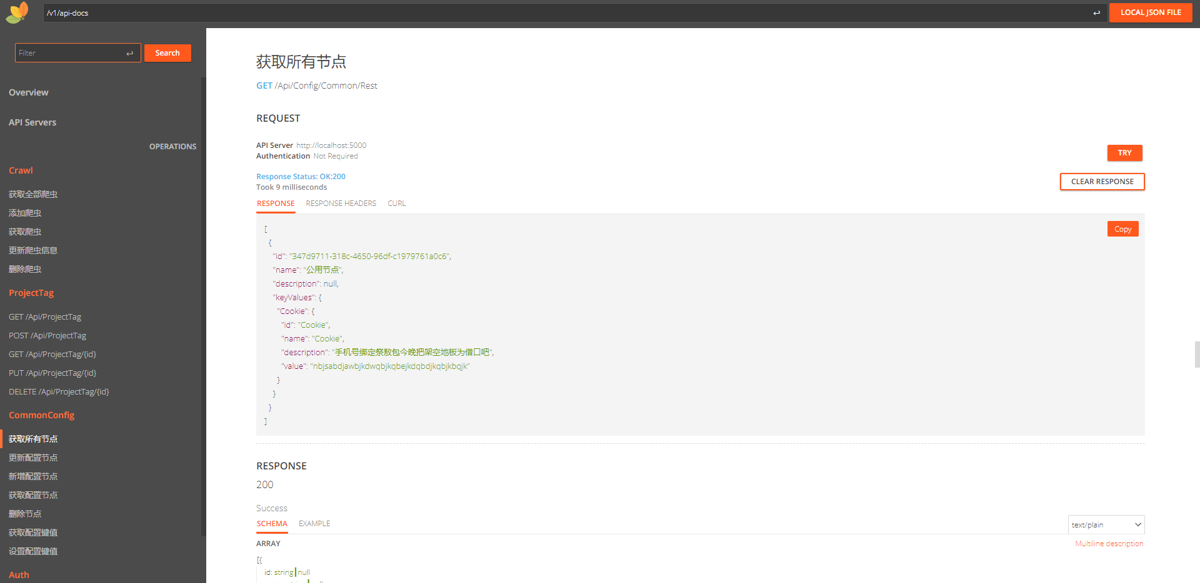
RapiDoc
Also a two-column layout, but some features aren't fully wrapped yet—just barely enough~
If you only want a simple interactive doc without auth and such, you can give it a try. The UI is pretty clean.
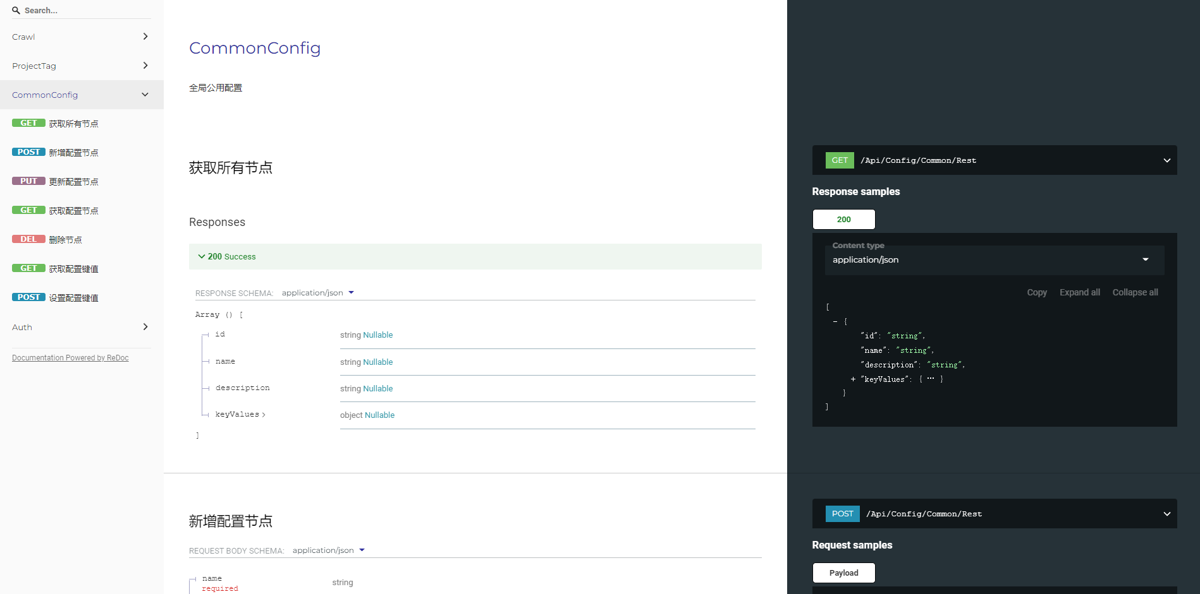
Redoc
Redoc is provided by Swashbuckle.AspNetCore; you need to install the Swashbuckle.AspNetCore.ReDoc nuget package.
Two-column layout, but this Redoc doesn't support interaction—just for viewing~
The UI feels pretty decent, but without interaction it comes off as a bit of a letdown.
API Testing Tools
Besides testing APIs through the docs auto-exported via OpenApi from our own projects, sometimes you need API testing tools to test APIs provided by partners, or to import OpenApi-exported APIs into a testing tool. You can also use these tools' team collaboration features for document sharing~
When it comes to mainstream API testing tools, Postman is probably the first one everyone thinks of. I find it great too. Recently I've also seen some domestic tools and tried them out~
- Postman: A veteran tool, nothing much to say—except the free version limits teams to 3 people
- ApiPost: A domestic tool, a close clone of Postman. Free version allows 15 people on a team, not bad! (Downside: quite a few ads in the UI)
- ApiFox: Also domestic. The UI is a bit nicer than ApiPost, but the features are weaker—not recommended~
After trying them all, Postman still has the best experience, but Postman's team limit of 3 people isn't enough!
Then I tried the domestic tools recommended by a junior colleague. First was ApiFox: incomplete features, for example there's no way to set a global header per project. Pass~
Then ApiPost. This thing is basically a Chinese version of Postman—even the layout is similar. Teams can have 15 people, that's okay~ But it suffers from the typical disease of domestic software: too many sticky ads, kinda gross~ Then again, it's free—what more can you ask for? Good enough to make do.
References
- Swashbuckle.AspNetCore project: https://github.com/domaindrivendev/Swashbuckle.AspNetCore
- Knife4jUI project: https://github.com/luoyunchong/IGeekFan.AspNetCore.Knife4jUI
- RapiDoc project: https://github.com/luoyunchong/IGeekFan.AspNetCore.RapiDoc
Serialization
Serialization in this article means JSON object serialization~
Before .NET Core 3 there was no built-in JSON library, so serialization depended on the NewtonsoftJson library. Nothing much to say—it's quite good, and after so many years of development this library is very stable~
Later when .NET Core officially supported JSON, I immediately switched to System.Text.Json. No extra nuget package to install, so convenient, hahaha
// 序列化json
var json = JsonSerializer.Serialize(new {
    login_state = loginStateCode,
    client_id = "client123"
});
// 反序列化
public class LoginStateCodeResponse {
    public int state { get; set; }
    public object request { get; set; }
    public string message { get; set; }
    public string cause { get; set; }
    public Dictionary<string, dynamic> variables { get; set; }
    public string data { get; set; }
}
var data = JsonSerializer.Deserialize<LoginStateCodeResponse>(content);
Worth mentioning, C# anonymous objects are really handy~
I won't paste the NewtonsoftJson code—it's on the official site, simple and easy to understand~
There's also a WebApi serialization issue related to design that you often run into with related fields. You can check out my previous blog post.
References
- NewtonsoftJson official site: https://www.newtonsoft.com/json
Serialization
Nowadays data exchange is basically in JSON format. In the past, no question, JSON first choice was NewtonsoftJson. But now there's also System.Text.Json, which feels pretty good too—no need to nuget-install a third-party library, just use the built-in one, quite convenient~
So now I use System.Text.Json more often. These two methods are pretty handy
JsonSerializer.Serialize()JsonSerializer.Deserialize<T>()
Logging & Monitoring
References
- How to get the client (Client) IP in ASP.NET Core: https://www.cjavapy.com/article/361/
- Fixing Exceptionless 5.x not sending emails properly: https://www.cnblogs.com/edisonchou/p/solve_the_problem_of_exceptionless_on_cannot_send_emails.html
Scheduled Tasks / Async Task Queues
References
- Hangfire official docs: https://docs.hangfire.io/en/latest/getting-started/index.html
- Hangfire project practice sharing: http://www.csharpkit.com/2017-12-03_50092.html
- HangFire Redis storage: https://github.com/marcoCasamento/Hangfire.Redis.StackExchange
todo
That's all I've written on development practices, because what I know is quite limited. But learning never ends. Here I'll note some technologies I've heard of but haven't practiced yet, and I'll research and try them when I have time.
- API throttling
- Single sign-on
- The "authorization" part of "authentication and authorization"
- Concurrency control
- The famous ABP vNext
API throttling not done yet
This throttling wasn't done probably because AspNetCore's performance is so good, and also because our project is relatively small—a single machine can easily handle it. So I didn't set up API rate limiting like I used to when building projects with Django.
Given AspNetCore's convenient design, rate limiting should also just be a one-line config in IServiceColletion~
_EOF_
Asp-Net-Core Study Notes: WebApi Development Practices
- 本文作者:
- 程序设计实验室
- 版权声明:
- 本博客所有文章除特别声明外,均采用 BY-NC-SA 许可协议。转载请注明出处!
相关文章
Asp-Net-Core学习笔记:5.构建和部署
从上次开始学习Asp.Net Core以来,一直都是玩一玩,还没有什么机会用来实战,最近公司有个新的小项目,于是我用Asp.Net Core来尝尝新,结果也是非常OK,熟悉之后开发效率感觉和Django基本没差。 那么进入正题,本文简单说说Asp.Net Core应用的构建和部署。 构建 构建是使用build命令,不过一般我们都用vs或者rider之类的IDE,应该比较少会用到这个命令: dotn
2022-02-16 · Asp-Net-Core学习笔记 · 约 1 分钟
Asp-Net-Core学习笔记:1.MVC入门篇
Asp.Net Core 学习 基于.Net Core 2.2版本的学习笔记。 常识 像Django那样自动检查代码更新,自动重载服务器(太方便了) dotnet watch run 托管设置 设置项目文件的AspNetCoreHostingModel属性。 PropertyGroup TargetFrameworknetcoreapp2.2/TargetFramework Asp
2022-02-16 · Asp-Net-Core学习笔记 · 约 1 分钟
Asp-Net-Core学习笔记:身份认证入门
前言 过年前我又来更新了~ 我就说了最近不是在偷懒吧,其实这段时间还是有积累一些东西的,不过还没去整理…… 所以只能发以前没写完的一些笔记出来 就当做是温习一下啦 PS:之前说的红包封面我还没搞,得抓紧时间了 最近在准备搞一个我之前做的开源项目代码合集来做一期分享 两种常见的认证方式 先来看看两种常见的认证方式:基于token的认证和传统的session认证的区别。 session认证 我们知道,
2022-02-16 · Asp-Net-Core学习笔记 · 约 1 分钟
Asp-Net-Core学习笔记:4.Blazor-WebAssembly入门
本来今天开始是有其他的安排了,也没办法抽出那么多时间来学NetCore,不过我想做事情有始有终吧,除了gRPC还没跑起来之外,Blazor这部分也了解了一点。目前来说还不是很完善,真正的离线单页应用还处于预览版阶段。
2023-07-12 · Asp-Net-Core学习笔记 · 约 1 分钟
讨论
共 0 条加载评论中…