ASP.NET Core Learning Notes: Unit Testing and Integration Testing
During my time using AspNetCore, I have reviewed many open-source projects and blogs and noticed that many people in the .Net ecosystem are attentive to and actively using various new technologies. However, there seems to be little focus on testing. Testing is a very important phase in the software lifecycle and is of vital significance for ensuring software reliability. In the application development process, it is essential to test the application to ensure its functionality aligns with expectations. This not only ensures correct execution of features but also helps developers identify and fix defects (Bugs) in the system as early as possible.
目录13 个章节
Preface
During my time using AspNetCore, I have reviewed many open-source projects and blogs. I've observed that while many people are paying attention to and utilizing various new technologies within the .NET ecosystem, there seems to be less focus on testing.
Testing is a crucial phase in the software lifecycle and is of paramount importance for ensuring software reliability. During the application development process, testing must be conducted to ensure that its functionality aligns with expectations. This not only ensures correct execution of features but also helps developers identify and rectify defects (bugs) in the system early on, thereby enhancing software reliability. Testing should cover all functionalities of the software. Thorough and meticulous testing can significantly reduce software development costs; conversely, insufficient testing will inevitably lead to software being deployed with undiscovered defects, putting users at risk from the consequences of those flaws.
Based on the layers involved, testing can be categorized into unit testing, integration testing, and system testing. Unit testing refers to tests that verify the functionality of code segments (such as methods or functions). Developers typically write corresponding test methods to check whether the code execution matches the expected results. Integration testing is used to verify whether multiple interdependent modules or components can work together correctly. System testing involves a comprehensive test of the entire system to confirm that it operates normally and meets the requirements.
This article primarily records unit testing and integration testing.
PS: This article only introduces simple testing methods to throw out a brick to attract jade. For more in-depth usage, you can refer to the official documentation, which is clearly written.
Testing in .Net
There are mainly several templates for testing projects in .Net:
- MSTest
- NUnit
- xUnit
This article selects xUnit as the testing project template.
Unit Testing
From the perspective of the testing levels involved, tests are divided into unit testing, integration testing, and system testing. Unit testing refers to tests that verify the functionality of code segments (such as methods or functions). It is typically written by developers to verify whether the code execution matches the expected results. Integration testing is used to verify whether multiple dependent modules or components can work correctly together. System testing involves a comprehensive test of the entire system to confirm that it operates normally and meets requirements.
- Arrange: Prepare for the test, such as setting up test data, variables, and environments.
- Act: Execute the method to be tested, such as calling the function or method under test.
- Assert: Verify the test results, checking if the output of the tested method matches the expected results.
The Simplest Example
Controller Code
[ApiController]
public class DemoController : ControllerBase {
  [HttpGet("[action]")]
  public ApiResponse Test() {
    return ApiResponse.Ok("version=2.0");
  }
}
Unit Test Code
public class DemoTests {
  private readonly DemoController _demoController;

  public DemoTests() {
    _demoController = new DemoController();
    _demoController.ControllerContext = new ControllerContext {
      HttpContext = new DefaultHttpContext()
    };
  }

  [Fact]
  public void Test_Test() {
    var resp = _demoController.Test();
    Assert.Equal("version=2.0", resp.Message);
  }
}
Controller with Parameters
In actual development, Controllers use dependency injection and often have many parameters.
For example, this controller uses EFCore's DbContext.
public class StudentController : ControllerBase {
  private readonly AppDbContext _dbCtx;

  public StudentController(AppDbContext dbCtx) {
    _dbCtx = dbCtx;
  }
  /// <summary>
  /// 学生分数等级
  /// </summary>
  [HttpGet("[action]")]
  public async Task<List<StudentGrades>> StudentScoreGrades() {
    return await _dbCtx.StudentGrades.ToListAsync();
  }
}
At this point, in unit tests, you need to use a mock object framework to simulate dependencies.
Here we are using the Moq library, which can be installed directly via NuGet.
public class StudentTests {
  private readonly StudentController _studentController;

  public StudentTests() {
    var mockOptions = new Mock<DbContextOptions<AppDbContext>>();
    var mockDbContext = new Mock<AppDbContext>(mockOptions.Object);
    _studentController = new StudentController(mockDbContext.Object) {
      ControllerContext = new ControllerContext {
        HttpContext = new DefaultHttpContext()
      }
    };
  }

  [Fact]
  public async Task Test_StudentScoreGrades() {
    var resp = await _studentController.StudentScoreGrades();
    Assert.True(resp.Count > 0);
  }
}
PS: In actual use, this mocking can be quite cumbersome, so it's better to use integration tests for these interfaces later on.
Integration Testing
Integration testing ensures that the components of an application work correctly, including the underlying infrastructure supported by the application, such as databases and file systems. ASP.NET Core provides components for integration testing, including a WebHost for testing and an in-memory test server called TestServer. Unlike unit testing, where all dependencies are mocked, in integration testing, real components identical to those in the production environment should be used, such as databases and third-party libraries.
Simply put, unit testing mocks all components, while integration testing is performed on a real system. For example, for an interface developed with ASP.NET Core, the integration test directly uses HTTP requests to retrieve interface data and then checks whether this returned data meets the expected conditions.
Before you begin, you need to install the dependency.
dotnet add Microsoft.AspNetCore.Mvc.Testing
Expose the Tested Project's Program/Startup Class
Integration tests use WebApplicationFactory to start the AspNetCore application.
Therefore, a minor modification is required in the tested project to allow the test project to access its Program class.
The tested project used in this article is based on .Net6. Modify its Program.cs and add the following code:
public partial class Program { }
This makes the Program class public, allowing the test project to access it.
The official documentation also mentions modifying the .csproj and adding the following configuration:
<ItemGroup>
  <InternalsVisibleTo Include="MyTestProject" />
</ItemGroup>
However, I tried it and it didn't seem to have any effect, so the first method is more convenient.
PS: If the project is from a version before .Net6, change the Startup class to public.
Example
Take the Student interface mentioned earlier as an example.
Make HTTP requests to these endpoints, and then determine whether the response headers meet the specified conditions.
public class StudentTests : IClassFixture<WebApplicationFactory<Program>> {
  private readonly WebApplicationFactory<Program> _factory;

  public StudentTests(WebApplicationFactory<Program> factory) {
    _factory = factory;
  }

  [Theory]
  [InlineData("/api/v2/Student/StudentScoreGrades")]
  [InlineData("/api/v2/Student/Height")]
  [InlineData("/api/v2/Student/Weight")]
  public async Task Get_EndpointsReturnSuccessAndCorrectContentType(string url) {
    var client = _factory.CreateClient();
    var response = await client.GetAsync(url);
    response.EnsureSuccessStatusCode();
    Assert.Equal("application/json; charset=utf-8; ver=2", response.Content.Headers.ContentType?.ToString());
  }
}
More Examples
This article only introduces integration tests for WebApi; actual development may also involve testing for MVC, Blazor, and other projects.
The official documentation provides a sample project: https://github.com/dotnet/AspNetCore.Docs.Samples/tree/main/test/integration-tests/IntegrationTestsSample
It contains many examples of integration tests that you can refer to.
Running Tests
Before running the first test, you need to build the test project.
The IDE used in this article is Rider (Visual Studio is similar in this regard), which provides a visual testing interface.
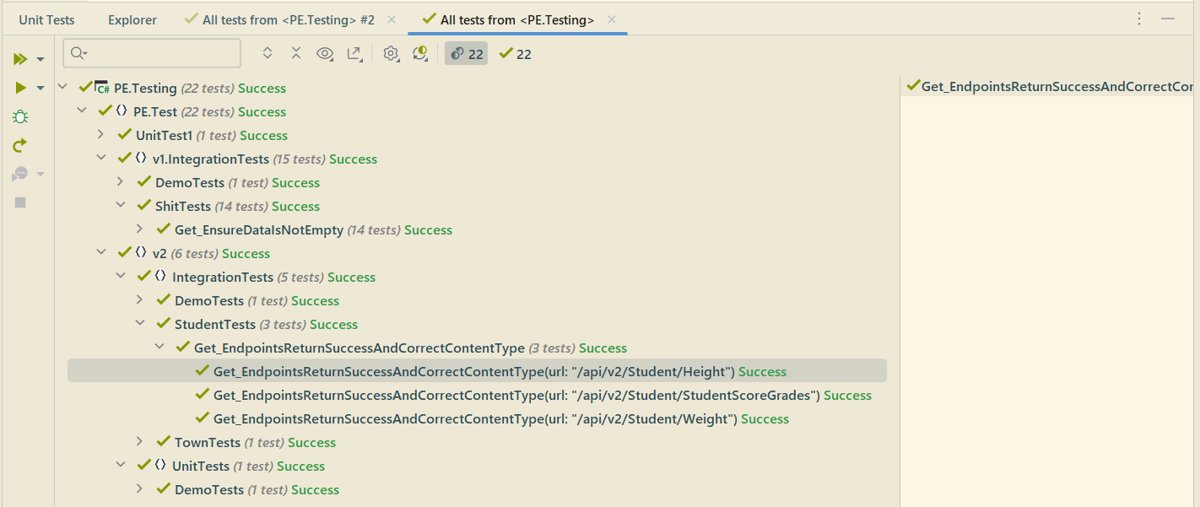
After writing a new test, simply click the green triangle next to it to run that specific test individually.
References
_EOF_
ASP.NET Core Learning Notes: Unit Testing and Integration Testing
- 本文作者:
- 程序设计实验室
- 版权声明:
- 本博客所有文章除特别声明外,均采用 BY-NC-SA 许可协议。转载请注明出处!
相关文章
Asp-Net-Core学习笔记:1.MVC入门篇
Asp.Net Core 学习 基于.Net Core 2.2版本的学习笔记。 常识 像Django那样自动检查代码更新,自动重载服务器(太方便了) dotnet watch run 托管设置 设置项目文件的AspNetCoreHostingModel属性。 PropertyGroup TargetFrameworknetcoreapp2.2/TargetFramework Asp
2022-02-16 · Asp-Net-Core学习笔记 · 约 1 分钟
Asp-Net-Core学习笔记:5.构建和部署
从上次开始学习Asp.Net Core以来,一直都是玩一玩,还没有什么机会用来实战,最近公司有个新的小项目,于是我用Asp.Net Core来尝尝新,结果也是非常OK,熟悉之后开发效率感觉和Django基本没差。 那么进入正题,本文简单说说Asp.Net Core应用的构建和部署。 构建 构建是使用build命令,不过一般我们都用vs或者rider之类的IDE,应该比较少会用到这个命令: dotn
2022-02-16 · Asp-Net-Core学习笔记 · 约 1 分钟
Asp-Net-Core学习笔记:身份认证入门
前言 过年前我又来更新了~ 我就说了最近不是在偷懒吧,其实这段时间还是有积累一些东西的,不过还没去整理…… 所以只能发以前没写完的一些笔记出来 就当做是温习一下啦 PS:之前说的红包封面我还没搞,得抓紧时间了 最近在准备搞一个我之前做的开源项目代码合集来做一期分享 两种常见的认证方式 先来看看两种常见的认证方式:基于token的认证和传统的session认证的区别。 session认证 我们知道,
2022-02-16 · Asp-Net-Core学习笔记 · 约 1 分钟
Asp-Net-Core学习笔记:部署,早知道,还是docker,以及一点碎碎念
前言 AspNetCore技术栈在我们团队里的使用也有一段时间了,之前的部署方式一直是本地编译之后上传可执行文件到服务器,使用supervisor来管理进程这种很原始的方式。 参考之前的文章: 对于小项目来说尚可,够用,但是存在几个问题: 每次更新花费的时间太长了,无论是Framework-Dependent还是Self-Contained,都要上传很大的文件~ 更新的时候需要在superviso
2022-02-16 · Asp-Net-Core学习笔记 · 约 1 分钟
讨论
共 0 条加载评论中…