

Asp-Net-Core Study Notes: 3. Developing a Chat Room with the SignalR Real-Time Communication Framework
A First Try at SignalR I saw this in MVP Yang's blog. I thought it was something new introduced in NetCore 3, but it turns out it has been around for many years, so it seems to be a fairly mature technology. Introduction SignalR is an open-source real-time framework for .NET Core/.NET Framework. SignalR can use Web Socket, Server Sent Events, and Long Polling as underlying transport methods. Signal
目录12 个章节
A First Try at SignalR
I saw this in MVP Yang's blog. I thought it was something new introduced in NetCore 3, but it turns out it has been around for many years, so it seems to be a fairly mature technology.
Introduction
SignalR is an open-source real-time framework for .NET Core/.NET Framework. SignalR can use Web Socket, Server Sent Events, and Long Polling as underlying transport methods.
SignalR is built on these three technologies and abstracts over them, allowing you to focus more on business problems rather than underlying transport technology issues.
The above introduction comes from a blog. SignalR is divided into client and server. The server runs on AspNetCore, and the client supports frontend, desktop, and mobile. I looked it up, and even Flutter has a corresponding support library.
A Few Concepts
Fallback Mechanism
SignalR supports three underlying transport technologies and can automatically negotiate the transport type based on client compatibility. As shown in the figure
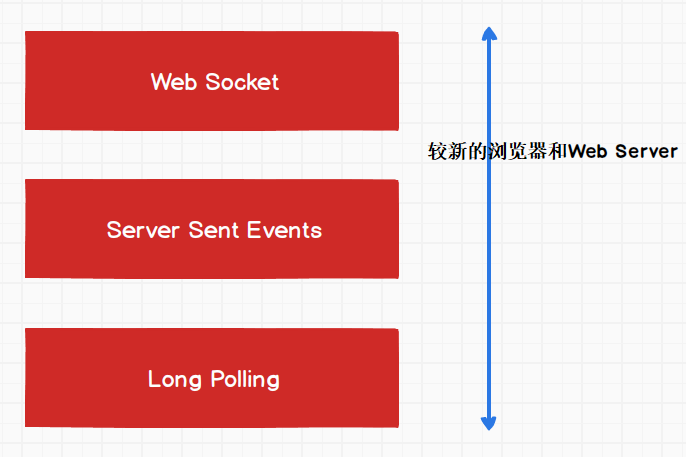
Web Socket is the best and most efficient transport method. If the browser or web server does not support it, it will fall back to SSE, and if that doesn't work either, it will use Long Polling.
RPC
No need to explain too much: Remote Procedure Call. SignalR uses the RPC paradigm for communication between the server and the client.
Hub
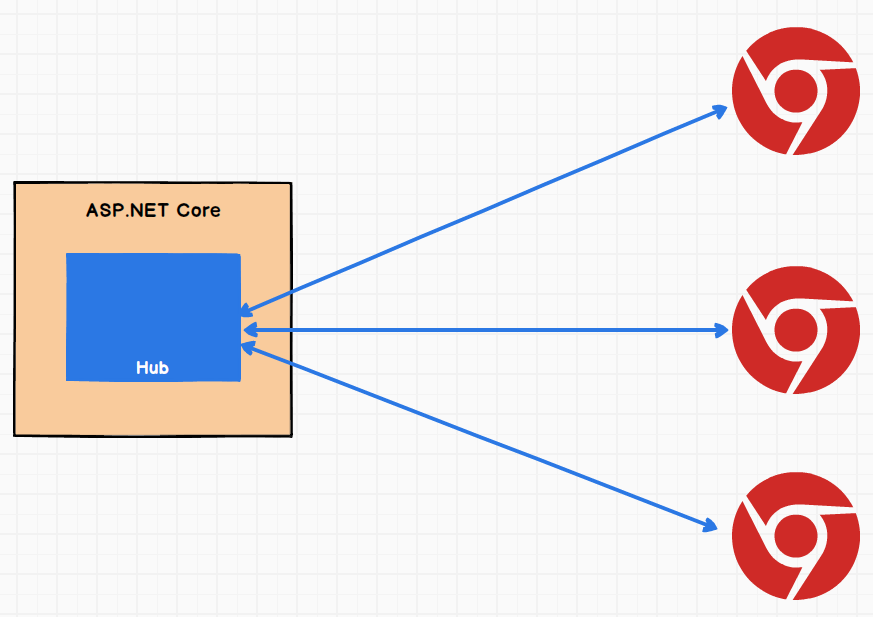
Hub is a SignalR component that runs on the server. It is a component used for communication. Hub uses RPC to receive messages from the client and can also send messages to the client.
About Horizontal Scaling
For various underlying communication methods, SignalR has a Sticky Sessions solution, which can ensure that a client's requests during a session are all assigned to the same server. I'll look into the details later when needed.
Getting Started
What I want to build is a chat room, so I only need to write a simple service.
First, create an AspNetCore project and register the SignalR service:
public void ConfigureServices(IServiceCollection services)
{
    services.AddControllers();
    services.AddSignalR();
}
Create the ChatService class:
public class ChatService
{
    private readonly List<ChatMessage> _messages;
    private readonly IHubContext<ChatHub> _context;
    public List<ChatMessage> Messages { get => _messages; }
    public ChatService(IHubContext<ChatHub> context)
    {
        _context = context;
        _messages = new List<ChatMessage>();
    }
}
Message entity class:
public class ChatMessage
{
    public string UserName { get; set; }
    public string Content { get; set; }
    public DateTime SendedTime { get; set; }
    public string ClientName { get; set; }
}
Here's the key part: writing the Hub:
You can use SendAsync to make remote calls
public class ChatHub : Hub {
    private readonly ChatService _chatService;
    public ChatHub(ChatService chatService) {
        _chatService = chatService;
    }
    public async Task GetMessages(string connectionId) {
        var data = _chatService.Messages;
        await Clients.Client(connectionId).
            SendAsync("GetMessages", data);
    }
    public async Task SendMessage(string userName, string content, string clientName) {
        var msg = new Models.ChatMessage {
            UserName = userName,
            Content = content,
            SendedTime = DateTime.Now,
            ClientName = clientName
        };
        _chatService.Messages.Add(msg);
        await Clients.All.SendAsync("SendMessage", msg);
    }
    public override Task OnConnectedAsync() {
        GetMessages(Context.ConnectionId);
        return base.OnConnectedAsync();
    }
}
Registering Dependency Injection and Middleware
Dependency injection
public void ConfigureServices(IServiceCollection services)
{
    services.AddControllers();
    services.AddSignalR();
    services.AddSingleton<CountService>();
    services.AddSingleton<ChatService>();
}
Middleware
public void Configure(IApplicationBuilder app, IWebHostEnvironment env)
{
    app.UseStaticFiles();
    app.UseRouting();
    app.UseEndpoints(endpoints =>{
        endpoints.MapControllers();
        endpoints.MapHub<ChatHub>("/chat");
    });
}
Client
For convenience, I'll just use a web page.
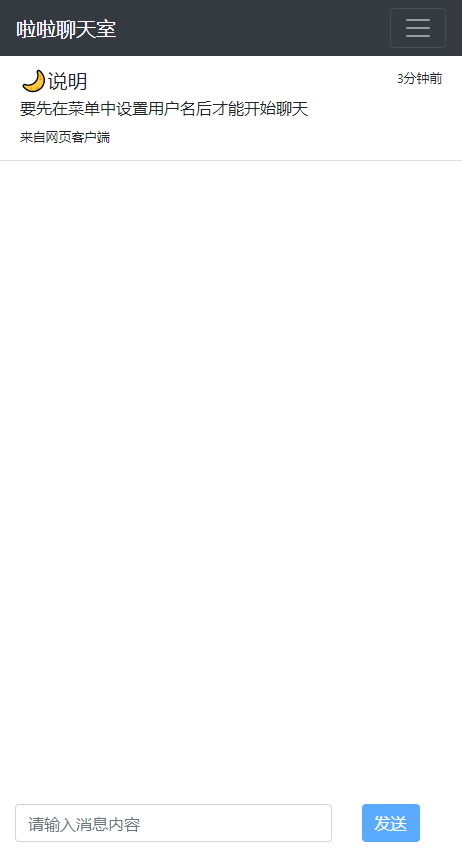
First, write a simple chat UI layout. I won't paste the code here since there's nothing technically interesting. The result looks roughly like this:
First, install signalr.js, which can be done via npm.
Then you need to write the JS:
function setupConnection() {
    connection = new signalR.HubConnectionBuilder()
        .withUrl("/chat")
        .build();

    connection.on("SendMessage", message => {
        console.log(message);
        addMsg(message.userName, message.sendedTimeStr, message.content, message.clientName);
    });

    connection.on("GetMessages", data => {
        console.log(data);
        for (var i = 0; i < data.length; i++) {
            let message = data[i];
            addMsg(message.userName, message.sendedTimeStr, message.content, message.clientName);
        }
    });

    connection.on("Finished", () => {
        connection.stop();
        console.log("finished.")
    });

    connection.start()
        .catch(err => console.error(err.toString()));
}
You can remotely invoke server methods with the following code:
connection.invoke("SendMessage", username, content, '网页客户端');
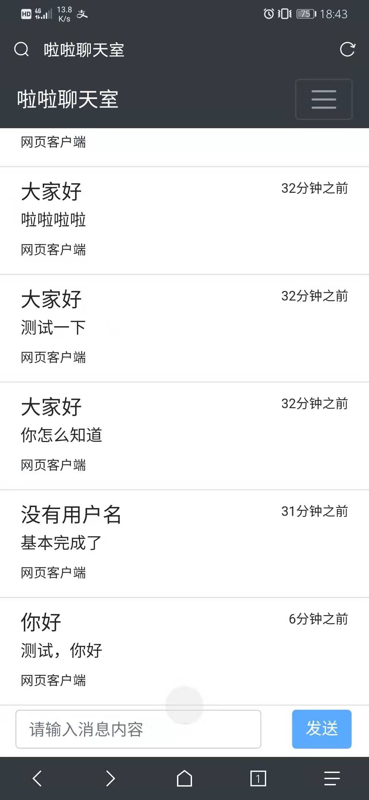
Then you can open multiple browsers to test. This is a screenshot from my phone
PS: To deploy this to a server, I even bought a new Alibaba Cloud server...
References
- Teacher Yang's blog: https://www.cnblogs.com/cgzl/p/9515516.html
- https://juejin.im/post/5c1c7b9c6fb9a049d23606a8
- AspNetCore application deployment: https://article.itxueyuan.com/dX28oy
- Startup configuration: https://www.cnblogs.com/Hai--D/p/5842842.html
Welcome to Discuss
For questions, please leave a message in the WeChat official account backend. I'll reply to every message~
- WeChat official account: 画星星高手
- Coding livestream: https://live.bilibili.com/11883038
- Zhihu: https://www.zhihu.com/people/dealiaxy
- Column: https://zhuanlan.zhihu.com/deali
- Jianshu: https://www.jianshu.com/u/965b95853b9f
_EOF_
Asp-Net-Core Study Notes: 3. Developing a Chat Room with the SignalR Real-Time Communication Framework
- 本文作者:
- 程序设计实验室
- 版权声明:
- 本博客所有文章除特别声明外,均采用 BY-NC-SA 许可协议。转载请注明出处!
相关文章
Asp-Net-Core学习笔记:部署,早知道,还是docker,以及一点碎碎念
前言 AspNetCore技术栈在我们团队里的使用也有一段时间了,之前的部署方式一直是本地编译之后上传可执行文件到服务器,使用supervisor来管理进程这种很原始的方式。 参考之前的文章: 对于小项目来说尚可,够用,但是存在几个问题: 每次更新花费的时间太长了,无论是Framework-Dependent还是Self-Contained,都要上传很大的文件~ 更新的时候需要在superviso
2022-02-16 · Asp-Net-Core学习笔记 · 约 1 分钟
Asp-Net-Core学习笔记:5.构建和部署
从上次开始学习Asp.Net Core以来,一直都是玩一玩,还没有什么机会用来实战,最近公司有个新的小项目,于是我用Asp.Net Core来尝尝新,结果也是非常OK,熟悉之后开发效率感觉和Django基本没差。 那么进入正题,本文简单说说Asp.Net Core应用的构建和部署。 构建 构建是使用build命令,不过一般我们都用vs或者rider之类的IDE,应该比较少会用到这个命令: dotn
2022-02-16 · Asp-Net-Core学习笔记 · 约 1 分钟
Asp-Net-Core学习笔记:4.Blazor-WebAssembly入门
本来今天开始是有其他的安排了,也没办法抽出那么多时间来学NetCore,不过我想做事情有始有终吧,除了gRPC还没跑起来之外,Blazor这部分也了解了一点。目前来说还不是很完善,真正的离线单页应用还处于预览版阶段。
2023-07-12 · Asp-Net-Core学习笔记 · 约 1 分钟
Asp-Net-Core学习笔记:2.MVC视图、模型、持久化、文件、错误处理、日志
TagHelper 入门 优点:根据参数自动生成,不需要手写超链接,类似Django模板里面的url命令。 在ViewImport中添加TagHelper @addTagHelper *,Microsoft.AspNetCore.Mvc.TagHelpers 比如,链接TagHelper使用 a class=btn btn-outline-primary asp-controller=st
2022-08-12 · Asp-Net-Core学习笔记 · 约 1 分钟
讨论
共 0 条加载评论中…