

Asp-Net-Core Development Notes: Implementing API Rate Limiting with the RateLimit Middleware
Preface I've been busy lately (addicted to Steam in February, then work got hectic starting in March), so I haven't updated the blog for a long time. I've accumulated some notes though, so I'll jot them down in a spare moment. The requirement is this: I previously built a ticket system, and now I need to rate-limit login, registration, and creating tickets so users can't request too frequently. Starting from .NET 7, there's already built-in rate limiting, but our project is still using the .NET 6 LTS version. Until the next LTS is released, we won't consider using a non-LTS version like .NET 7
目录13 个章节
Preface
I've been busy lately (addicted to Steam in February, then work got hectic starting in March), so I haven't updated the blog for a long time. I've accumulated some notes though, so I'll jot them down in a spare moment.
The requirement is this: I previously built a ticket system, and now I need to rate-limit login, registration, and creating tickets so users can't request too frequently.
Starting from .NET 7, there's already built-in rate limiting, but our project is still using the .NET 6 LTS version. Until the next LTS is released, we won't consider using a non-LTS version like .NET 7.
Then I found this AspNetCoreRateLimit component. It has nearly three thousand stars on GitHub, and after looking at the docs it seemed simple and flexible to use, so I decided to give it a try~
The AspNetCoreRateLimit Component
Project homepage: https://github.com/stefanprodan/AspNetCoreRateLimit
Here's the official introduction:
AspNetCoreRateLimit is an ASP.NET Core rate limiting solution designed to control the rate of requests that clients can make to a Web API or MVC app based on IP address or client ID.
The AspNetCoreRateLimit NuGet package contains an IpRateLimitMiddleware and a ClientRateLimitMiddleware, with each middleware you can set multiple limits for different scenarios like allowing an IP or Client to make a maximum number of calls in a time interval like per second, 15 minutes, etc. You can define these limits to address all requests made to an API or you can scope the limits to each API URL or HTTP verb and path.
Let the recently impressive ChatGPT translate it:
AspNetCoreRateLimit is an ASP.NET Core rate limiting solution designed to control the rate of requests that clients can make to a Web API or MVC application based on IP address or client ID.
The AspNetCoreRateLimit NuGet package contains an IpRateLimitMiddleware and a ClientRateLimitMiddleware. With each middleware you can set multiple limits for different scenarios, such as allowing an IP or client to make a maximum number of calls in a time interval like per second, 15 minutes, etc. You can define these limits to address all requests made to an API, or you can scope the limits to each API URL or HTTP verb and path.
This component is quite flexible to use. You define rules directly in the ASP.NET Core configuration, which means you can change rate-limit rules without recompiling the app. The official example configures them directly in appsettings.json, but using other configuration sources should theoretically work as well (e.g. with a config center).
A brief intro to how this component works.
First, it has two modes:
- Rate limiting by IP address
- Rate limiting by ClientID
IP address is easy to understand. At first I thought ClientID was the user ID, but after reading the docs, it's a parameter placed in the request header, such as X-ClientId. You have to implement this yourself; you can just use the user ID.
For convenience, this project uses IP address mode directly.
The RateLimit component can configure global rate limiting, or rate limiting for a specific IP address (or range).
Configuring Services
To read data from appsettings.json, first register the options service in Program.cs
builder.Services.AddOptions();
Then write an extension method to register RateLimit-related services.
Import the namespaces
using AspNetCoreRateLimit;
using AspNetCoreRateLimit.Redis;
using StackExchange.Redis;
Write a static class
public static class ConfigureRateLimit {
    public static void AddRateLimit(this IServiceCollection services, IConfiguration conf) {
        //load general configuration from appsettings.json
        services.Configure<IpRateLimitOptions>(conf.GetSection("IpRateLimiting"));

        var redisOptions = ConfigurationOptions.Parse(conf.GetConnectionString("Redis"));
        services.AddSingleton<IConnectionMultiplexer>(provider => ConnectionMultiplexer.Connect(redisOptions));
        services.AddRedisRateLimiting();

        services.AddSingleton<IRateLimitConfiguration, RateLimitConfiguration>();
    }

    public static IApplicationBuilder UseRateLimit(this IApplicationBuilder app) {
        app.UseIpRateLimiting();

        return app;
    }
}
Let me walk through the configuration code.
I don't currently need different rate-limit rules for different IP address ranges
so I just use IpRateLimitOptions
services.Configure<IpRateLimitOptions>(conf.GetSection("IpRateLimiting"));
To rate-limit by IP, you have to record how many times each IP has been accessed. The RateLimit component supports multiple storage backends. The simplest is to store in memory, but for stability I still chose Redis.
These few lines configure Redis.
var redisOptions = ConfigurationOptions.Parse(conf.GetConnectionString("Redis"));
services.AddSingleton<IConnectionMultiplexer>(provider => ConnectionMultiplexer.Connect(redisOptions));
services.AddRedisRateLimiting();
Finally, inject IRateLimitConfiguration. I guess the middleware needs it. At least I currently don't need any RateLimit-related code in the Controller.
After writing the extension methods, go back to Program.cs
Register services
builder.Services.AddRateLimit(builder.Configuration);
Add the middleware
var app = builder.Build();

app.UseExceptionless();
app.UseStaticFiles(new StaticFileOptions {
    ServeUnknownFileTypes = true
});
app.UseRateLimit();

// ...

app.Run();
I put UseRateLimit after UseStaticFiles, otherwise static files on the page would count toward the request total and you'd get rate-limited very quickly.
Configuration
Write the specific rate-limit rules in appsettings.json.
Don't copy the official config rules as-is; you need to understand their docs.
EnableEndpointRateLimiting- This option must be set to true, otherwise the rate limit is global and you can't set limits per path.StackBlockedRequests- Leave it at the default of false. If set to true, repeated requests after an endpoint is rate-limited still count toward the visit total, which can leave you rate-limited until the end of time.
The other settings are self-explanatory.
GeneralRules are the rate-limit rules for specific paths.
If you want global rate limiting, set EnableEndpointRateLimiting to false, then configure it like this — 5 requests per minute:
{
    "Endpoint": "*",
    "Period": "1m",
    "Limit": 5
}
Endpoint can be set in the form HTTP方法:路径, for example post:/account/login. Check the docs for details (see item 3 in the reference docs).
Here's my config file, rate-limiting the add-ticket, login, and sign-up endpoints.
{
  "IpRateLimiting": {
    "EnableEndpointRateLimiting": true,
    "StackBlockedRequests": false,
    "RealIpHeader": "X-Real-IP",
    "ClientIdHeader": "X-ClientId",
    "HttpStatusCode": 429,
    "IpWhitelist": [],
    "EndpointWhitelist": [
      "get:/api/license",
      "*:/api/status"
    ],
    "ClientWhitelist": [
      "dev-id-1",
      "dev-id-2"
    ],
    "GeneralRules": [
      {
        "Endpoint": "*:/ticket/add",
        "Period": "1m",
        "Limit": 5
      },
      {
        "Endpoint": "post:/account/login",
        "Period": "1m",
        "Limit": 5
      },
      {
        "Endpoint": "post:/account/SignUp",
        "Period": "1m",
        "Limit": 5
      }
    ],
    "QuotaExceededResponse": {
      "Content": "{{ \"message\": \"先别急,你访问得太快了!\", \"details\": \"已经触发限流。限流规则: 每 {1} 只能访问 {0} 次。请 {2} 秒后再重试。\" }}",
      "ContentType": "application/json",
      "StatusCode": 429
    }
  }
}
I also customized the message shown when rate-limited.
The result looks like this:
{
  "message": "先别急,你访问得太快了!",
  "details": "已经触发限流。限流规则: 每 1m 只能访问 5 次。请 16 秒后再重试。"
}
Extension
.NET 7 built-in rate limiting component code: https://github.com/cristipufu/aspnetcore-redis-rate-limiting
This project introduces several rate limiting strategies, complete with hand-drawn illustrations that are vivid and engaging. Interested readers may want to take a look—it's quite interesting.
Rate Limiting Strategies
Although this article does not use the .NET 7 rate limiting middleware, these rate limiting strategies are still worth a look and seem to have reference value.
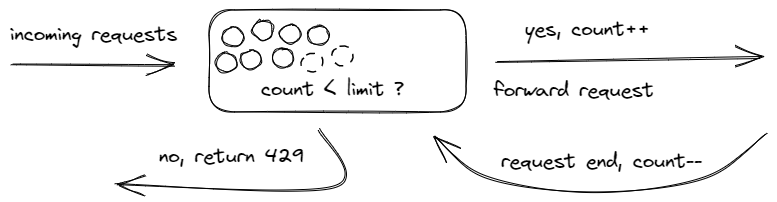
Concurrent Requests Rate Limiting
Concurrency Rate Limiter limits how many concurrent requests can access a resource. If your limit is 10, then 10 requests can access a resource at once and the 11th request will not be allowed. Once the first request completes, the number of allowed requests increases to 1, when the second request completes, the number increases to 2, etc.
Instead of "You can use our API 1000 times per second", this rate limiting strategy says "You can only have 20 API requests in progress at the same time".
Fixed Window Rate Limiting
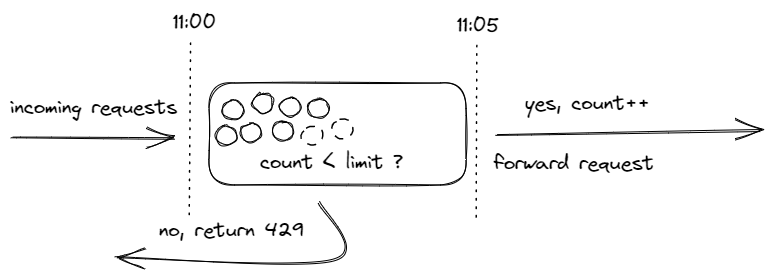
The Fixed Window algorithm uses the concept of a window. The window is the amount of time that our limit is applied before we move on to the next window. In the Fixed Window strategy, moving to the next window means resetting the limit back to its starting point.
Sliding Window Rate Limiting
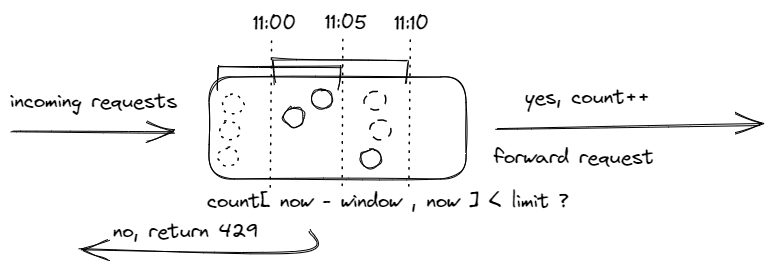
Unlike the Fixed Window Rate Limiter, which groups the requests into a bucket based on a very definitive time window, the Sliding Window Rate Limiter, restricts requests relative to the current request's timestamp. For example, if you have a 10 req/minute rate limiter, on a fixed window, you could encounter a case where the rate-limiter allows 20 requests during a one minute interval. This can happen if the first 10 requests are on the left side of the current window, and the next 10 requests are on the right side of the window, both having enough space in their respective buckets to be allowed through. If you send those same 20 requests through a Sliding Window Rate Limiter, if they are all sent during a one minute window, only 10 will make it through.
Token Bucket Rate Limiting
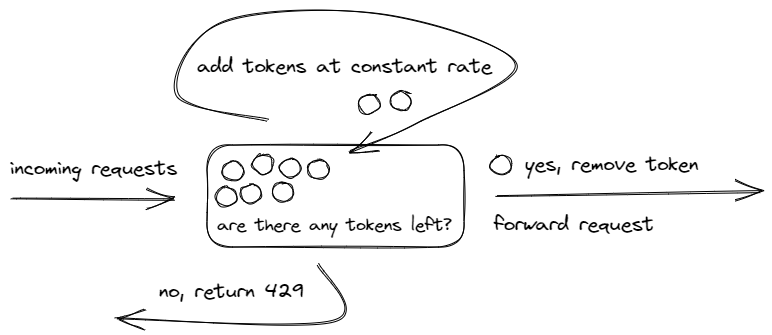
Token Bucket is an algorithm that derives its name from describing how it works. Imagine there is a bucket filled to the brim with tokens. When a request comes in, it takes a token and keeps it forever. After some consistent period of time, someone adds a pre-determined number of tokens back to the bucket, never adding more than the bucket can hold. If the bucket is empty, when a request comes in, the request is denied access to the resource.
References
_EOF_
Asp-Net-Core Development Notes: Implementing API Rate Limiting with the RateLimit Middleware
- 本文作者:
- 程序设计实验室
- 版权声明:
- 本博客所有文章除特别声明外,均采用 BY-NC-SA 许可协议。转载请注明出处!
相关文章
Asp-Net-Core开发笔记:Oracle调优
Supported Connection String Attributes To obtain an OracleConnection object in a .NET stored procedure that represents the implicit database connection, set the ConnectionString property of the Oracle
2023-03-05 · Asp-Net-Core开发笔记 · 约 1 分钟
Asp-Net-Core开发笔记:在docker部署时遇到一个小坑
哦吼 之前刚说了尝试了使用docker来部署AspNetCore应用,结果这才刚上班就遇到问题了= =… 我这项目用的数据库是Oracle,之前直接运行没啥问题,但放在docker里运行就报了这个错误: ORA-01882: timezone region not found 看这错误信息是在说时区不对,分别在服务器和docker里看一下时间: [root@localhost ~]# date -
2022-02-16 · Asp-Net-Core开发笔记 · 约 1 分钟
Asp-Net-Core开发笔记:使用ActionFilterAttribute实现非侵入式的参数校验
用ActionFilterAttribute搞非侵入校验,省得重复写代码。支持Query、Body、Route、Header,HttpContext共享数据,但OAuth2.0边学边做,项目乱糟糟,功能凑合。
2024-05-17 · Asp-Net-Core开发笔记 · 约 1 分钟
Asp-Net-Core开发笔记:进一步实现非侵入性审计日志功能
现在已经可以实现对业务代码完全无侵入的审计日志了,在需要审计的接口上加上 `[AuditLog]` 特性,就可以记录这个接口的操作日志,还有相关的实体变化记录,还算是方便。
2024-04-29 · Asp-Net-Core开发笔记 · 约 1 分钟
讨论
共 0 条加载评论中…