

ASP.NET Core Study Notes: Deployment — Should Have Known, It's Still Docker, Plus a Few Ramblings
Introduction We've been using the ASP.NET Core tech stack on our team for some time now. The previous deployment method was always compiling locally, then uploading the executable to the server, and using supervisor to manage the process — a very primitive approach. See the previous article: For small projects it was acceptable, good enough, but there were a few problems: Each update took too long; whether Framework-Dependent or Self-Contained, you had to upload very large files~ When updating you had to in superviso
目录6 个章节
Introduction
We've been using the ASP.NET Core tech stack on our team for some time now. The previous deployment method was always compiling locally, then uploading the executable to the server, and using supervisor to manage the process — a very primitive approach.
See the previous article:
For small projects it was acceptable, good enough, but there were a few problems:
- Each update took too long; whether
Framework-DependentorSelf-Contained, you had to upload very large files~ - When updating, you had to stop the process in supervisor, otherwise you couldn't overwrite
- Every update was a manual operation, not geeky at all
Given that we'd been using Docker very happily in previous Django projects, and that everywhere people were promoting how great .NET Core's official Docker support was, I couldn't fall behind either — we had to deploy with Docker!
An even more critical reason: I recently started a new small project that uses Redis, but Redis wasn't installed on the server. As someone spoiled by Docker, there's no way I was going to go install and configure that stuff~
So let's get started, right from the official Microsoft documentation (MSDN is such a good thing)
Getting Started
In fact, I've already started trying out .net6.0 for new projects. The default project template comes with Docker configuration — completely foolproof. You don't have to write any config files yourself; upload it to the server and just docker build in one go (or even better, docker-compose up)
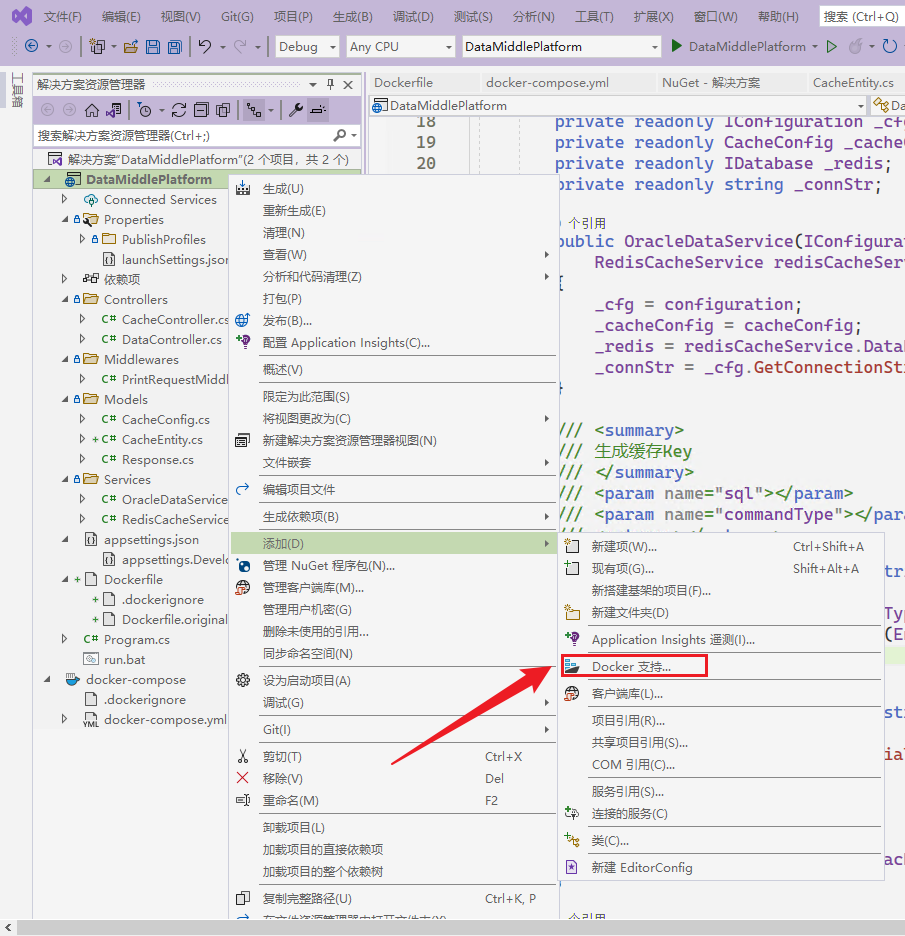
If you don't have that, no problem. Upgrade VS to the latest 2022 version (other versions should have it too, please test yourself), right-click the project and Add, and you can choose Docker support~
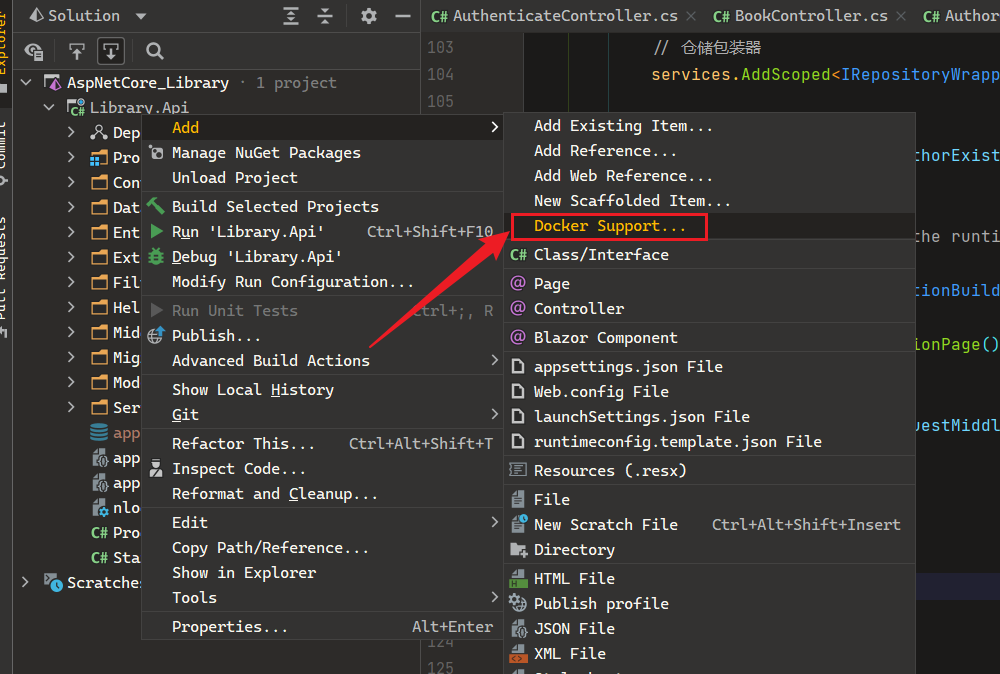
Rider can do it too, and I'd been using Rider for development all along before this, but as of writing this article, Rider's 2021.3 version hasn't been released yet and doesn't yet support .net6.0, so I didn't use Rider to test automatically adding Docker support~
If you don't want to use the foolproof generated Dockerfile, that's fine too. Below is the Dockerfile for the project I deployed, for reference. (Project name: DataMiddlePlatform)
#See https://aka.ms/containerfastmode to understand how Visual Studio uses this Dockerfile to build your images for faster debugging.

FROM mcr.microsoft.com/dotnet/aspnet:6.0 AS base
WORKDIR /app
EXPOSE 80
EXPOSE 443

FROM mcr.microsoft.com/dotnet/sdk:6.0 AS build
WORKDIR /src
COPY ["DataMiddlePlatform/DataMiddlePlatform.csproj", "DataMiddlePlatform/"]
RUN dotnet restore "DataMiddlePlatform/DataMiddlePlatform.csproj"
COPY . .
WORKDIR "/src/DataMiddlePlatform"
RUN dotnet build "DataMiddlePlatform.csproj" -c Release -o /app/build

FROM build AS publish
RUN dotnet publish "DataMiddlePlatform.csproj" -c Release -o /app/publish

FROM base AS final
WORKDIR /app
COPY --from=publish /app/publish .
ENTRYPOINT ["dotnet", "DataMiddlePlatform.dll"]
You can basically ignore the Dockerfile, because when a .net6.0 project is generated, it already includes a Dockerfile. In this project I only modified the docker-compose.yml file, because I needed to add a Redis container~
Here is my docker-compose.yml file code
version: '3.4'

services:
  redis:
    image: redis
    expose:
      - 6379

  web:
    image: ${DOCKER_REGISTRY-}web
    environment:
      - ASPNETCORE_ENVIRONMENT=Production
      - ASPNETCORE_URLS=https://+:443;http://+:80
    build:
      context: .
      dockerfile: DataMiddlePlatform/Dockerfile
    depends_on:
      - redis
    ports:
      - "15002:80"
      - "15003:443"
No more explanation; see the official documentation for docker-compose usage~
Switching Environments
Earlier we added a Redis container in docker-compose.yml and added a dependency in the web image, so accessing Redis from the Web container uses an address like redis:6379, unlike local development where you use localhost:6379. In Django you'd have to check based on environment variables in settings.py (my Django-Starter framework has automatic detection built in)
ASP.NET Core's infrastructure is very complete: by default there are three environments — development, staging, and production — each with a corresponding appsettings.json configuration file. So you just distinguish different Redis addresses in the config files. Same goes for other database configurations. So convenient~!
In this project, that means in the appsettings.Development.json file, the Redis connection address is "Connection": "127.0.0.1:6379", using the locally installed Redis service during local development.
Then in the appsettings.json file, use "Connection": "redis:6379", so when deploying with Docker, it uses the Redis service inside Docker~
Perfect
Deployment
Now that the dockerfile and docker-compose.yml are written, there's not much to say about deployment: just upload the entire code folder to the server, then one command does it: docker-compose up~
Because ASP.NET Core's own performance is already quite good, small projects don't even need nginx to serve static files. Super convenient~!
To update the service, currently I upload the code then run docker-compose up --build to rebuild. Because you only need to upload the code files, each update is much faster this way, and you can write a script to one-click update after git commit — that... counts as automated, I guess... hhh
Wrap-up
Microservices are the development trend. Moving applications from old deployment methods to containerization is a very important step. Our team's Java is still at the stage of tossing a jar up there and running it with supervisor, (rant: later there were even projects that didn't set up supervisor at all, just started them in a shell, and you'd never know when they crashed)
After this period of practice, ASP.NET Core has still reliably withstood not-insignificant concurrency, and has a fairly complete ecosystem (although third-party libraries can't compare to Java and Python, they're more than good enough), high development efficiency (but the learning barrier isn't low either, at least harder than Django). Weighing the pros and cons, plus the fact that my own mastery of this framework is still quite shallow, I can only promote it on a small scale~
I'm still in the exploration stage with ASP.NET Core. It's good, no question, I just haven't used it enough at work, I'm not familiar enough with it, plus my previous experience wrestling with Django let me taste the sweetness of dynamic language development, so I won't migrate the team's entire tech stack to .NET Core in the short term. After all, there still aren't enough people who know C#, and newly hired grads learning it from scratch would face a non-trivial barrier, and project timelines can't afford that kind of disruption...
I still really like Microsoft's tech stack. It's genuinely great to use. Current and future small projects will undoubtedly all choose this stuff. But as for how much it improves productivity, I don't have much confidence at the moment. Next I need to research technologies around build automation and deployment automation. Sigh, the lack of infrastructure on a small team is truly painful...... No wonder Serverless is becoming popular now, and low-code platforms are taking off too. Programmers will eventually put themselves out of a job...
References
_EOF_
ASP.NET Core Study Notes: Deployment — Should Have Known, It's Still Docker, Plus a Few Ramblings
- 本文作者:
- 程序设计实验室
- 版权声明:
- 本博客所有文章除特别声明外,均采用 BY-NC-SA 许可协议。转载请注明出处!
相关文章
Asp-Net-Core学习笔记:WebApi开发实践
前言 用AspNetCore做Api开发也有一段时间了,正好年底在做总结,做一个WebApi开发实践笔记。 暂时想到的一些技术关键词,同时也作为本文的大纲,现在对这套技术体系的了解还不够深入,以后会持续更新这个Api开发实践~ 身份认证:JwtBearer 分页:X.PagedList 缓存 ResponseCache Redis:StackExchange.Redis 数据持久化 / ORM F
2022-07-04 · Asp-Net-Core学习笔记 · 约 1 分钟
Asp-Net-Core学习笔记:身份认证入门
前言 过年前我又来更新了~ 我就说了最近不是在偷懒吧,其实这段时间还是有积累一些东西的,不过还没去整理…… 所以只能发以前没写完的一些笔记出来 就当做是温习一下啦 PS:之前说的红包封面我还没搞,得抓紧时间了 最近在准备搞一个我之前做的开源项目代码合集来做一期分享 两种常见的认证方式 先来看看两种常见的认证方式:基于token的认证和传统的session认证的区别。 session认证 我们知道,
2022-02-16 · Asp-Net-Core学习笔记 · 约 1 分钟
Asp-Net-Core学习笔记:5.构建和部署
从上次开始学习Asp.Net Core以来,一直都是玩一玩,还没有什么机会用来实战,最近公司有个新的小项目,于是我用Asp.Net Core来尝尝新,结果也是非常OK,熟悉之后开发效率感觉和Django基本没差。 那么进入正题,本文简单说说Asp.Net Core应用的构建和部署。 构建 构建是使用build命令,不过一般我们都用vs或者rider之类的IDE,应该比较少会用到这个命令: dotn
2022-02-16 · Asp-Net-Core学习笔记 · 约 1 分钟
Asp-Net-Core学习笔记:gRPC快速入门
gRPC 使用起来非常的丝滑,目前来说也没遇到什么坑,可以非常平滑地与已有项目集成,如果有类似的场景,强烈推荐尝试一下 gRPC !gRPC 的功能很多,本文仅介绍了最基本的使用,更多的请阅读文档,详细有了本文的基础铺垫,读者再阅读文档深入使用时,会比较轻松上手。
2023-07-11 · Asp-Net-Core学习笔记 · 约 1 分钟
讨论
共 0 条加载评论中…